En
Fr
De
It
Es
Ca
Eu
Pt
El
Da
Nl
No
Sv
Fi
Ru
Uk
Lv
Lt
Et
Pl
Cs
Sk
Sl
Hr
Hu
Ro
Bg
Tr
Ar
Fa
3
1 2 3 4 5 6 7 12
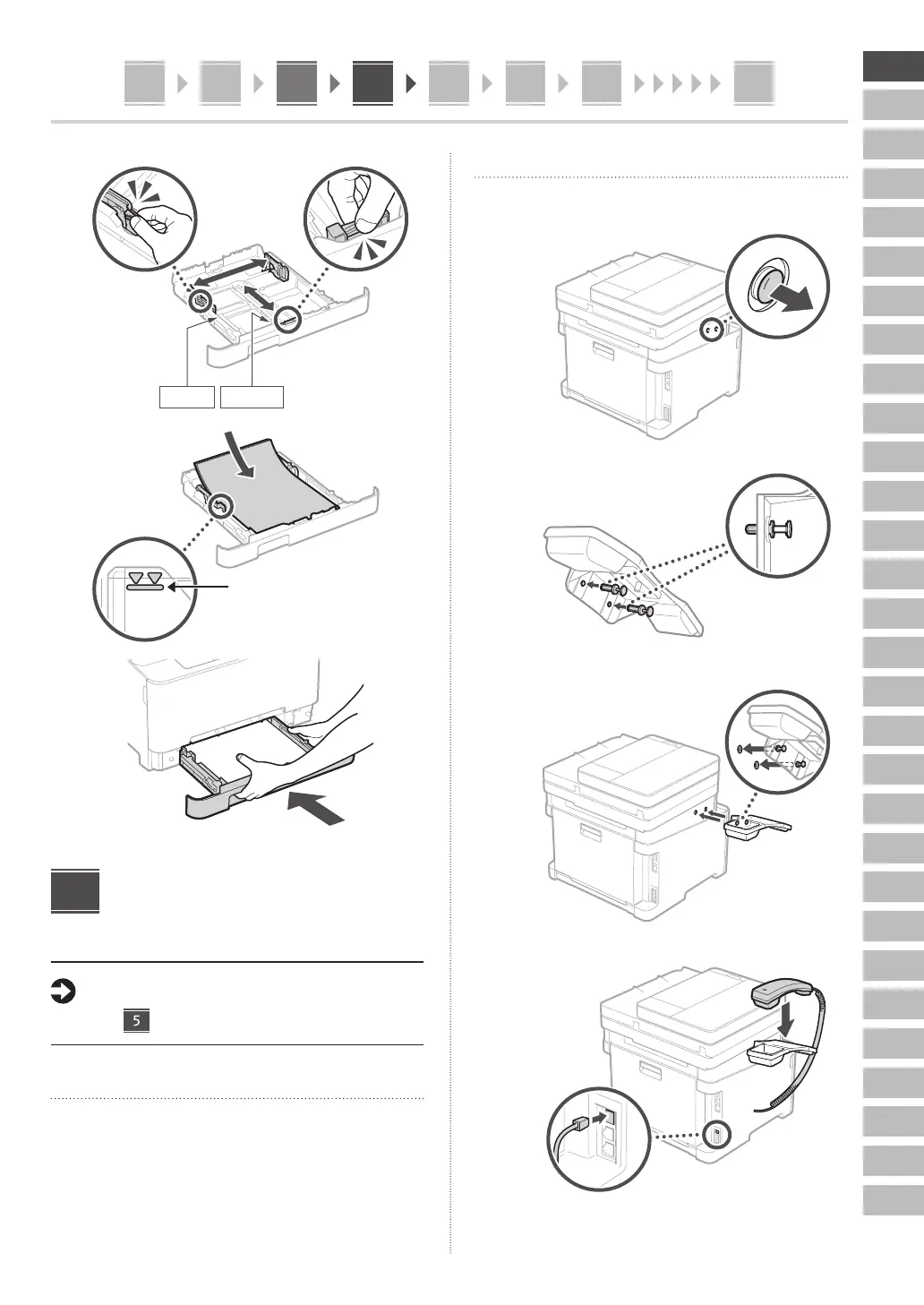
2.
A4/A5
A4/LGL
3.
Ensure that the amount of paper
loaded is not above this line
4.
Installing the Optional
Part
If you are not using optional part, proceed to
step .
Before Installing the Optional Part
When installing the optional part after the machine has
been installed, perform the following before starting work:
1.
Shut down the machine and your computer.
2.
Unplug the machine from the mains power outlet.
3.
Disconnect all cords and cables from the machine.
4
Handset
* The handset cannot be used with some models.
1.
2.
Insert the attached pin
halfway (Do not insert it
all the way in here).
3.
Insert the pin all
the way in.
4.






 To Next Page