Replacing TheInkRibbon
Inser tingPrintingP aper
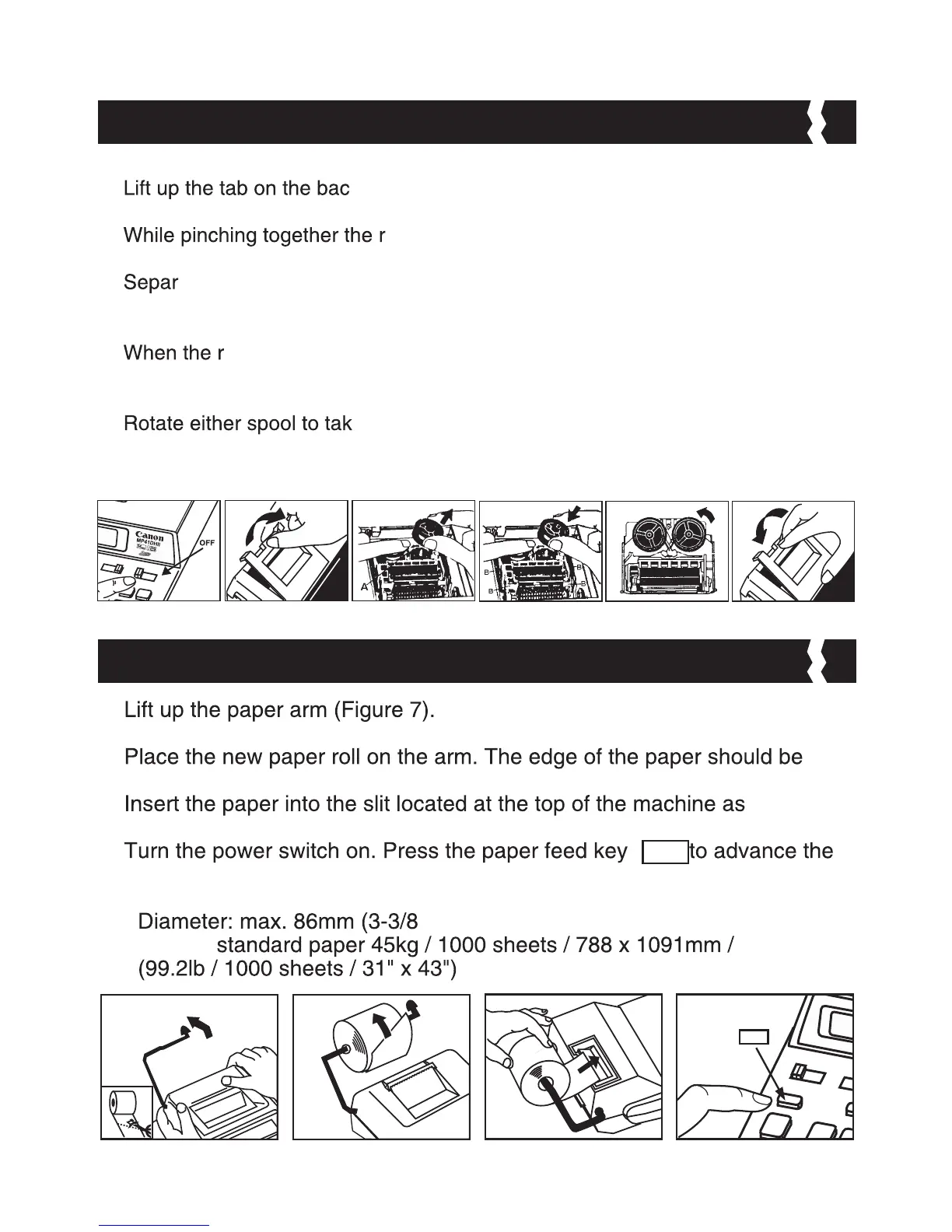
Note: Turn the power switch off. (Figure 1)
1)
k-side of the printer cover, and then remove the cover.
(Figure 2)
2)
ibbon lock (A) in the direction of arrow, lift ribbon
spools off the shafts. Discard the old ribbon and spools. (Figure 3)
3)
ate the spools of new ribbon between the tape and printer head. Guide it
around the four positions of the ribbon guide (B) and place the spools on the
shafts. (Figure 4)
4)
ibbon spools have settled, release the ribbon locks. If necessary,
rotate the spools until the pegs on the botton of the spool seat themselves in
the holes of the spool holder. (Figure 5)
5)
e up any ribbon slack, making sure that the ribbon is
positioned around the four ribbon guides. Replace the printer cover. (Figure 6)
IMPOR TANT:Useonl ythesametypeofribbonspools.
1)
• When inserting the paper, cut the edge of the paper as shown.
2)
positioned as shown (Figure 8).
3)
indicated (Figure 9).
4)
paper (Figure 10).
• Suitable paper roll – Width: 57mm (2-1/4”) /
”)
• Paper:
1)
4)
2)
5)
3)
6)
9)
8)
70
0
7)
10)
FEED
FEED
5


 To Next Page