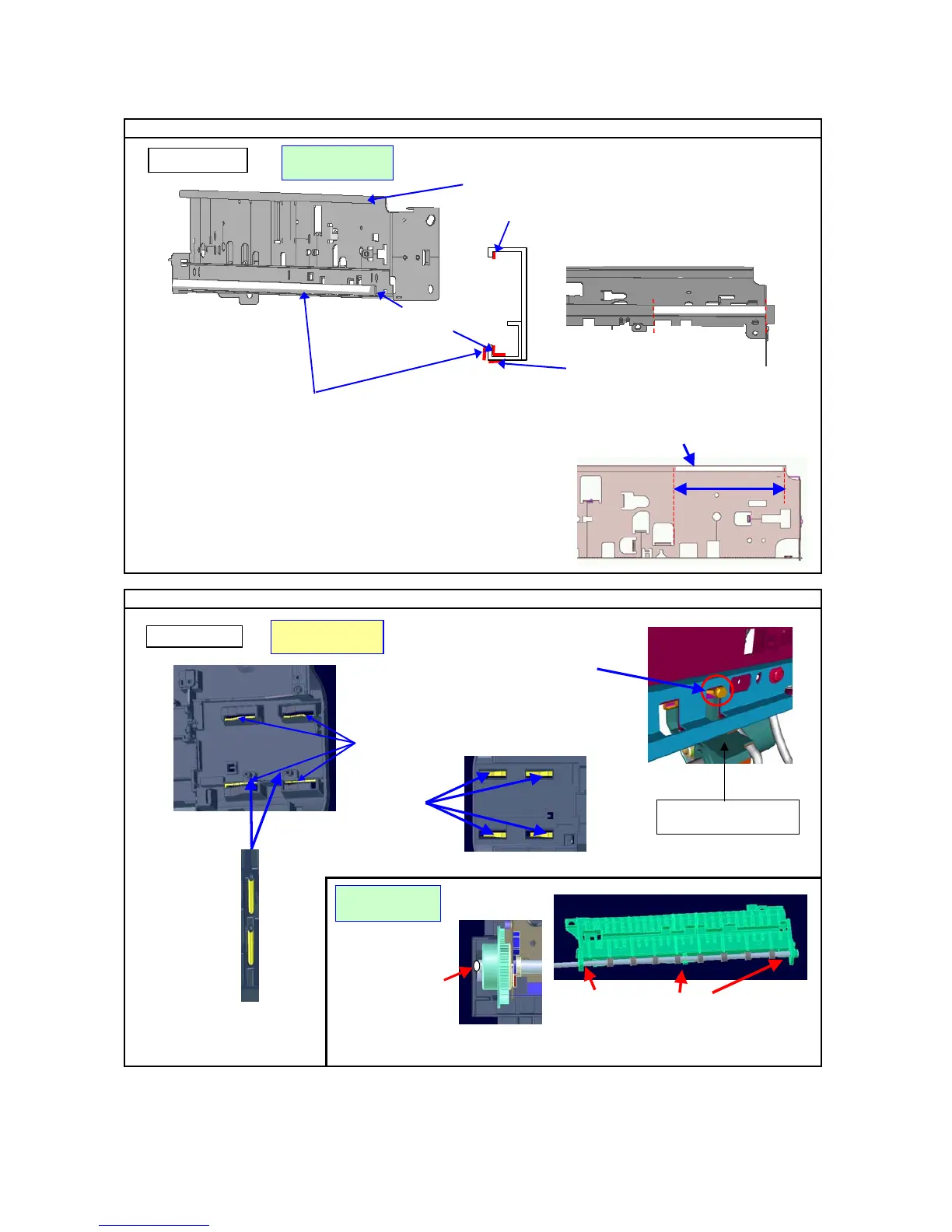
2-5. Grease Application
Where to apply grease / Grease oil amount (mg)
Where to apply grease / Grease oil amount (mg)
Bottom Case
Molykote PG-641
CK-0562-000
Right hand side of the bottom surface:
9 to 18mg x 1
Printer Chassis
Floil KG-107A
QY9-0057-000
Trigger Arm (Carriage sliding
portion): 2 to 6mg x 1
Right-hand side of the front surface:
9 to 18mg x 1
Slider shaft
sliding portions:
9 to 18mg x 4
Eject roller shaft sliding portions on the platen:
4.5 to 9mg x 3
Floil KG-107A
QY9-0057-000
Slider shaft
sliding portions
on the back side
of the bottom case:
9 to 18mg x 4
End of the eject roller
(
which contacts
the bottom case): 4.5 to 9mg x 1
Entire rear surface of the bottom front
bent part + entire upper surface
of the bottom part:
600±60mg
(
540 to 660mg
)
Entire front surface of the bottom front part:
180±20mg (160 to 200mg)
Entire rear surface of the upper bent part:
180±20mg (160 to 200mg)
Slider shaft
sliding portions
: 2 to 6mg x 4
The pump part of the driver unit
(No grease application)
(24/32)















 To Next Page