69
Shooting
To cancel the self-timer
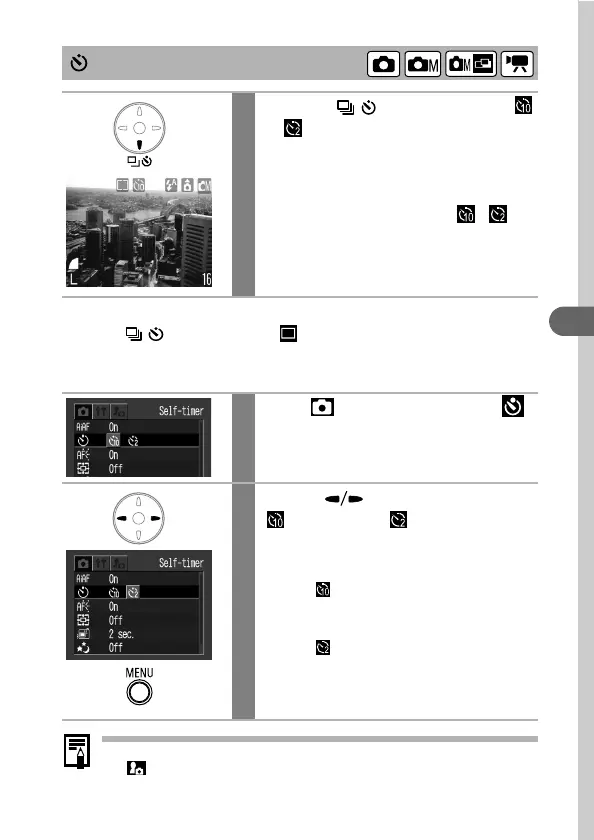
Press the / button to display .
Changing the Self-timer Countdown Time
The self-timer sound can be changed with the Selftimer Sound item in
the (My Camera) menu (p. 159).
Using the Self-timer
1
Press the / button to display
or .
• When the shutter button is pressed fully,
the self-timer will activate and the self-
timer lamp will blink.
• When the self-timer is set to ( ),
the shutter activates 10 (2) seconds after
the shutter button is pressed fully.
1
In the (Rec.) menu, select .
See Selecting Menus and Settings (p. 44).
2
Use the button to select
(10 sec.) or (2 sec.) and
press the MENU button.
• The display will return to the Rec. screen.
• When is selected, the self-timer
sounds and the blinking gets faster 2
seconds before the shutter activates.
• When is selected, the self-timer
sounds at the same time as the shutter
button is pressed. The shutter activates in
2 seconds.












 To Next Page