59 ImageBrowser Software User Guide
Chapter 5
Organizing Images
Assigning Keywords (2/2)
Other Ways to Assign Keywords
■ Menu Method
Select an image in the Browser Area, click the [Edit] menu and
select the [Keyword] submenu, followed by [Settings].
■ File Information Dialog Box Method
Set the display mode to List or TimeTunnel. Select an image in
the Browser Area, click the [File] menu and select [Get Info]. In
the File Information dialog box, click [View/Modify Keywords]
and assign keywords.
Managing Keywords
1.
Click the [Edit] menu and select the [Keyword]
submenu, followed by [Manage].
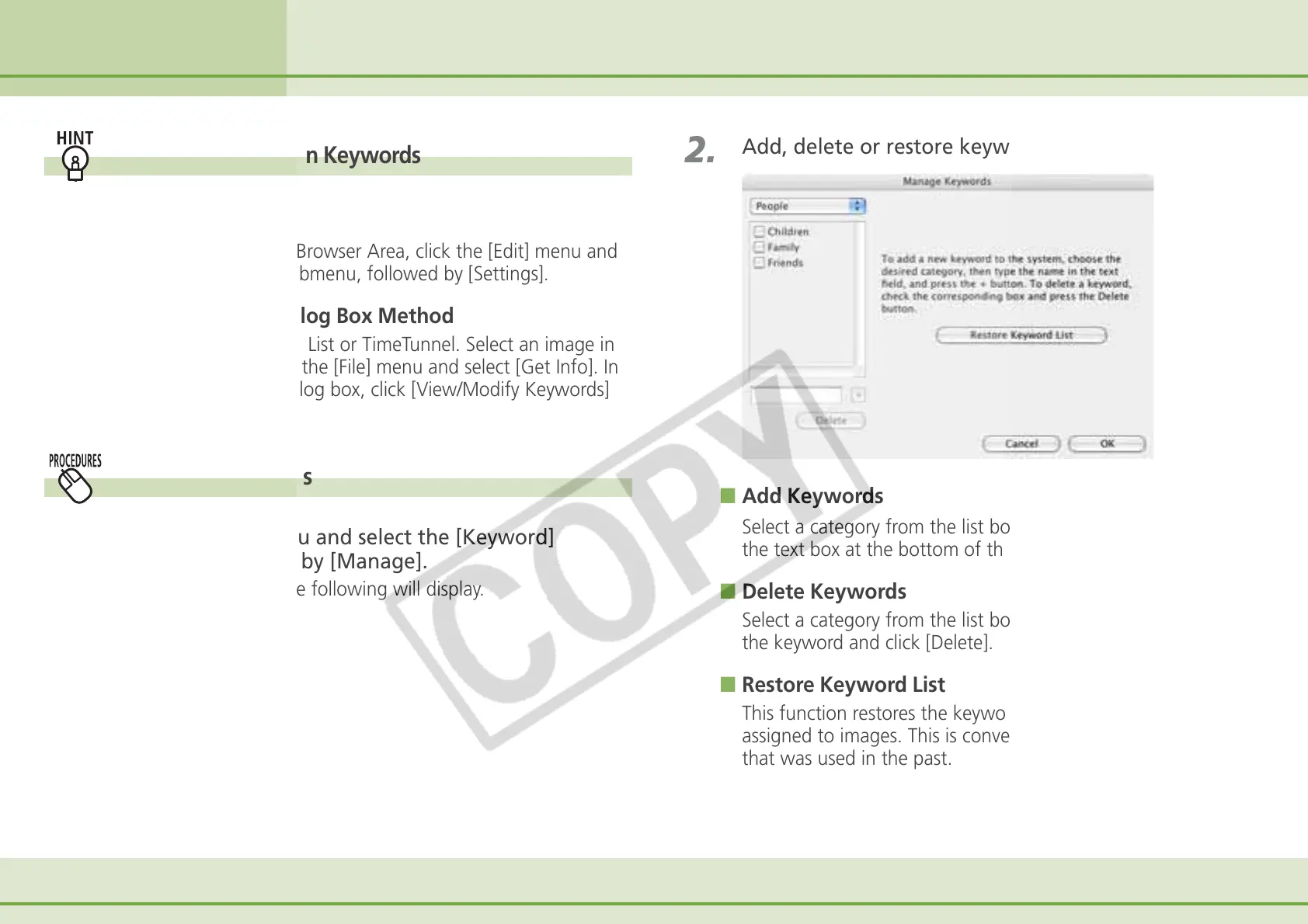
A window similar to the following will display.
2.
Add, delete or restore keywords.
■ Add Keywords
Select a category from the list box, type a new keyword into
the text box at the bottom of the list and click [+].
■ Delete Keywords
Select a category from the list box, place a check mark beside
the keyword and click [Delete].
■ Restore Keyword List
This function restores the keyword list based on the keywords
assigned to images. This is convenient if you deleted a keyword
that was used in the past.



 To Next Page