EasyManua.ls Logo

Canon PRIMA SUPER 155 CAPTION - Page 12

Canon PRIMA SUPER 155 CAPTION
43 pages
Print Icon
To Next Page IconTo Next Page
To Previous Page IconTo Previous Page
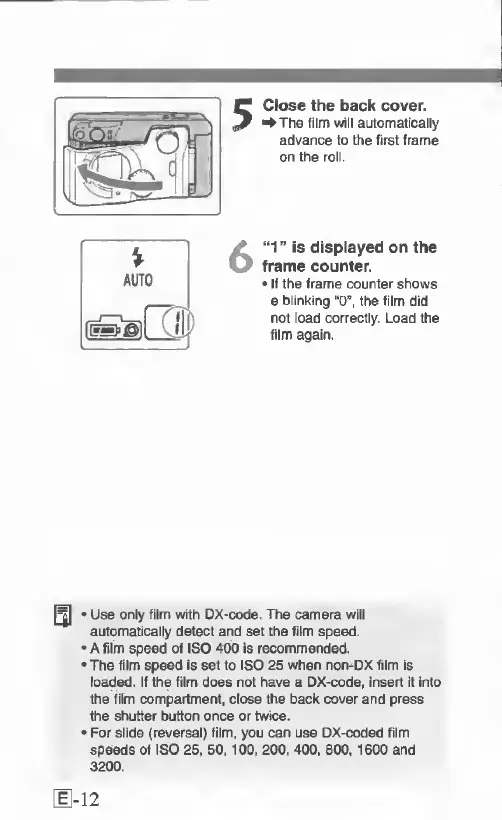
Loading...
Close
the
back
cover.
^The
film
will
automatically
advance
to
the
first
frame
on
the
roll.
“1”
is
displayed
on
the
frame
counter.
If
the
frame
counter
shows
a
blinking
“O',
the
film
did
not
load
correctly.
Load
the
film
again.
*
Use
only
film
with
DX-code.
The
camera
will
automatically
detect
and
set
the
film
speed.
*
A
film
speed
of
ISO
400
Is
recommended.
*
The
film
speed
Is
set
to
ISO
25
when
non-^DX
film
is
lo^ed.
If
the
film
does
not
have
a
DX-code,
insert
it
into
the
film
compartment,
close
the
back
cover
and
press
the
shutter
button
once
or
twice.
*
For
slide
(reversal)
film,
you
can
use
DX-coded
film
speeds
of
ISO
26,
50.100,
200,
400.
800,1600
and
3200.
12

Related product manuals