EasyManua.ls Logo

Canon PRIMA SUPER 155 CAPTION - Troubleshooting and Specifications; Troubleshooting Common Issues

Canon PRIMA SUPER 155 CAPTION
43 pages
Print Icon
To Next Page IconTo Next Page
To Previous Page IconTo Previous Page
Loading...
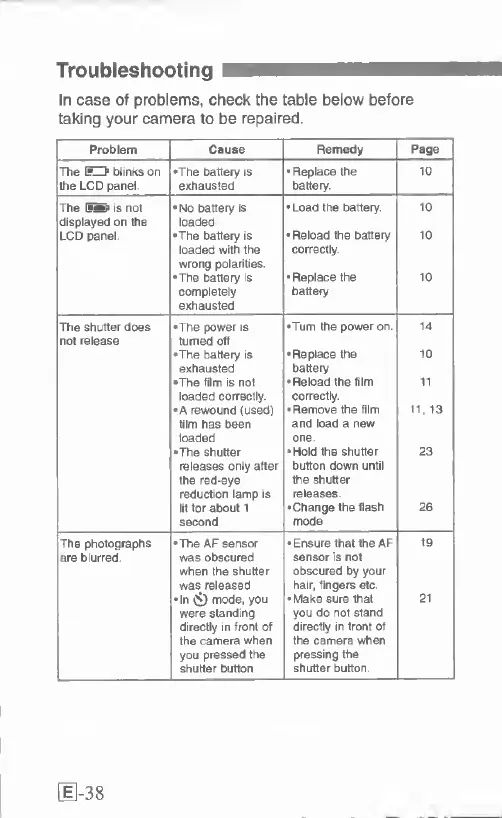
Troubleshooting
In
case
of
problems,
check
the
table
below
before
taking
your
camera
to
be
repaired.
Problem
Cause
Remedy
Page
The
EU
blinks
on
•The
battery
is
Replace
the
10
the
LCD
panel
exhausted
battery.
The
IfS
is
not
•No
battery
is
•Load
the
battery.
10
displayed
on
the
loaded
LCD
panel
•The
battery
is
Reload
the
battery
10
loaded
with
the
correctly
wrong
polarities.
•The
battery
is
•Replace
the
10
completely
exhausted
battery
The
shutter
does
•The
power
is
•Turn
the
power
on
14
not
release
turned
off
•The
battery
is
Replace
the
10
exhausted
battery
•The
film
is
not
•Reload
the
film
11
loaded
correctly.
correctly.
•A
rewound
(used)
Remove
the
film
11,
13
film
has
been
and
load
a
new
loaded
one.
•The
shutter
•Hold
the
shutter
23
releases
only
after
button
down
until
the
red-eye
the
shutter
reduction
lamp
is
releases.
lit
for
about
1
•Change
the
flash
26
second
mode
The
photographs
•The
AF
sensor
•Ensure
that
the
AF
19
are
blurred
was
obscured
sensor
is
not
when
the
shutter
obscured
by
your
was
released
hair,
fingers
etc
•In
Ci)
mode,
you
•Make
sure
that
21
were
standing
you
do
not
stand
directly
in
front
of
directly
in
front
of
the
camera
when
the
camera
when
you
pressed
the
pressing
the
shutter
button
shutter
button
[1-38

Related product manuals