EasyManua.ls Logo

Canon PRIMA SUPER 155 CAPTION - V<§> Changing the Flash Mode.26

Canon PRIMA SUPER 155 CAPTION
43 pages
Print Icon
To Next Page IconTo Next Page
To Previous Page IconTo Previous Page
Loading...
%<§>
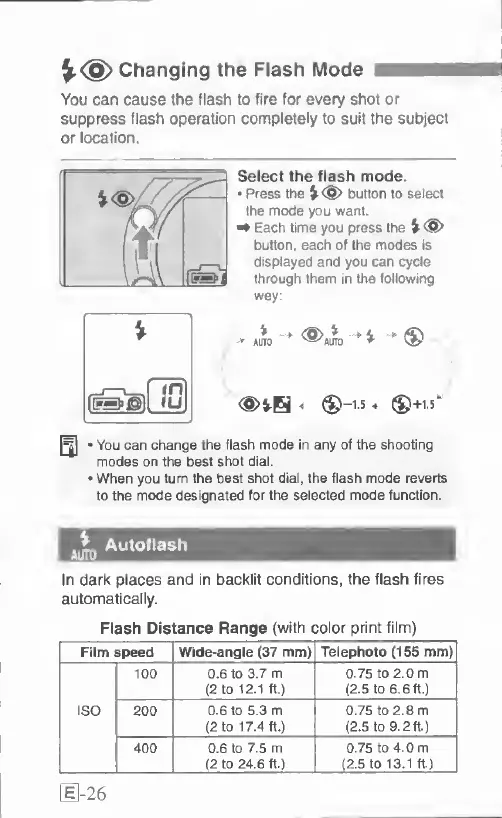
Changing
the
Flash
Mode
You
can
cause
the
flash
to
fire
for
every
shot
or
suppress
flash
operation
completely
to
suit
the
subject
or
location.
Select
the
flash
mode.
Press
the
button
to
select
the
mode
you
want.
^
Each
time
you
press
the
v<®>
button,
each
of
the
modes
is
displayed
and
you
can
cycle
through
them
in
the
loHowir>g
way:
V
%
AUTO
<
®-1-5
^
®+1.5^
You
can
change
the
flash
mode
in
any
of
the
shooting
modes
on
the
best
shot
dial.
When
you
turn
the
best
shot
dial,
the
flash
mode
reverts
to
the
mode
designated
for
the
selected
mode
function.
Autoflash
In
dark
places
and
in
backlit
conditions,
the
flash
fires
automatically.
Flash
Distance
Range
(with
color
print
film)
1
Film
speed
Wide-angle
(37
mm)
Telephoto
(155
mm)
ISO
1
100
0.6
to
3.7
m
(2
to
12.1
ft.)
0.75
to
2.0
m
(2
5
to
6.6
ft.)
200
0-6
to
5.3
m
(2
to
17.4
ft.)
0.75
to
2.8
m
(2.5
to
9.2ft.)
400
0.6
to
7.5
m
(2
to
24.6
ft.)
0.75
to
4.0
m
(2.5
to
13.1
ft)
[
1-26

Related product manuals