EasyManua.ls Logo

Canon PRIMA SUPER 155 CAPTION - Close-up Photography Guide

Canon PRIMA SUPER 155 CAPTION
43 pages
Print Icon
To Next Page IconTo Next Page
To Previous Page IconTo Previous Page
Loading...
Taking
Pictures
in
Autoflash
Mode
Close-up
Photography
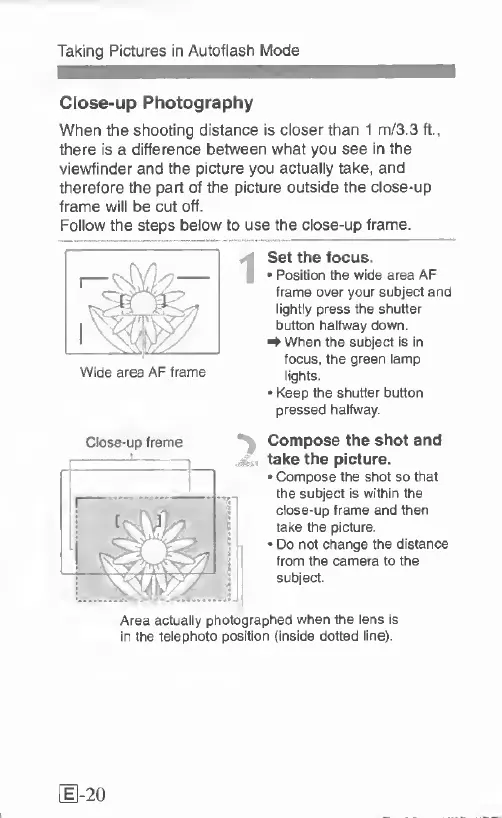
When
the
shooting
distance
is
closer
than
1
m/3.3
ft.,
there
is
a
difference
between
what
you
see
in
the
viewfinder
and
the
picture
you
actually
take,
and
therefore
the
part
of
the
picture
outside
the
close-up
frame
will
be
cut
off.
Follow
the
steps
below
to
use
the
close-up
frame.
I
S
et
the
focus.
Position
the
wide
area
AF
frame
over
your
subject
and
lightly
press
the
shutter
button
halfway
down.
^
When
the
subject
is
in
focus,
the
green
lamp
lights.
*
Keep
the
shutter
button
pressed
halfway.
^
Compose
the
shot
and
take
the
picture.
Compose
the
shot
so
that
the
subject
is
within
the
close-up
frame
and
then
take
the
picture.
Do
not
change
the
distance
from
the
camera
to
the
subject.
Area
actually
photographed
when
the
lens
is
in
the
telephoto
position
(inside
dotted
line).
Close-up
frame
Wide
area
AF
frame
[
1-20

Related product manuals