EasyManua.ls Logo

Canon PRIMA SUPER 155 CAPTION - Advanced Shooting Modes; Self-timer Operation

Canon PRIMA SUPER 155 CAPTION
43 pages
Print Icon
To Next Page IconTo Next Page
To Previous Page IconTo Previous Page
Loading...
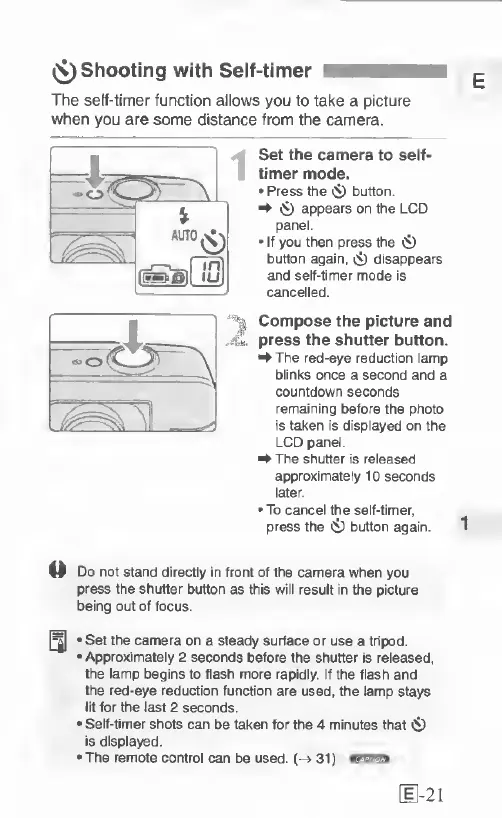
(^Shooting
with
Self-timer
The
self-timer
function
allows
you
to
take
a
picture
when
you
are
some
distance
from
the
camera.
Set
the
camera
to
self-
timer
mode.
Press
the
«$)
button
^
($)
appears
on
the
LCD
panel.
If
you
then
press
the
Ci)
button
again,
cD
disappears
and
self-timer
mode
is
cancelled.
Compose
the
picture
and
press
the
shutter
button.
^The
red-eye
reduction
lamp
blinks
once
a
second
and
a
countdown
seconds
remaining
before
the
photo
is
taken
is
displayed
on
the
LCD
panel.
^
The
shutter
is
released
approximately
10
seconds
later
To
cancel
the
self-timer,
press
the
0
button
again.
1
Do
not
stand
directly
in
front
of
the
camera
when
you
press
the
shutter
button
as
this
will
result
in
the
picture
being
out
of
focus.
Set
the
camera
on
a
steady
surface
or
use
a
tripod.
Approximately
2
seconds
before
the
shutter
is
released,
the
lamp
begins
to
flash
more
rapidly.
If
the
flash
and
the
red-eye
reduction
function
are
used,
the
lamp
stays
lit
for
the
last
2
seconds.
Self-timer
shots
can
be
taken
for
the
4
minutes
that
«S)
is
displayed.
The
remote
control
can
be
used.
(->
31)
[
1-21

Related product manuals