EasyManua.ls Logo

Canon PRIMA SUPER 155 CAPTION - Page 33

Canon PRIMA SUPER 155 CAPTION
43 pages
Print Icon
To Next Page IconTo Next Page
To Previous Page IconTo Previous Page
Loading...
IMObEI
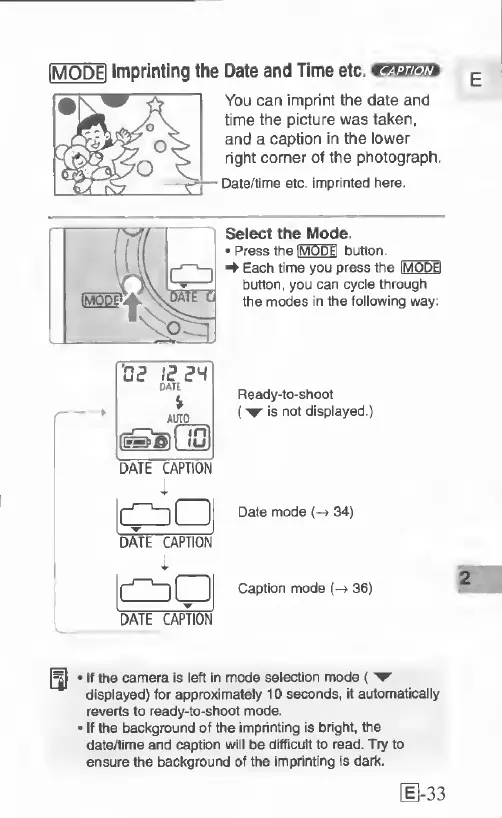
Imprinting
the
Date
and
Time
etc.
You
can
imprint
the
date
and
time
the
picture
was
taken,
and
a
caption
in
the
lower
right
corner
of
the
photograph.
Date/time
etc,
imprinted
here.
Select
the
Mode.
*
Press
the
IMODEI
button
^
Each
lime
you
press
the
IMODEI
button,
you
can
cycle
through
the
modes
in
the
following
way:
Ready-to-shoot
('w
is
not
displayed.)
Date
mode
(->
34)
DME
CAPTION
oP!
DATE
CAPTION
Caption
mode
(->
36)
[^
If
the
camera
is
left
In
mode
selection
mode
('W
displayed)
for
approximately
10
seconds,
it
automatically
reverts
to
ready-to-shoot
mode.
If
the
background
of
the
Imprinting
is
bright,
the
date/time
and
cation
will
be
difHcult
to
read.
Try
to
ensure
the
background
of
the
Imprinting
is
dark.
[
1-33

Related product manuals