EasyManua.ls Logo

Canon PRIMA SUPER 155 CAPTION - Page 35

Canon PRIMA SUPER 155 CAPTION
43 pages
Print Icon
To Next Page IconTo Next Page
To Previous Page IconTo Previous Page
Loading...
Imprinting
the
Date
and
Time
etc.
—E
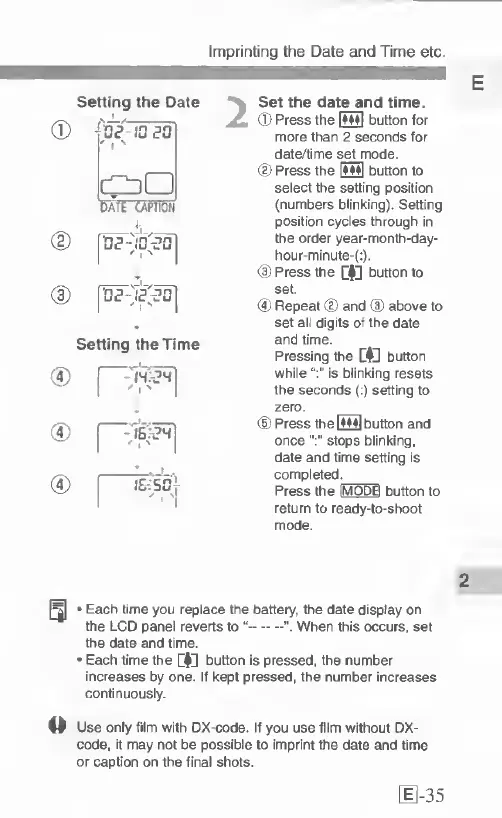
Setting
the
Date
^
Set
the
date
and
time.
®
Press
the
[M4|
button
for
more
than
2
seconds
for
date/time
set
mode.
(D
Press
the
\SS
button
to
select
the
setting
position
(numbers
blinking).
Setting
position
cycles
through
in
the
order
year-month-day-
hour-minute-(:).
@
Press
the
a:
button
to
set.
(5)
Repeat
(D
and
(D
above
to
set
all
digits
of
the
date
and
time.
Pressing
the
button
while
is
blinking
resets
the
seconds
(:)
setting
to
zero.
(5)
Press
the
[mS
button
and
oncestops
blinking,
date
and
time
setting
is
completed.
Press
the
IMODEI
button
to
return
to
ready-to-shoot
mode.
CD
16-501
2
-
Each
lime
you
replace
the
battery,
the
date
display
on
the
LCD
panel
reverts
to
“-When
this
occurs,
set
the
date
and
time.
Each
time
the
GlU
button
is
pressed,
the
number
increases
by
one.
If
kept
pressed,
the
number
increases
continuously.
Use
only
film
with
DX-code.
If
you
use
film
without
DX-
code,
it
may
not
be
possible
to
imprint
the
date
and
time
or
caption
on
the
final
shots.
[1-35

Related product manuals