EasyManua.ls Logo

Canon QL FT - Page 11

Canon QL FT
44 pages
Print Icon
To Next Page IconTo Next Page
To Previous Page IconTo Previous Page
Loading...
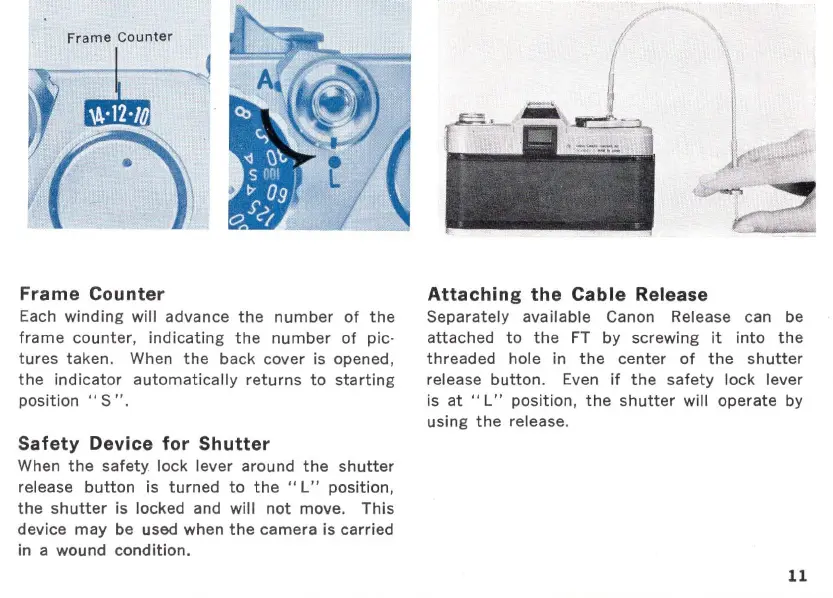
Frame Counter
Each
winding
will
advance
the
number
of
the
frame
counter,
indicating
the
number
of
picĀ·
tures
taken. When
the
back cover is opened,
the
indicator
automatically
returns
to
starting
position
"S".
Safety Device for Shutter
When
the
safety
lock lever around
the
shutter
release
button
is
turned
to
the"
L"
position,
the
shutter
is
locked and
will
not
move.
This
device
may
be used when
the
camera is carried
in a wound
condition.
Attaching the Cable Release
Separately
available Canon Release can be
attached
to
the
FT
by
screwing
it
into
the
threaded
hole in
the
center
of
the
shutter
release
button.
Even
if
the
safety
lock lever
is
at
"L"
position
,
the
shutter
will
operate
by
using
the
release.
11

Related product manuals