EasyManua.ls Logo

Canon QL FT - Double Exposures

Canon QL FT
44 pages
Print Icon
To Next Page IconTo Next Page
To Previous Page IconTo Previous Page
Loading...
,
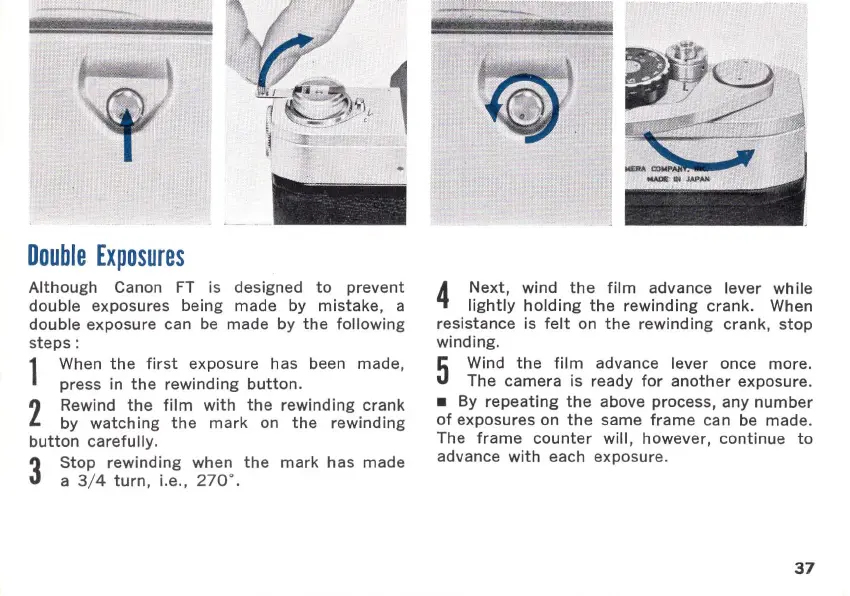
Double
Exposures
Although
Canon
FT
is designed
to
prevent
double
exposures being made by
mistake,
a
double exposure can be made by
the
following
steps
:
1
When
the
first
exposure has been made,
press in
the
rewi
nding
button.
2
Rewind
the
film
with
the
rewinding
crank
by
watching
the
mark
on
the
rewinding
button
carefully
.
3
Stop
rewi
nding
when
the
mark
has
made
a 3/ 4
turn
, i.e., 270' .
4
Next,
wind
the
film
advance lever while
lightly
holding
the
rewinding
crank
. When
resistance is
felt
on
the
rewinding
crank
,
stop
winding.
5
Wind
the
film
advance lever once more.
The
camera
is ready
for
another
exposure.
By
repeating
the
above process,
any
number
of
exposures on
the
same
frame
can be
made
.
The
frame
counter
will, however,
continue
to
advance
with
each exposure.
37

Related product manuals