EasyManua.ls Logo

Canon QL FT - Page 14

Canon QL FT
44 pages
Print Icon
To Next Page IconTo Next Page
To Previous Page IconTo Previous Page
Loading...
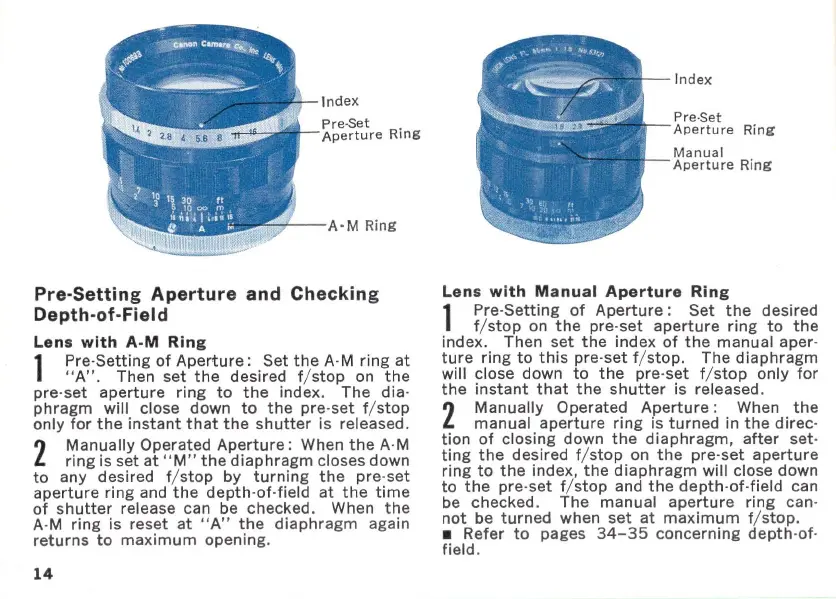
Index
Pre-Set
Aperture
Ring
--:;r-
--
A'M
Ring
Pre-Setting Aperture and Checking
Depth-of-Field
Lens
with
A·M
Ring
1
Pre-Setting
of
Aperture:
Set
the
A-M
ring
at
"
A"
_ Then
set
the
desired
f/stop
on
the
pre-
set
aperture
ring
to
the
index_
The
dia-
phragm
will
close
down
to
the
pre-set
f/
stop
only
for
the
instant
that
the
shutter
is released_
2
Manually
Operated
Aperture:
When
the
A-M
ring
is set
at
"M"
the
diaphragm
closes down
to
any desired f/
stop
by
turning
the
pre-set
aperture
ring
and
the
depth-of-field
at
the
time
of
shutter
release can be checked. When
the
A-M
ring
is reset
at
"A"
the
diaphragm
again
returns
to
maximum
opening.
14
Index
Pre-Set
Aperture
Ring
Manual
Aperture
Ring
Lens
with
Manual
Aperture
Ring
1
Pre-
Setting
of
Aperture:
Set
the
desired
f/
stop
on
the
pre-set
aperture
ring
to
the
index. Then
set
the
index
of
the
manual aper-
ture
ring
to
this
pre-set f/ stop. The
diaphragm
will close down
to
the
pre-set
f/stop
only
for
the
instant
that
the
shutter
is released.
2
Manually
Operated
Aperture
: When
the
manual
aperture
ring
is
turned
in
the
direc
-
tion
of
closing down
the
diaphragm,
after
set
-
ting
the
desired f/
stop
on
the
pre-set
aperture
ring
to
the
index,
the
diaphragm
will close down
to
the
pre-set
f/stop
and
the
depth-of-field
can
be checked .
The
manual
aperture
ring
can-
not
be
turned
when
set
at
maximum
f/ stop.
Refer
to
pages
34-35
concerning
depth
-
of
-
field_

Related product manuals