28
4.
Self-timer Function
The T60
is
equipped with a self-timer
function which enables you to include
yourself
in
the picture. When using the
self-timer function, attach the camera se-
curely to a tripod.
Make sure the film has been advanced
before setting this function.
1)
Compose and focus the picture. Con-
firm the exposure.
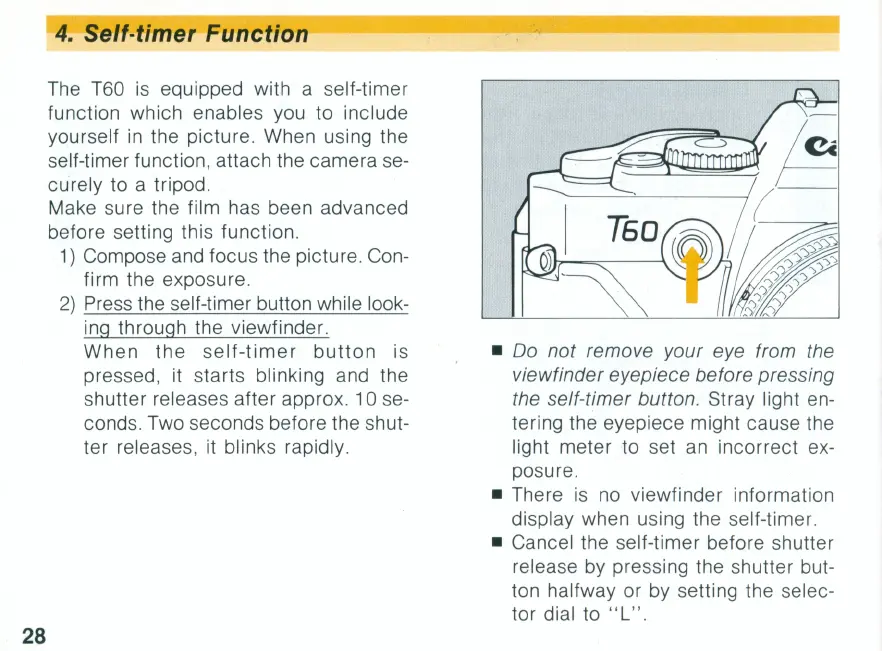
2)
Press the self-timer button while look-
ing through the viewfinder.
When
the
self-timer
button
is
pressed, it starts blinking and the
shutter releases after approx. 10 se-
conds. Two seconds before the shut-
ter releases, it blinks rapidly.
•
00
not remove your eye from the
viewfinder eyepiece before pressing
the self-timer button.
Stray light en-
tering the eyepiece might cause the
light meter to set
an
incorrect ex-
posure.
• There
is
no
viewfinder information
display when using the self-timer.
• Cancel the self-timer before shutter
release by pressing the shutter but-
ton halfway or by setting the selec-
tor dial to " L
".



 To Next Page