6
Preparations
---
----
1. Loading the Batteries
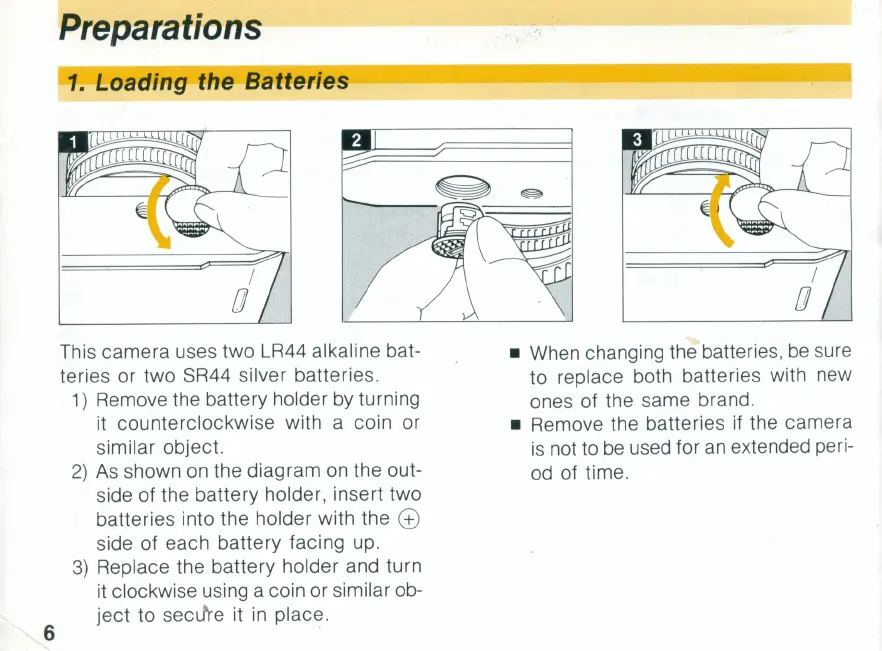
This camera uses two LR44 alkaline bat-
teries or two SR44 silver batteries.
1)
Remove the battery holder
by
turning
it counterclockwise with a coin or
similar object.
2)
As
shown
on
the diagram on the out-
side of the battery holder, insert two
batteries into the holder with the
@
side of each battery facing
up.
3)
Replace the battery holder and turn
it clockwise using a coin or similar ob-
ject
to secJre it
in
place.
• When changing the batteries,
be
sure
to replace both batteries with new
ones of the same brand .
• Remove the batteries if the camera
is
not to
be
used for
an
extended peri-
od
of time.



 To Next Page