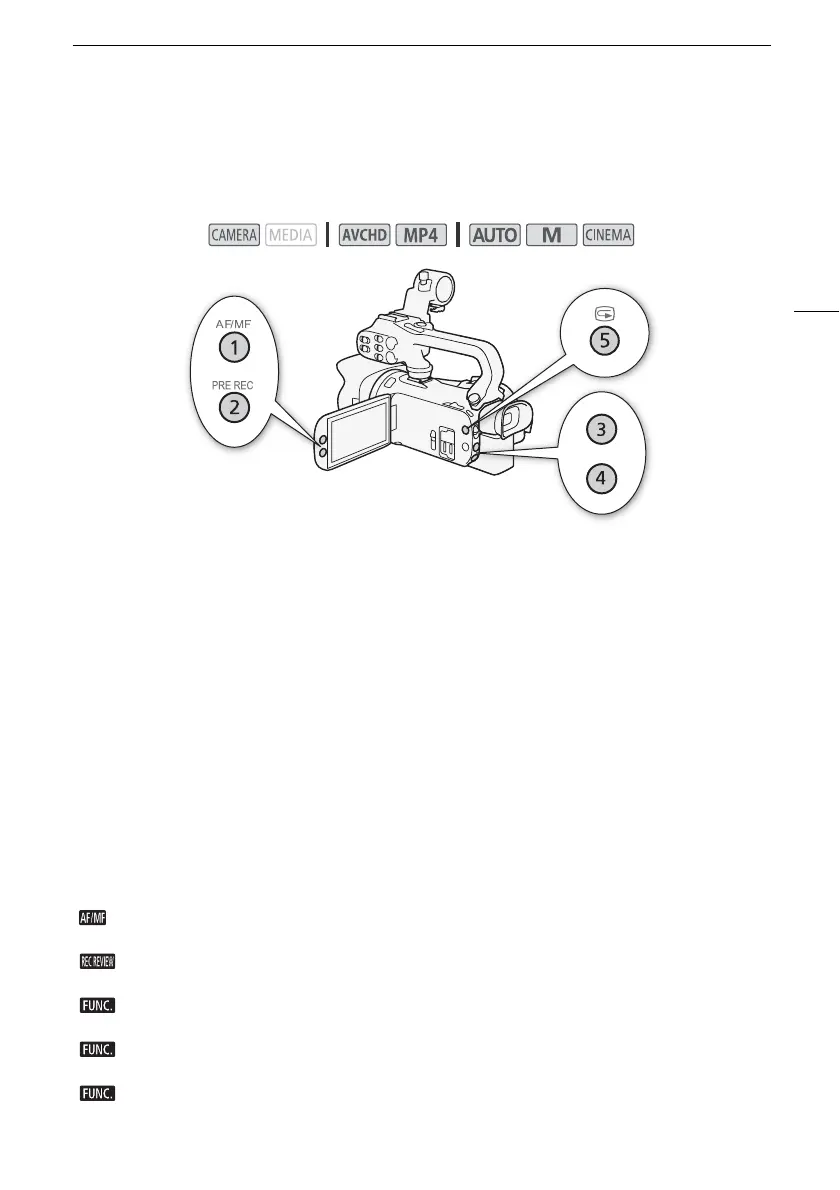
Assignable Buttons
91
Assignable Buttons
The camcorder conveniently features 5 buttons to which you can assign various functions. By
assigning often used functions, you can quickly access them with a single press of a button.
Changing the Assigned Function
1 Open the selection screen for the desired assignable button.
[FUNC.] > [MENU] > q > Select from [Assign Button 1] to [Assign Button 5]
2 Select the desired option and then touch [X].
Options
Operating modes:
[È Powered IS]* Tu rn s Po were d IS on /off (A 56).
[° BLC Always On]* Turns backlight correction on/off (A 62).
[~ Face Only AF]* Turns face only autofocus on/off (A 51).
[¦ Video Snapshot] Turns video snapshot on/off (A 84).
[Ä WB Priority]* Turns white balance priority on/off (A 125).
[z Pre REC] Turns pre-recording on/off (A 85). Default setting for assignable button 2.
[< IR Light]** Turns the infrared light on/off (A 87).
[œ Audio Output CH]** Switches the audio output channel between CH1/CH2, CH1/CH1,
CH2/CH2 and All/All (A 105).
[ AF/MF]*Switches between autofocus and manual focus (A 47). Default setting for assignable
button 1.
[ Rec Review] Reviews the last scene that was recorded (A 39). Default setting for
assignable button 5.
[ Rec. Programs]*Functions the same as selecting [Rec. Programs] (A 58, 60, 65) in the
FUNC. menu.
[ BLC Always On]* Functions the same as selecting [° BLC Always On] (A 62) in the FUNC.
menu.
[ White Balance]* Functions the same as selecting [Ä White Balance] (A 63) in the FUNC.
menu.



 To Next Page