47
Adjusting the Focus
Using the Focus Assistance Functions
In order to focus more accurately, you can use the following focus assistance functions: Dual Pixel Focus Guide,
an onscreen guide that shows you if the subject is in focus; peaking, which creates a clearer contrast by
emphasizing the outlines of the subject; and magnification, which enlarges the image on the screen. You can use
peaking and the focus guide or peaking and magnification simultaneously for greater effect.
Focus guide
By default, > [v Camera Setup] > [Focus Guide] is set to [i On], so the focus guide (A 122) will
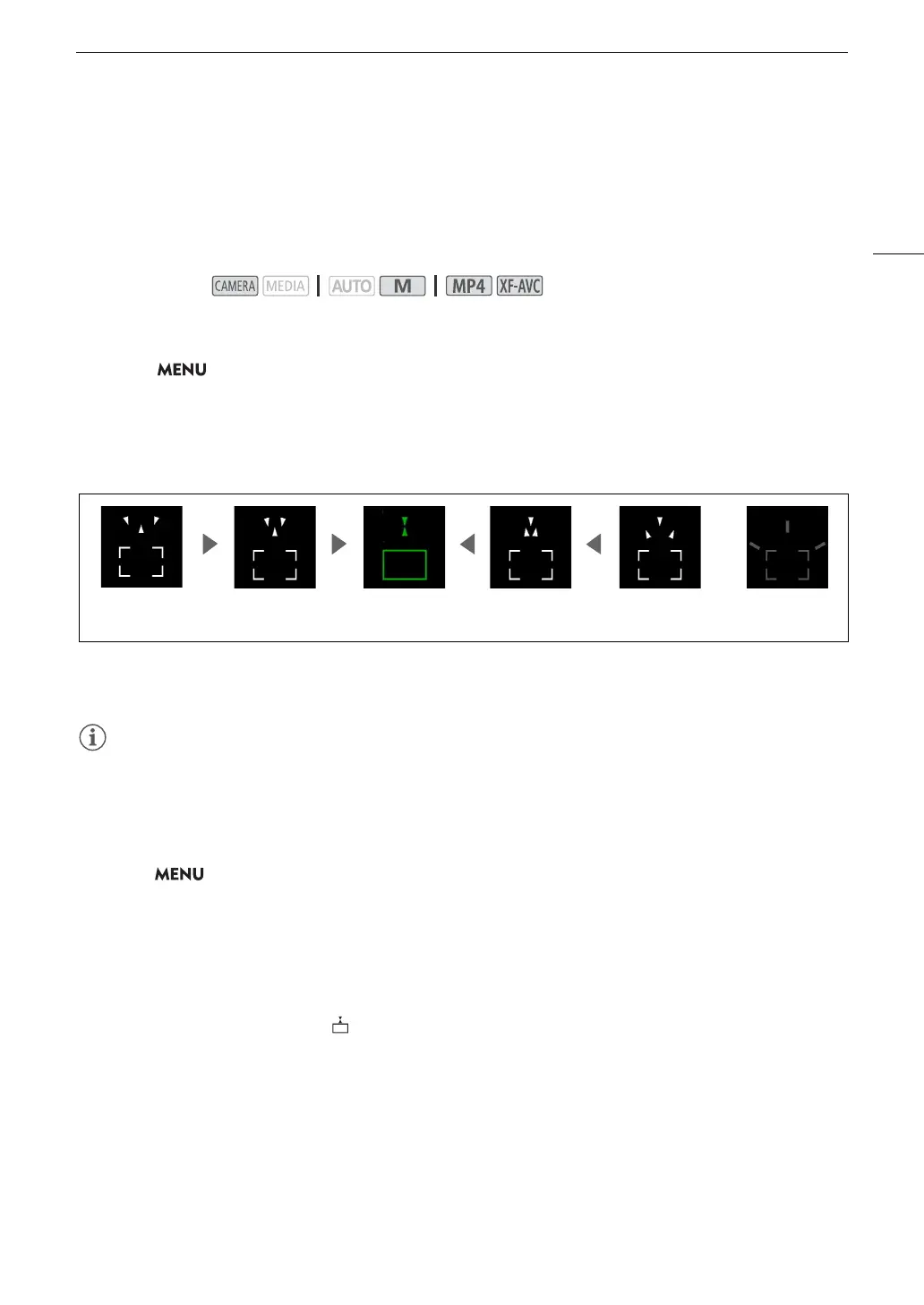
appear when the camcorder is set to manual focus mode. The focus guide gives you an intuitive visual indication
of the current focus distance and the direction and amount of adjustment necessary to bring the picture into full
focus. When used in combination with face detection and tracking (A 51), the focus guide frame will be
displayed near the eyes of the person detected as the main subject.
If necessary, touch the desired point on the screen to move the focus guide and focus on a different
subject.
• When the focus guide frame turns green, the subject is correctly focused.
• With subjects or in situations where autofocus may not work well (A 51), the focus guide may not be
displayed correctly.
• The focus guide cannot be used in the following cases:
- While the focus is being adjusted automatically using AF-boosted MF or continuous AF.
-When > [v Camera Setup] > [Conversion Lens] is set to an option other than [j Off].
- When the digital zoom is activated and the zoom ratio is in the digital zoom range.
- When the shooting mode is set to [T Fireworks].
- While the color bars are displayed.
- When infrared recording is activated.
• When the focus guide is used together with face detection & tracking, the focus guide may not appear near
the main subject’s eyes, depending on the direction in which the face is turned.
• If you set an assignable button to [ Focus Guide] (A 92), you can press the button to turn the focus guide
on/off.
Operating modes:
In focus
(in green)
Focus farther
(large adjustment)
Focus farther
(small adjustment)
Focus closer
(small adjustment)
Focus closer
(large adjustment)
Cannot determine
adjustment



 To Next Page