87
Web Camera Function
Web Camera Function
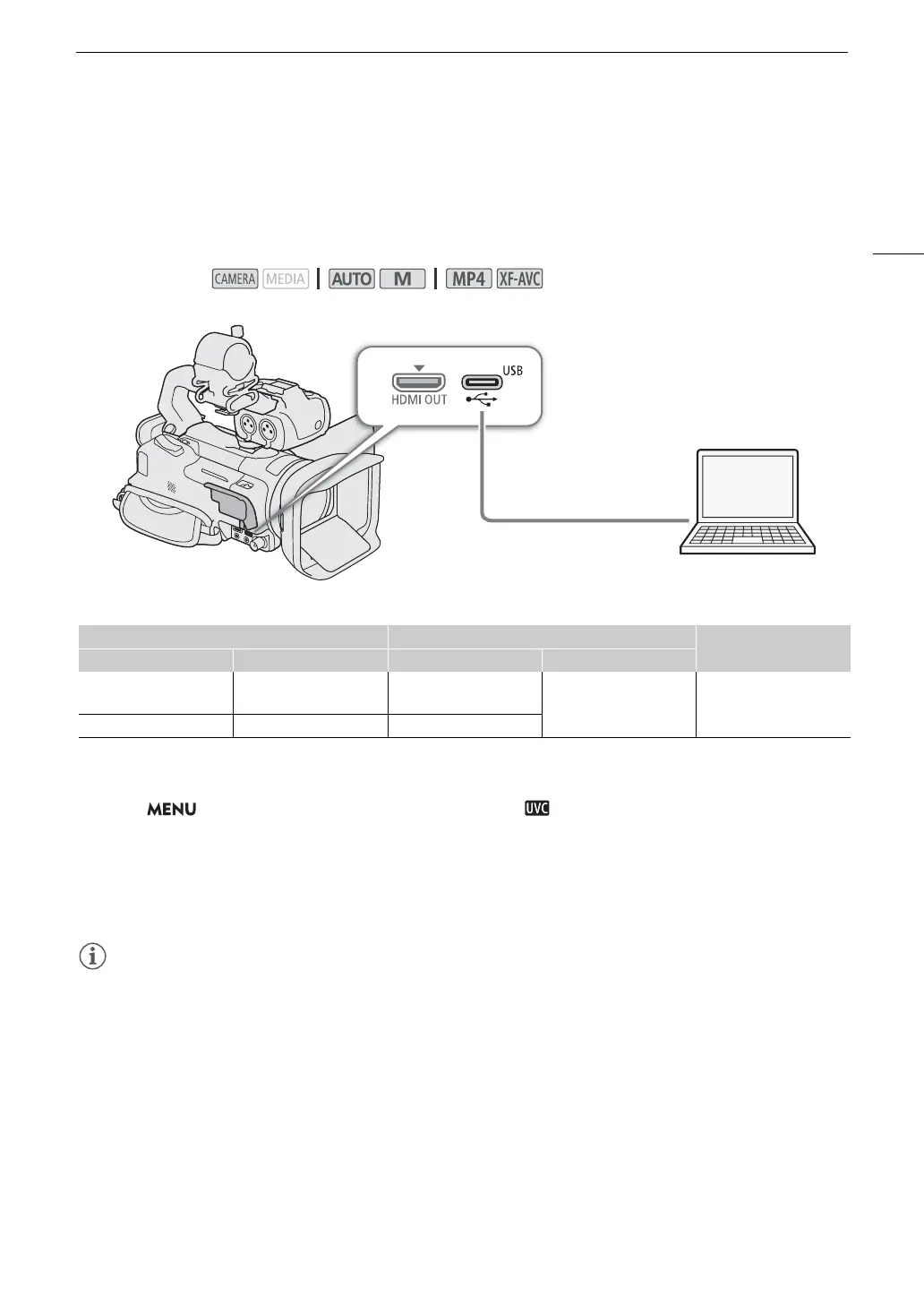
You can connect the camcorder to a computer using a USB cable, and use the camcorder as a web camera
(with compatible software). Only video can be recorded while using this function. For more details about
supported operative systems or software tested for use with the camcorder, visit your local Canon website. For
more details, refer to the computer’s and the USB cable's instruction manuals.
Video output configuration
1 Select the video configuration (A 42).
2 Select > [
B
System Setup] > [USB Mode] > [ Video Output (UVC)].
3 Connect the camcorder to a computer.
• Video will be displayed on the software in use.
4 Open the desired compatible software on the computer.
5 When the connection ends, disconnect the USB cable from the camcorder.
• Audio is not output.
• This function cannot be used while shooting photos.
Operating modes:
Recording video configuration Video output configuration
Video format
Clip format Resolution Resolution Frame rate
XF-AVC
MP4
3840x2160
1920x1080
1920x1080
30 fps (maximum) Motion JPEG
MP4 1280x720 1280x720
USB terminal
Commercially available USB cable or
IFC-100U/IFC-400U Interface Cable
(optional)
Computer



 To Next Page