CDE500 Vector Control AC Drive Simple operation instruction
Easy Operation Instruction
Notes: All the examples below are base on factory setting.
Example 1: Start/stop the AC drive and set frequency by Keypad.
1.1) Configure the following parameters according to the motor nameplate and actual
Digital setting frequency
1.2) Start/stop the AC drive by pressing the RUN/STOP key on the keypad.
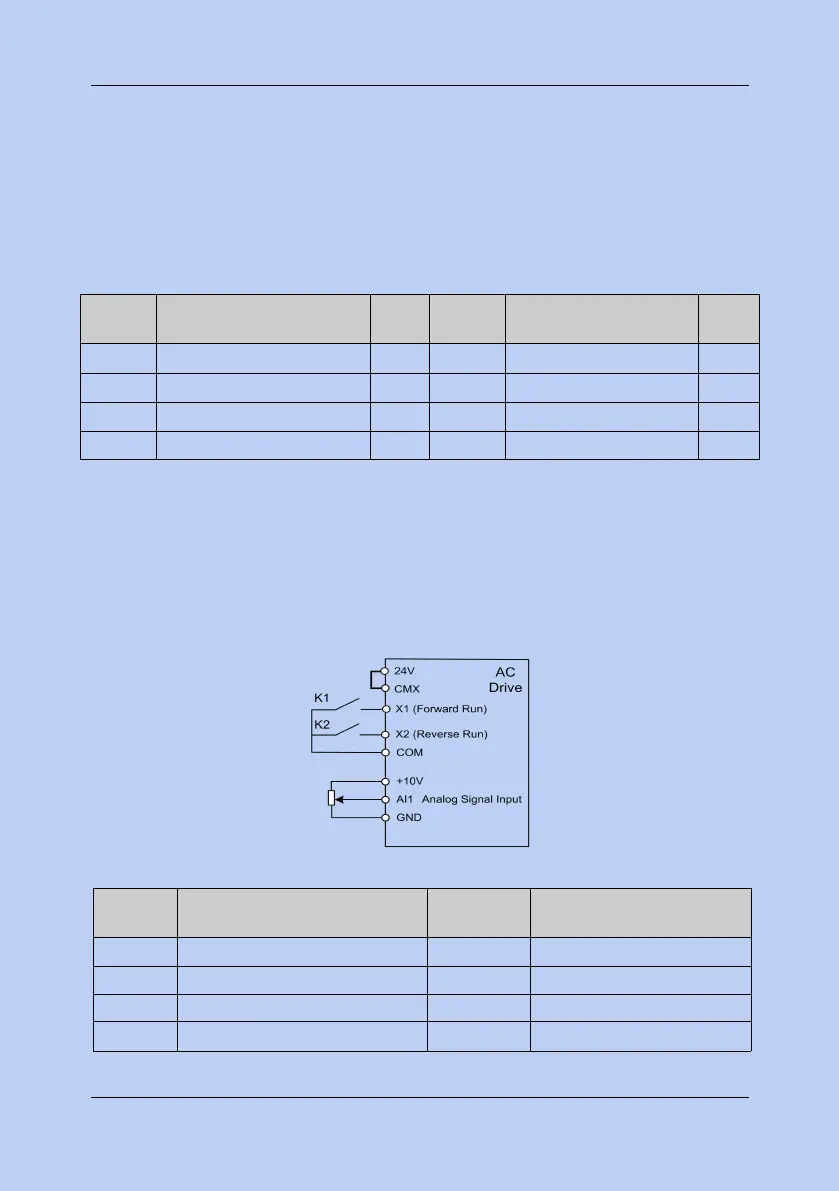
Example 2: Start/stop the AC drive by digital input (X terminals) and set frequency through
2.1) Terminal X1 controls forward running, X2 controls reverse running, and AI1 signal set the
running frequency.Please configure the wiring refer the following diagram.
2.2) Configure the following parameters base on the wiring mode.
Command sources selection
Commands from X terminals.
Main frequency source A selection
The function of terminal X1
The function of terminal X2



 To Next Page