For further assistance, please visit our website: capelloproducts.com
or contact customer service at support@capelloproducts.com or 1-855-896-1795.
Life Lab International Ltd.
“Made for iPod” and “Made for iPhone” mean that an electronic accessory has been designed to connect specically to iPod or
iPhone, respectively, and has been certied by the developer to meet Apple performance standards. Apple is not responsible for
the operation of this device or its compliance with safety and regulatory standards.
iPhone, iPod classic, iPod nano and iPod touch are trademarks of Apple Inc., registered in the U.S. and other countries.
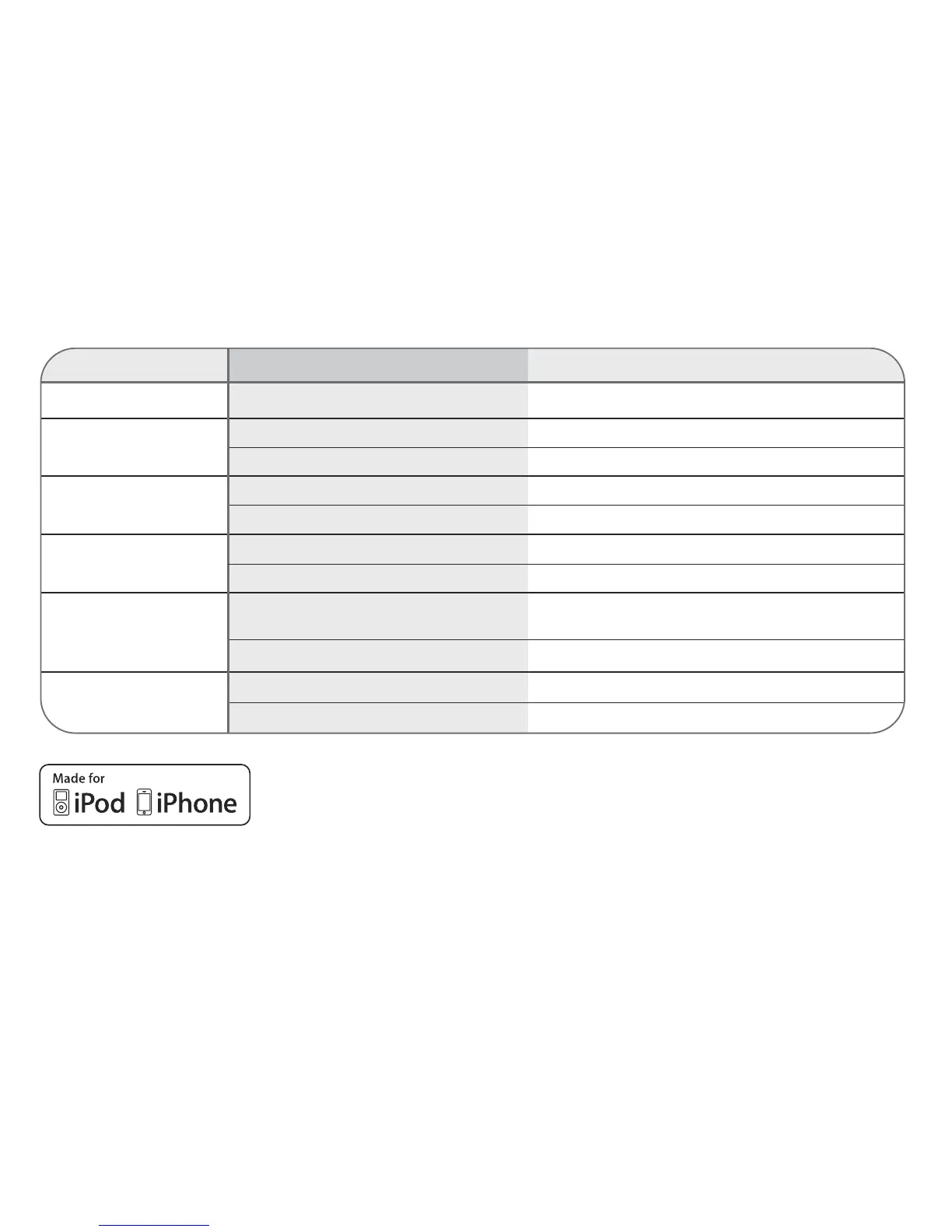
symptom cause solution
No sound. Volume is set to minimum. Increase volume.
Radio, no sound. Power is not on. Press the Power button to turn the power on.
Volume is set to minimum. Increase volume.
Radio, poor sound. Station is not tuned properly. Retune the FM broadcast station.
FM: Wire antenna is not extended. Extend FM wire antenna.
iPod mode, no sound. Incorrectly connected. Check the connection.
Not in iPod mode. Press SOURCE button.
Time reset to “12:00”. Batteries connected improperly, Check the batteries.
not connected or dead.
Clock not set. Set the clock.
Alarm does not Alarm is not activated or set properly. Set and activate alarm.
turn on Clock is not set. Set the clock.
troubleshooting



 To Previous Page