reviewing alerts
The CR2W All Hazards Weather Alert Radio can store up to 10 different alerts (with overlapping effective times) in its memory.
If the radio receives a new alert while a previous alert is still in effect, it automatically displays the new alert as scrolling text.
To review past alerts that are still in effect, press the arrow to scroll through the last 10 active alerts stored in memory.
“NO MESSAGE” will display if there are no active alerts
selecting weather band channel / frequency
While power switch is “ON,” press button to activate the radio.
Press button repeatedly until “WEATHER” is displayed.
Press or arrow repeatedly to step through weather band channels / frequencies. When you nd the NWS weather
band station for your area, stop pressing the arrow and the radio will stay on that station.
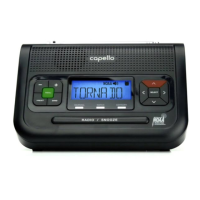
RADIO / SNOOZE
BAND
setting button audible notification
Press button until “TIME” is displayed.
Press or arrow until “BUTTON BEEPS” is displayed.
Press button to show current setting.
Press arrow to choose “OFF” or “ON”, then press .
Press to exit.


 To Next Page