EasyManua.ls Logo

capello CR2W - Advanced Function Settings; Alert and System Feature Configurations

capello CR2W
28 pages
Print Icon
To Next Page IconTo Next Page
To Previous Page IconTo Previous Page
Loading...
MENU
• TIME
• ALARM
• COUNTY
• ALT TYPE
• LANGUAGE
• NEW ALERT
DEFEAT SIREN
scroll event codes
select to change
ENABLE” or “DISABLE”
to save each change
to exit
SEL
SEL
SEL
SEL
MENU
• TIME
• ALARM
• COUNTY
• ALT TYPE
• LANGUAGE
• NEW ALERT
• DEFEAT SIREN
SIREN LEVEL
“LOW”
to set or
“HIGH”
to set or
to save each change
to exit
SEL
SEL
SEL
SEL
MENU
• TIME
• ALARM
• COUNTY
• ALT TYPE
• LANGUAGE
• NEW ALERT
• DEFEAT SIREN
• SIREN LEVEL
ALT TEST
SOUND ALERT
SILENCE ALERT
to exit
SEL
SEL
SEL
MENU
• TIME
• ALARM
• COUNTY
• ALT TYPE
• LANGUAGE
• NEW ALERT
• DEFEAT SIREN
• SIREN LEVEL
• ALT TEST
LIGHT
“BLT NORM”
to set or
“BLT ON”
to set or
“BLT OFF”
to save
to exit
SEL
MENU
• TIME
• ALARM
• COUNTY
• ALT TYPE
• LANGUAGE
• NEW ALERT
• DEFEAT SIREN
• SIREN LEVEL
• ALT TEST
• LIGHT
BUTTON BEEPS
“ON”
to set or
“OFF”
to save
to exit
SEL
SEL
SEL
SEL
SEL
SEL
DEFEAT SIREN SIREN LEVEL ALT TEST LIGHT BUTTON BEEPS
MENU
MENU
MENU
MENU
MENU
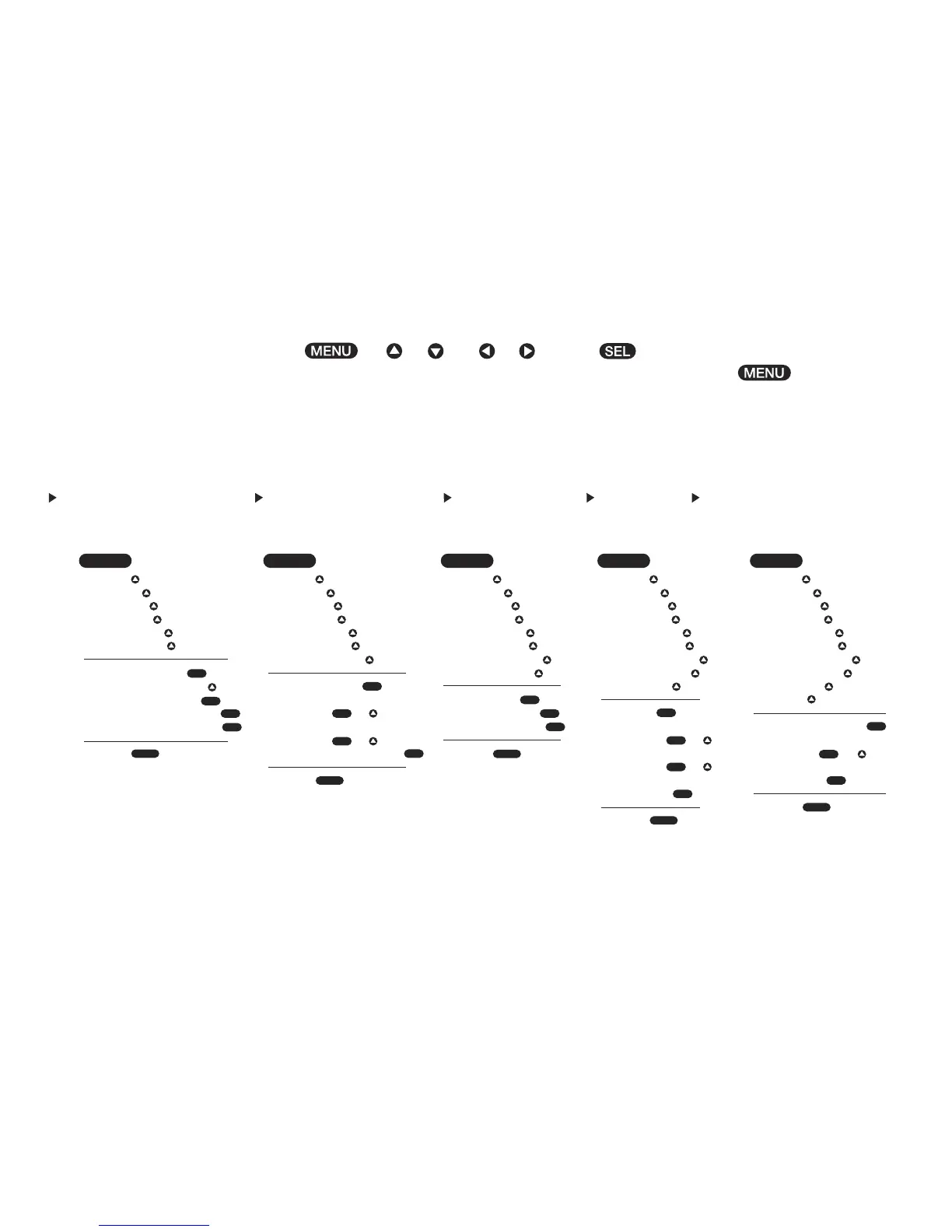
All programming uses a combination of , + or and or arrows. button is used to save settings.
The menu consists of 11 customizable functions to scroll through and select your personalized settings. Press button to go
back to previous function and to exit menu mode.

Related product manuals