46 Instruction manual C2600 Please keep this instruction manual for future reference
CONNECTIVITY
NOTE:
Download the CapleHome App to your mobile
device/tablet, prior to connection setup.
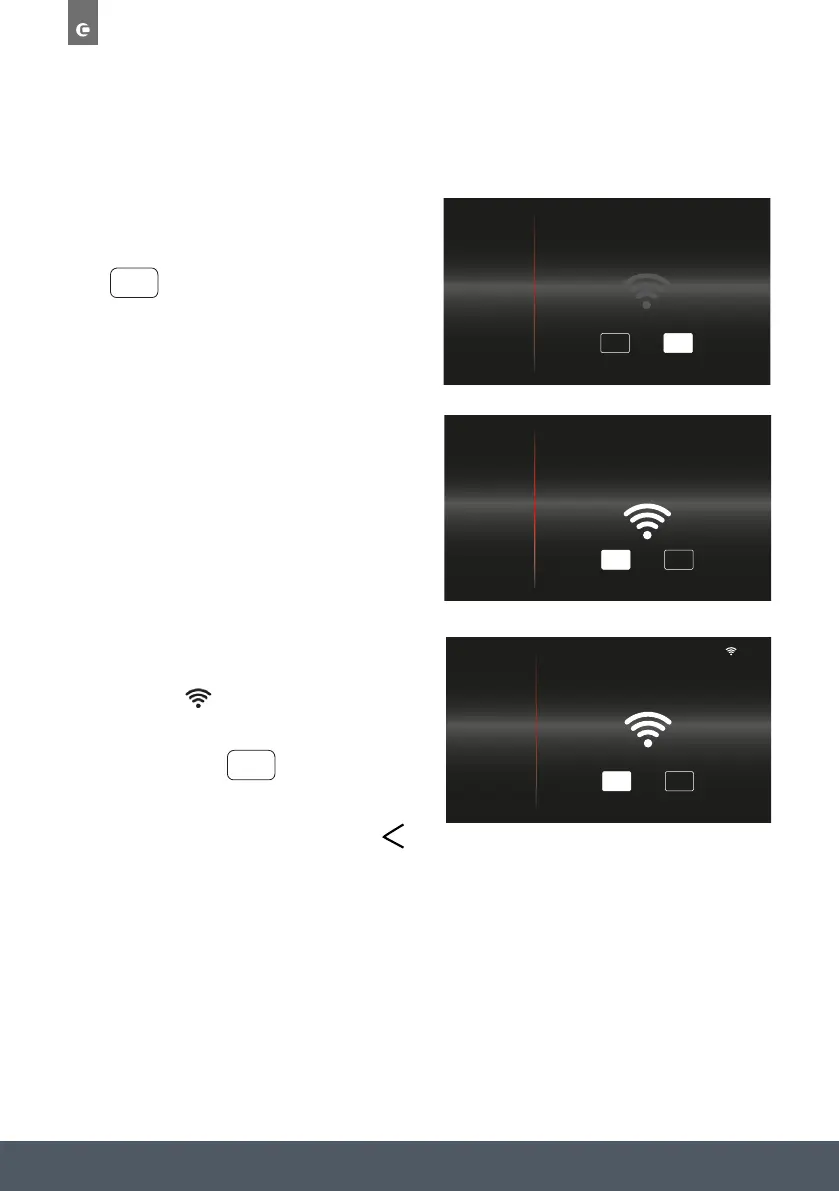
Press to enable WIFI.
Follow the on-screen prompt to open the
CapleHome App and follow instructions on your
device to connect to WIFI.
Once the appliance is connected to your mobile
device/tablet, ‘connected to…’ message will
display and the symbol will appear in the top
right corner next to the time.
To disable WIFI press
After making your adjustments, select a different
setting option from the menu or press the
button to return to the home screen.
NOTE:
By connecting the appliance to the Caple Home App, you are allowing the appliance to be
controlled by the App.
WiFi frequency: 2.4Ghz
10
:
10
ON OFF
TIME & DATE
SOUND
DISPLAY
SERVICE
DEMO MODE
CONNECTIVITY
ON
40
Once the appliance is
connected to your mobile
device/tablet, ‘connected
to…’ message will display and
the symbol will appear
in the top right corner next to
the time.
To disable WIFI press
After making your adjustments, select a different setting option from
the menu or press the
button to return to the home screen.
OFF
10
:
10
OFF
SSID: CapleHome-XXXX
KEY: See rating label or user manual
OPEN APP AND FOLLOW INSTRUCTIONS
TO CONNECT TO WIFI
ON
TIME & DATE
SOUND
DISPLAY
SERVICE
DEMO MODE
CONNECTIVITY
10
:
10
TIME & DATE
SOUND
DISPLAY
SERVICE
DEMO MODE
CONNECTIVITY
OFF
CONNECTED TO CAPLEHOME-XXXX
ON



 To Next Page