Instruction manual C324620 Please keep this instruction manual for future reference
ELECTRONIC TIMER
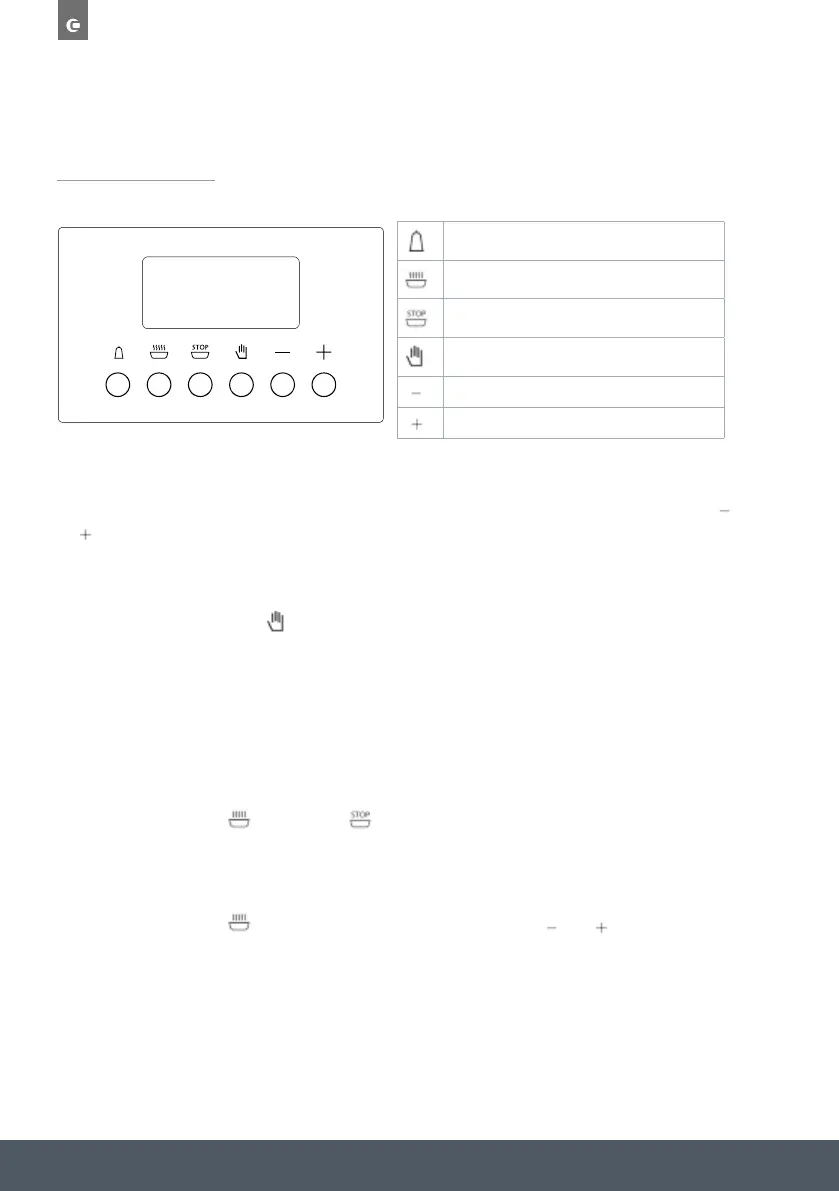
SETTING THE TIME
› Press any two buttons – cook time, end time or countdown – at the same time and
or
to set the desired time. This deletes any previously set programme. The functions are
disabled until the time has been set and the AUTO symbol flashes.
MANUAL USE
› Press the manual button
to resume functions, the AUTO symbol will stop flashing and the
cook time symbol lights up.
NOTE:
› Manual operation can only be enabled after the automatic programme is over or it has
been cancelled.
AUTOMATIC USE
› Press the cook time
or end time button to automatically change from manual use to
automatic use.
SEMI-AUTOMATIC USE WITH COOK TIME SETTING
› Press the cook time
button and set the desired time with or . The AUTO and cook
time symbol will illuminate continuously.
› When the set cooking time corresponds with the clock time the oven will switch off
automatically. An acoustic signal will sound and AUTO will flash. Press any button to switch
the signal off.
Countdown
Cook time
End time
Manual
Subtract time
Add time


 To Next Page