Instruction manual C324626 Please keep this instruction manual for future reference
TELESCOPIC RUNNERS (OPTIONAL ACCESSORY)
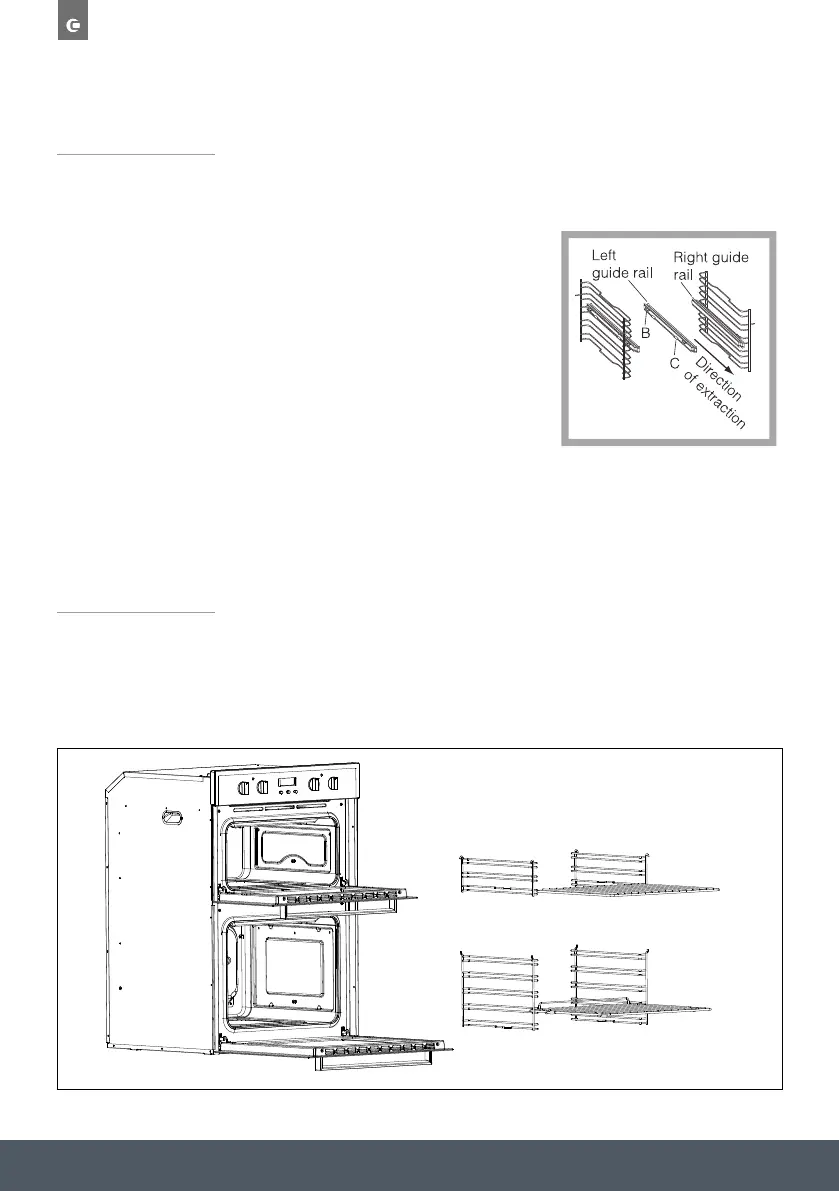
To assemble the telescopic runners:
› Remove the side racks (see secton below and Fig.2)
› Choose which shelf to use with the telescopic runner.
Pay attention to the direction in which the runner is
to be extracted, position joint ‘B’ and joint ‘C’ on the
frame (see Fig.1).
› Squeeze the bars together slightly and clip either
end of the telescopic runners on to the side racks.
› Finally, re-fit the side racks (See below and Fig.2)
NOTE:
Telescopic runners are optional accessories and are not included.
1
- Finally, re-fit the side rack
Fig.1
SSiiddee rraacckkss aanndd CCaattaallyyttiicc lliinneerrss
To install, align the 2 holes in the catalytic liners with the 2 steel clips in the side of
the oven cavity. Once aligned, attach side racks by pushing these onto the furthest
steel clip and then clicking the other end onto the closest steel clip.
This will secure the catalytic liners to the sides of the oven. To remove, unclip the side
racks from the side of the oven, and remove the catalytic liners.
Visit our Caple website to view a 'How to video' on this. w
wwwww..ccaappllee..ccoo..uukk
1
- Finally, re-fit the side rack
Fig.1
To install, attach side rack by hanging these through the 2 holes in the side of the
oven cavity, and pushing them onto the round steel clip towards the bottom.
To remove, unclip the side racks from the side of the oven.
SSiiddee rraacckkss
SIDE RACKS
To install, attach side rack by hanging these through the 2 holes in the side of the oven cavity, and
pushing them onto the round steel clip towards the bottom.
To remove, unclip the side racks from the side of the oven.
Figure 1.
Figure 2.


 To Next Page