16 Instruction manual C981G & C1081G Please keep this instruction manual for future reference
TURNING OFF A BURNER
Briefly press the “+” and “-” buttons for the desired burner simultaneously. The power level
indicator shows letter “H” indicating that the burner is still hot. This indication is cleared after a
few minutes.
TURNING OFF ALL THE BURNERS
To turn off all burners simultaneously, briefly press the ON/OFF button: the appliance will enter
standby mode.
SETTING THE CLOCK
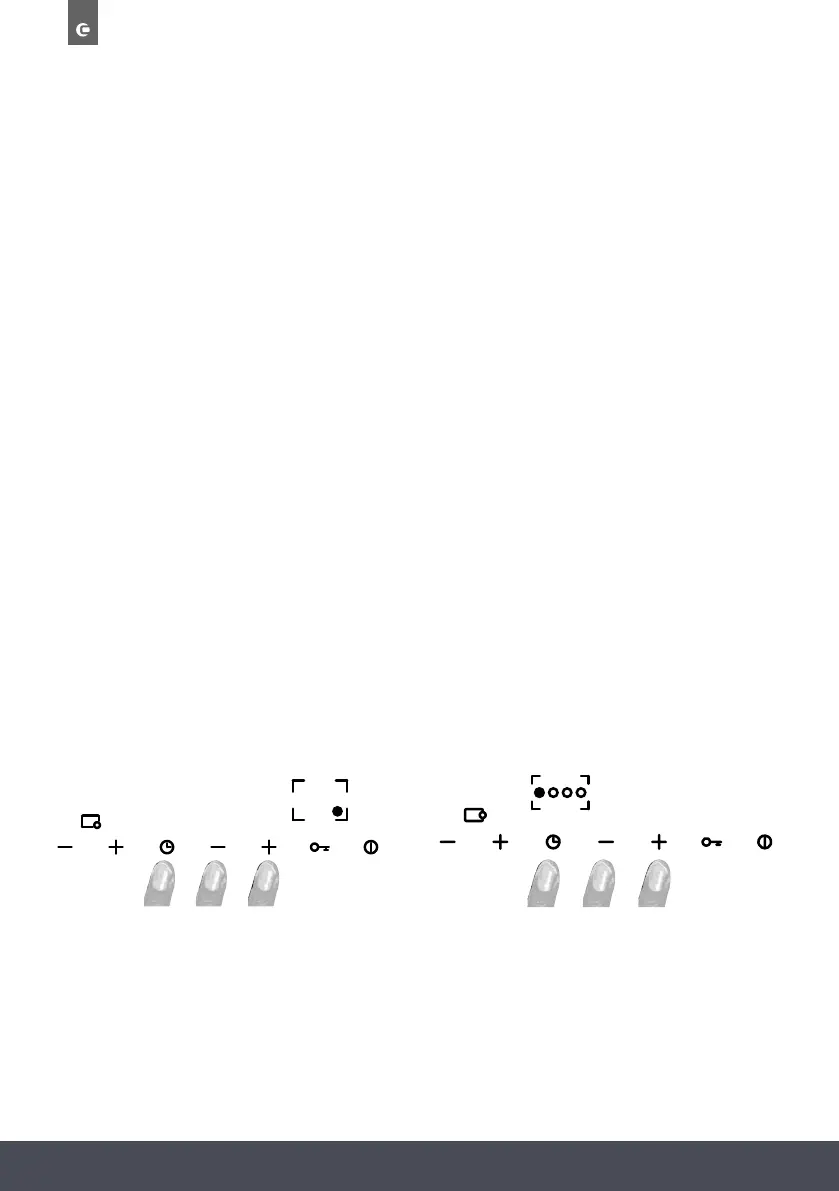
After a power failure, the hob clock must be reset. To set the clock, simultaneously press and hold
the buttons shown in the figure for at least 3 seconds. The flashing digits on the left of the dot
indicate the hour and the digits on the right indicate the minutes. Increase or decrease the hour
using the “+” and “-” buttons.
Hold down the “+” or “-” button to increase or decrease the hours digits rapidly. To set the
minutes, press the button with the clock symbol again. The digits on the right of the dot will start
flashing; set the minutes as described above. Press the button with the clock symbol again to save
the set time.
T U R N I N G OFF A BURNER
Briefly press the “+” and “-” buttons for the desired burner simultaneously. The
power level indicator shows letter “H” indicating that the burner is still hot. This indication
is cleared after a few minutes.
TURNING OFF ALL THE BURNERS
To turn off all burners simultaneously, briefly press the ON/OFF button: the appliance
will enter standby mode.
SETTING THE CLOCK
After a power failure, the hob clock must be reset. To set the clock, simultaneously press
and hold the buttons shown in the figure for at least 3 seconds. The flashing digits on
the left of the dot indicate the hour and the digits on the right indicate the minutes.
Increase or decrease the hour using the “+” and “-” buttons.
Hold down the “+” or “-” button to increase or decrease the hours digits rapidly.
To set the minutes, press the button with the clock symbol again. The digits on the right
of the dot will start flashing; set the minutes as described above. Press the button with
the clock symbol again to save the set time.
08.00
C 9 8 1 G : C 1 0 8 1 G :
08.00
T U R N I N G OFF A BURNER
Briefly press the “+” and “-” buttons for the desired burner simultaneously. The
power level indicator shows letter “H” indicating that the burner is still hot. This indication
is cleared after a few minutes.
TURNING OFF ALL THE BURNERS
To turn off all burners simultaneously, briefly press the ON/OFF button: the appliance
will enter standby mode.
SETTING THE CLOCK
After a power failure, the hob clock must be reset. To set the clock, simultaneously press
and hold the buttons shown in the figure for at least 3 seconds. The flashing digits on
the left of the dot indicate the hour and the digits on the right indicate the minutes.
Increase or decrease the hour using the “+” and “-” buttons.
Hold down the “+” or “-” button to increase or decrease the hours digits rapidly.
To set the minutes, press the button with the clock symbol again. The digits on the right
of the dot will start flashing; set the minutes as described above. Press the button with
the clock symbol again to save the set time.
08.00
C 9 8 1 G : C 1 0 8 1 G :
08.00
C981G C1081G



 To Next Page