17Instruction manual C981G & C1081GPlease keep this instruction manual for future reference
BURNER RESET
The burners may lock out due to external faults (for example, in the event of either a power or gas
supply failure).The display of each locked out burner will show the letter “b”.
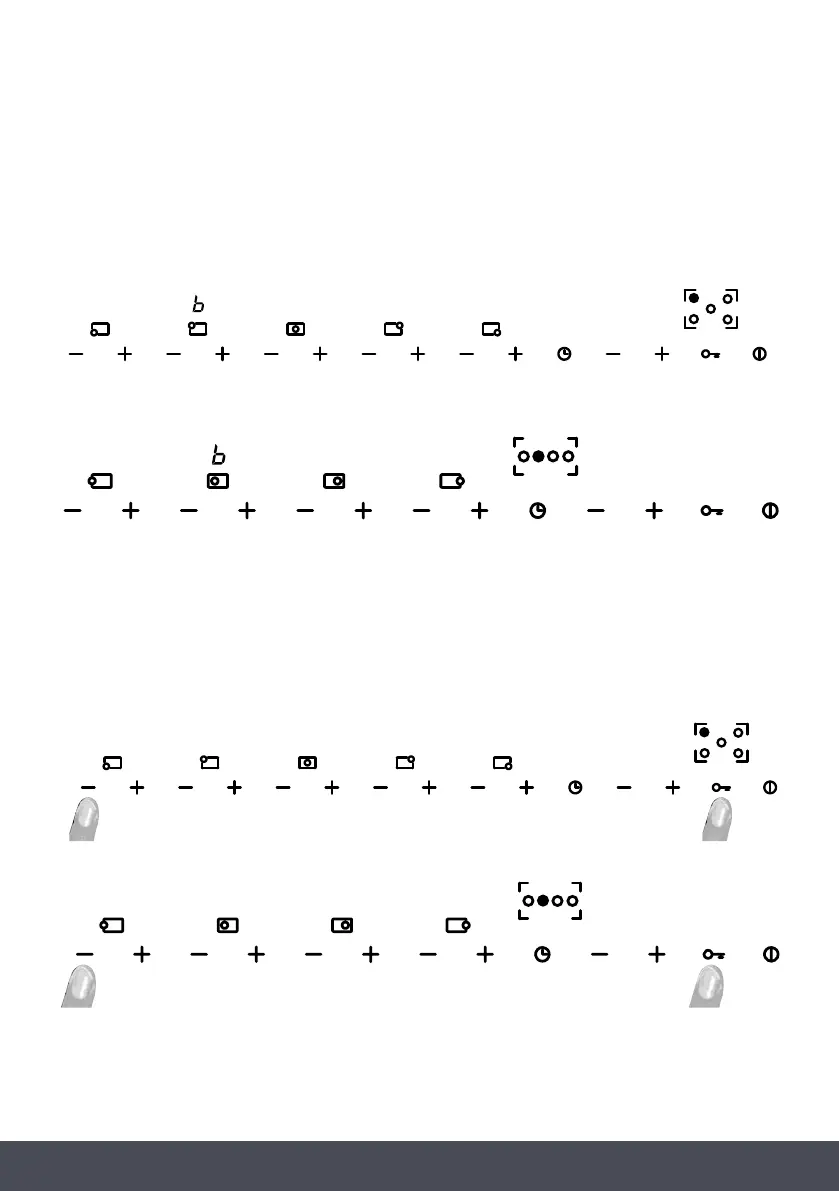
To reset the burners, simultaneously hold down the “-” and “key” buttons as shown in the figure
(regardless of which burner is locked) for at least 2 seconds.
Once the burners have been reset, they will be set to level 0, ready to be turned on again.
N O T E :
If you repeat the reset procedure 5 consecutive times within 15 minutes, the message 'FLT06'
will be displayed and no other reset requests will be accepted for the following 15 minutes.
C981 G :
C 1 0 8 1G :
C981 G :
C1081G :
BURNER RESET
The burners may lock out due to external faults (for example, in the event of either a power or gas
supply failure).The display of each locked out burner will show the letter “b”.
To reset the burners, simultaneously hold down the “-” and “key” buttons as shown in the figure
(regardless of which burner is locked) for at least 2 seconds.
Once the burners have been reset, they will be set to level 0, ready to be turned on again.
N O T E :
If you repeat the reset procedure 5 consecutive times within 15 minutes, the message 'FLT06'
will be displayed and no other reset requests will be accepted for the following 15 minutes.
C981 G :
C 1 0 8 1G :
C981 G :
C1081G :
BURNER RESET
The burners may lock out due to external faults (for example, in the event of either a power or gas
supply failure).The display of each locked out burner will show the letter “b”.
To reset the burners, simultaneously hold down the “-” and “key” buttons as shown in the figure
(regardless of which burner is locked) for at least 2 seconds.
Once the burners have been reset, they will be set to level 0, ready to be turned on again.
N O T E :
If you repeat the reset procedure 5 consecutive times within 15 minutes, the message 'FLT06'
will be displayed and no other reset requests will be accepted for the following 15 minutes.
C981 G :
C 1 0 8 1G :
C981 G :
C1081G :
BURNER RESET
The burners may lock out due to external faults (for example, in the event of either a power or gas
supply failure).The display of each locked out burner will show the letter “b”.
To reset the burners, simultaneously hold down the “-” and “key” buttons as shown in the figure
(regardless of which burner is locked) for at least 2 seconds.
Once the burners have been reset, they will be set to level 0, ready to be turned on again.
N O T E :
If you repeat the reset procedure 5 consecutive times within 15 minutes, the message 'FLT06'
will be displayed and no other reset requests will be accepted for the following 15 minutes.
C981 G :
C 1 0 8 1G :
C981 G :
C1081G :
C981G
C1081G
C1081G
BURNER RESET
The burners may lock out due to external faults (for example, in the event of either a power or gas
supply failure).The display of each locked out burner will show the letter “b”.
To reset the burners, simultaneously hold down the “-” and “key” buttons as shown in the figure
(regardless of which burner is locked) for at least 2 seconds.
Once the burners have been reset, they will be set to level 0, ready to be turned on again.
C981G:
NOTE:
If you repeat the reset procedure 5 consecutive times within 15 minutes, the message ‘FLT06’ will
be displayed and no other reset requests will be accepted for the following 15 minutes.



 To Next Page