18 Instruction manual C981G & C1081G Please keep this instruction manual for future reference
CHILD SAFETY LOCK
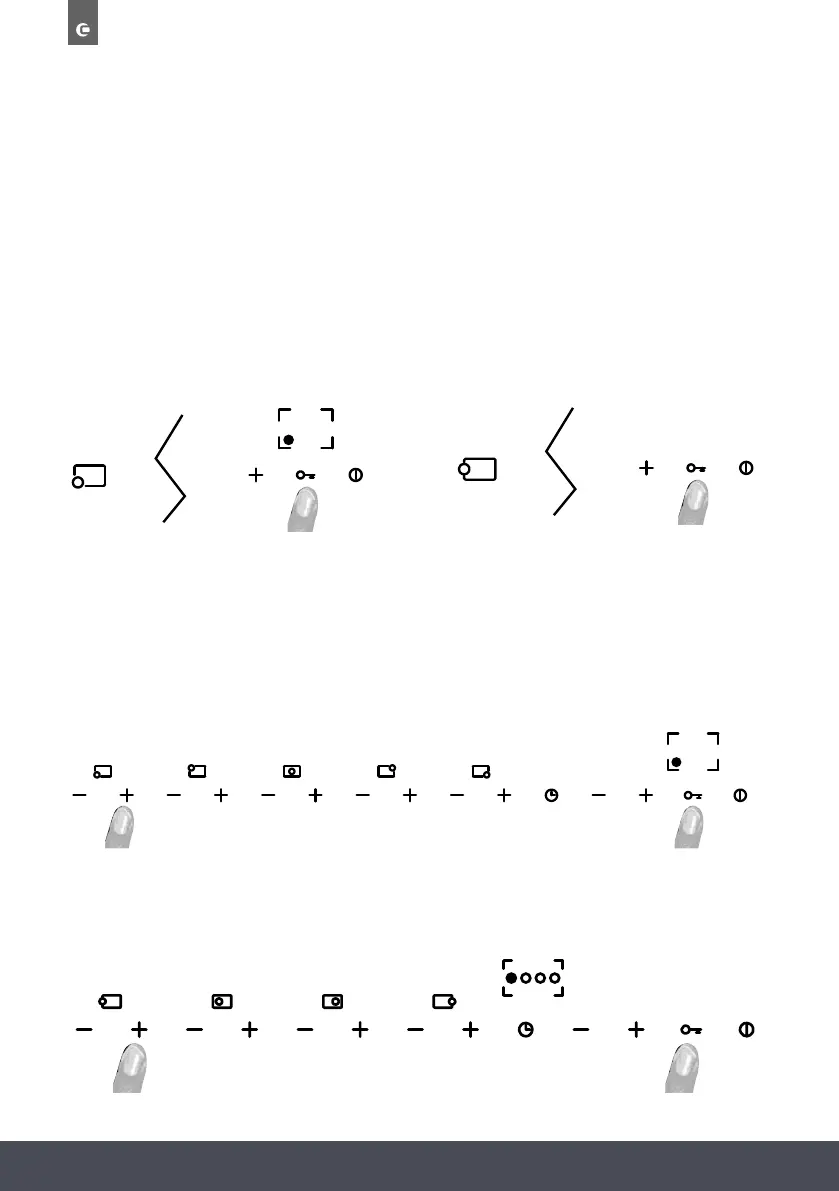
To activate this function, press the “key” button for at least 2 seconds. All burner power levels
will remain in their current status. When the touch panel is locked the decimal points light up in
the display of each burner. When the touch panel is locked, it is not possible to change the burner
power levels or change the timer settings, but it is possible to switch the hob off by pressing the
ON/OFF button. Locked burners cannot be reset when the touch panel lock is activated. The touch
panel must be unlocked before performing the burner reset procedure.
CHILD SAFETY LOCK
To activate this function, press the “key” button for at least 2 seconds. All burner power
levels will remain in their current status. When the touch panel is locked the decimal points
light up in the display of each burner. When the touch panel is locked, it is not possible to
change the burner power levels or change the timer settings, but it is possible to switch the hob
off by pressing the ON/OFF button. Locked burners cannot be reset when the touch panel lock is
activated. The touch panel must be unlocked before performing the burner reset procedure.
5.
C98 1 G :
C 1 0 8 1 G :
5.
T O UNLOCK THE TOUCH PANEL
5555 5
C98 1 G :
C10 8 1 G :
5 55 5
To unlock the touch panel, press the “key” button and the “+” button of the LH burner for at least
2 seconds. When the touch panel is unlocked the decimal points switch off in the power
level displays.
CHILD SAFETY LOCK
To activate this function, press the “key” button for at least 2 seconds. All burner power
levels will remain in their current status. When the touch panel is locked the decimal points
light up in the display of each burner. When the touch panel is locked, it is not possible to
change the burner power levels or change the timer settings, but it is possible to switch the hob
off by pressing the ON/OFF button. Locked burners cannot be reset when the touch panel lock is
activated. The touch panel must be unlocked before performing the burner reset procedure.
5.
C98 1 G :
C 1 0 8 1 G :
5.
T O UNLOCK THE TOUCH PANEL
5555 5
C98 1 G :
C10 8 1 G :
5 55 5
To unlock the touch panel, press the “key” button and the “+” button of the LH burner for at least
2 seconds. When the touch panel is unlocked the decimal points switch off in the power
level displays.
CHILD SAFETY LOCK
To activate this function, press the “key” button for at least 2 seconds. All burner power
levels will remain in their current status. When the touch panel is locked the decimal points
light up in the display of each burner. When the touch panel is locked, it is not possible to
change the burner power levels or change the timer settings, but it is possible to switch the hob
off by pressing the ON/OFF button. Locked burners cannot be reset when the touch panel lock is
activated. The touch panel must be unlocked before performing the burner reset procedure.
5.
C98 1 G :
C 1 0 8 1 G :
5.
T O UNLOCK THE TOUCH PANEL
5555 5
C98 1 G :
C10 8 1 G :
5 55 5
To unlock the touch panel, press the “key” button and the “+” button of the LH burner for at least
2 seconds. When the touch panel is unlocked the decimal points switch off in the power
level displays.
CHILD SAFETY LOCK
To activate this function, press the “key” button for at least 2 seconds. All burner power
levels will remain in their current status. When the touch panel is locked the decimal points
light up in the display of each burner. When the touch panel is locked, it is not possible to
change the burner power levels or change the timer settings, but it is possible to switch the hob
off by pressing the ON/OFF button. Locked burners cannot be reset when the touch panel lock is
activated. The touch panel must be unlocked before performing the burner reset procedure.
5.
C98 1 G :
C 1 0 8 1 G :
5.
T O UNLOCK THE TOUCH PANEL
5555 5
C98 1 G :
C10 8 1 G :
5 55 5
To unlock the touch panel, press the “key” button and the “+” button of the LH burner for at least
2 seconds. When the touch panel is unlocked the decimal points switch off in the power
level displays.
C981G C1081G
C1081G
TO UNLOCK THE TOUCH PANEL
To unlock the touch panel, press the “key” button and the “+” button of the LH burner for at
least 2 seconds. When the touch panel is unlocked the decimal points switch off in the power level
displays.
C981G


 To Next Page
 Loading...