35Instruction manual C981G & C1081GPlease keep this instruction manual for future reference
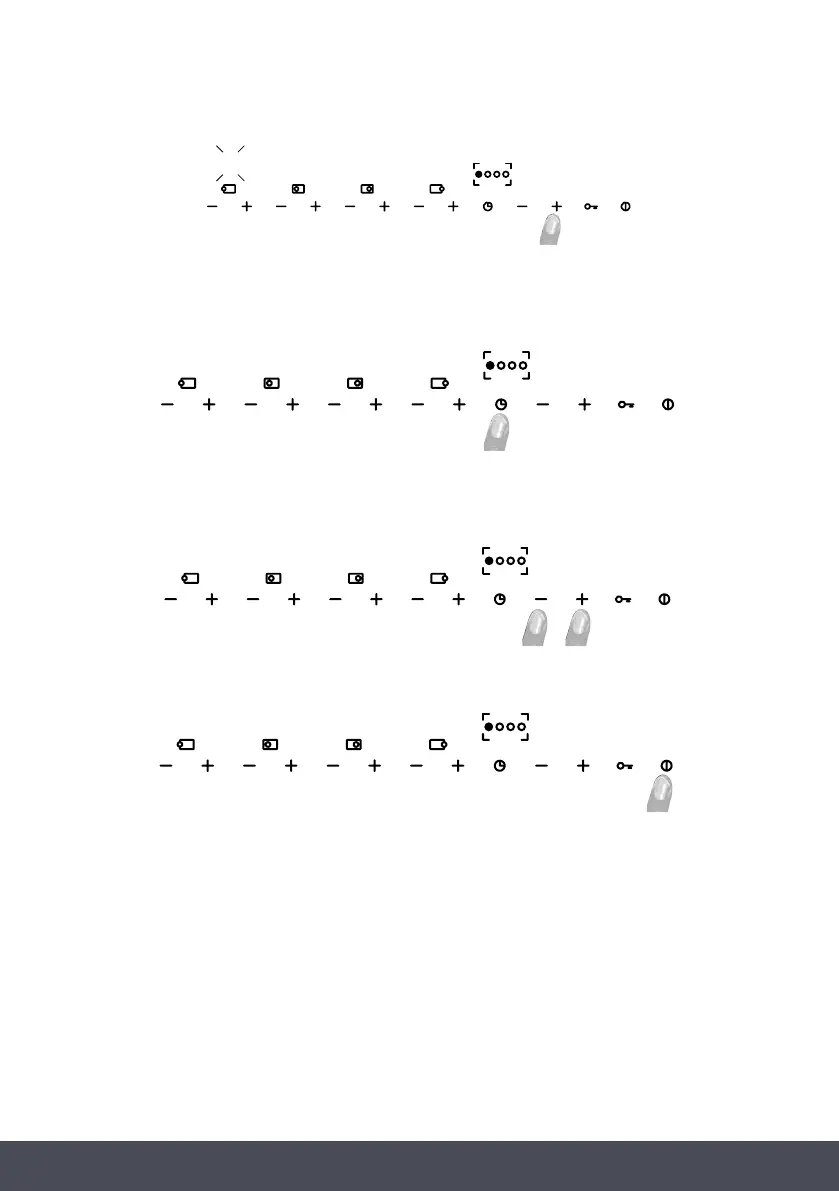
Now it will be possible to increase or decrease the minimum flow, use the “+” and “-” buttons of the
specific burner. After this action the test is repeated automatically.
After adjusting the burner, press the timer button again to exit the procedure. The minimum flow
settings are saved and will be used each time you use the appliance.
You can repeat this procedure for all burners.
To exit, turn the device off by pressing the on / off button.
1
90
Now it will be possible to increase or decrease the minimum flow, use the “+” and “-” buttons of the
specific burner. After this action the test is repeated automatically.
After adjusting the burner, press the timer button again to exit the procedure. The minimum flow
settings are saved and will be used each time you use the appliance.
You can repeat this procedure for all burners.
To exit, turn the device off by pressing the on / off button.
1
90
Now it will be possible to increase or decrease the minimum flow, use the “+” and “-” buttons of the
specific burner. After this action the test is repeated automatically.
After adjusting the burner, press the timer button again to exit the procedure. The minimum flow
settings are saved and will be used each time you use the appliance.
You can repeat this procedure for all burners.
To exit, turn the device off by pressing the on / off button.
1
90
Now it will be possible to increase or decrease the minimum flow, use the “+” and “-” buttons of the
specific burner. After this action the test is repeated automatically.
After adjusting the burner, press the timer button again to exit the procedure. The minimum flow
settings are saved and will be used each time you use the appliance.
You can repeat this procedure for all burners.
To exit, turn the device off by pressing the on / off button.
1
90
Now it will be possible to increase or decrease the minimum flow, use the “+” and “-” buttons of
the specific burner. After this action the test is repeated automatically.
After adjusting the burner, press the timer button again to exit the procedure. The minimum flow
settings are saved and will be used each time you use the appliance.
You can repeat this procedure for all burners.
To exit, turn the device off by pressing the on / off button.



 To Next Page