16
Pause function
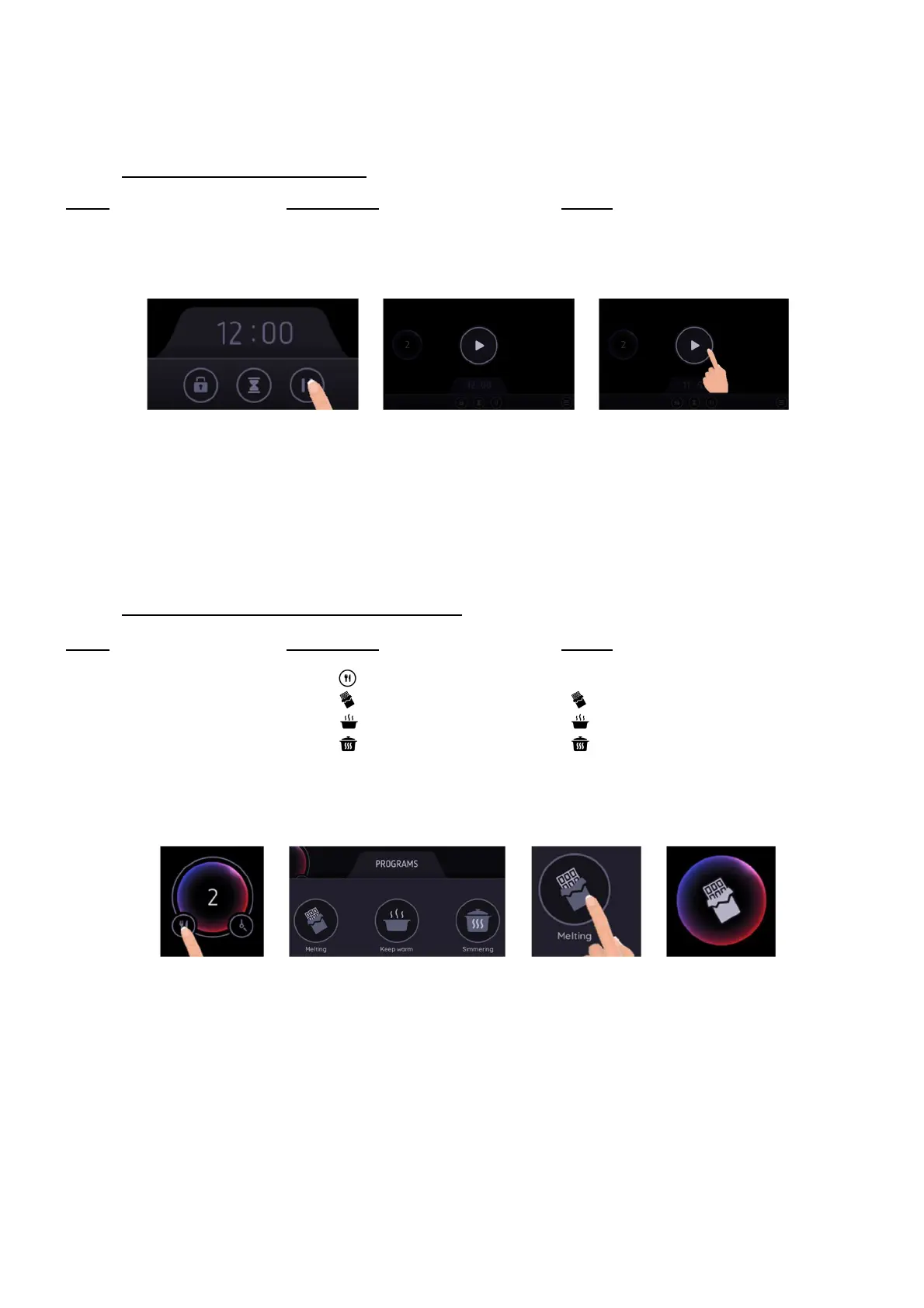
This function stops the entire hob’s cooking activity temporarily and allows restarting with the same settings.
If the Pause state is longer than 10 minutes, the hob will automatically switch off.
• Start-up/stop the pause function:
Action Control panel Display
Engage pause Press [ II ] The display goes grey and [ ►] appears
All cooking process are stopped
Stop the pause Press [ ►] Previous setting are on the display
Cooking process resumes
Pan programs
This function allows you to select pre-defined cooking programs.
This will avoid liquids overflowing and burning on the bottom of the pan.
The hob will automatically reach and maintain the temperatures according to the selected program:
o Melting (44°C)
o Keep warm (70°C)
o Simmering (94°C)
• To engage, to start the function “Keep warm”:
Action Control panel Display
Pan selection Select the desired pan [ 0 ]
Select “Programs” Press [ ] next to the pan Programs selection menu appears
Engage melting Press [ ] [ ]
Engage keep warm Press [ ] [
Engage simmering Press [ ] [ ]
To stop Select the pan and slide to [ 0 ]
or press again on the selected
program in the menu
or double tap on the pan [ 0 ] or [ H ]
This function can be started independently on all the heating zones.
The maximum duration of these programs is 2 hours.



 To Next Page