19
Child Lock
In order to restrict the access (e.g. for children) and prevents from accidentally operation of the hob, it is possible to
activate the Child Lock function.
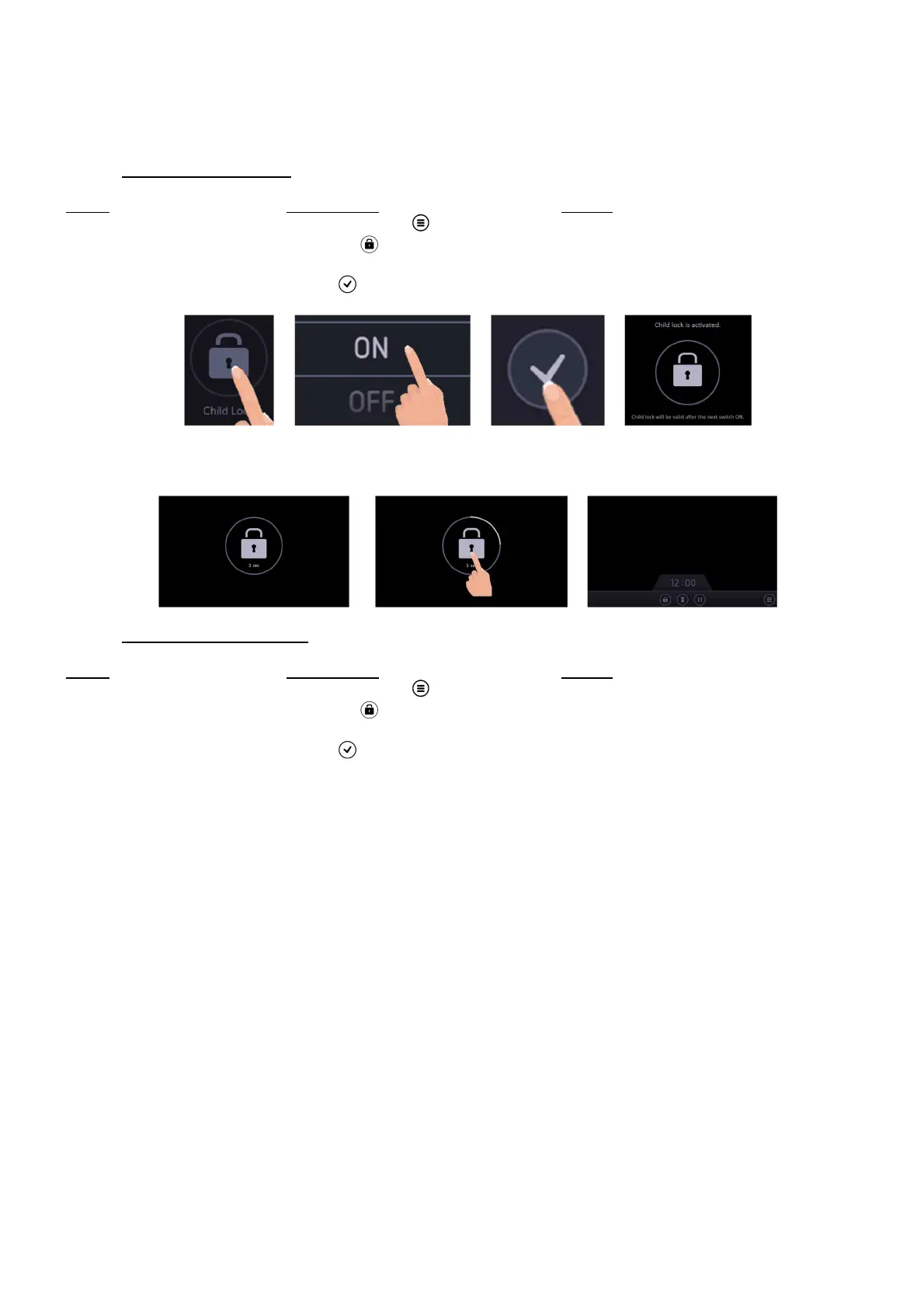
• Activate the child lock:
Action Control panel Display
Enter in the Settings menu Press menu key [ ] The settings are displayed
Enter in the Child Lock setting Press on [ ] Child Lock setting is open
Activate the Child Lock Scroll to “ON” The Child Lock is activated
Validate the settings Press [ ] to validate the settings Settings main menu
Each time the hob switches on, the display shows the Child Lock symbol.
Press this symbol for 3 seconds to access to the main screen.
• Deactivate the child lock:
Action Control panel Display
Enter in the Settings menu Press menu key [ ] The settings are displayed
Enter in the Child Lock setting Press on [ ] Child Lock setting is open
Deactivate the Child Lock Scroll to “OFF” The Child Lock is deactivated
Validate the settings Press [ ] to validate the settings Settings main menu
Now, each time the hob switches on, the main screen is displayed directly.



 To Next Page