23Instruction manual CAFF46GMPlease keep this instruction manual for future reference
COOLER (COOLER)
The cooler mode is used for setting the temperature of the cooler compartment. Press the
“cooler” button to set the temperature of the cooler to 2, 3, 4, 5, 6, 7, 8°C.
FREEZER / COOLER 1 (ZONE 1)
To use the zone 1 compartment as a freezer, press the “zone1” button to set the temperature
of the bottom-left compartment to -16, -17, -18, -19, -20, -21, -22, -23 or -24 °C.
To use the bottom-left compartment as a cooler, press and hold the “zone1” button for 3
seconds. Then, set the temperature to 2, 3, 4, 5, 6, 7 or 8 °C.
FREEZER (ZONE 2)
Press the “zone2” button to set the temperature of the bottom-right compartment to -16, -17,
-18, -19, -20, -21, -22, -23 or -24 °C.
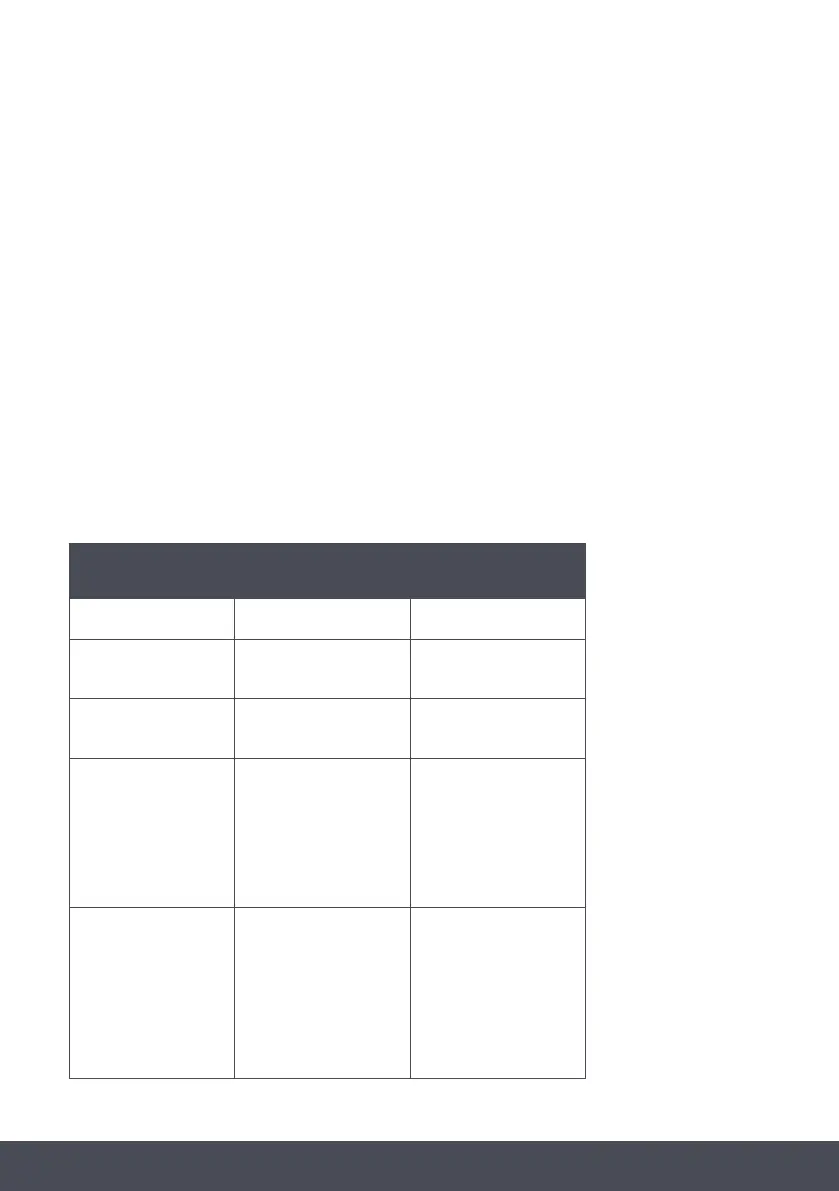
RECOMMENDED TEMPERATURE SETTINGS
FREEZER
COMPARTMENT
COOLER
COMPARTMENT
REMARKS
-18°C 4°C
For regular use and best
performance.
-20°C, -21°C,
-22°C, -23°C or -24°C
4°C
Recommended
when environmental
temperature exceeds 30°C.
Super Freeze 4°C
Must be used when you
wish to freeze food in a
short period of time.
-18°C, -19°C,
-20°C, -21°C,
-22°C, -23°C or -24°C
2°C
These temperature
settings must be used
when the environmental
temperature is high or if
you think the refrigerator
compartment is not cool
enough because the door
is being opened frequently.
-18°C, -19°C,
-20°C, -21°C,
-22°C, -23°C or -24°C
Super Cool
Must be used when the
refrigerator compartment
is overloaded with food
or when food needs to be
quickly cooled.


 To Next Page