Instruction manual CM108BG18 Please keep this instruction manual for future reference
AUTO COOKING
SYMBOL DESCRIPTION DISPLAY
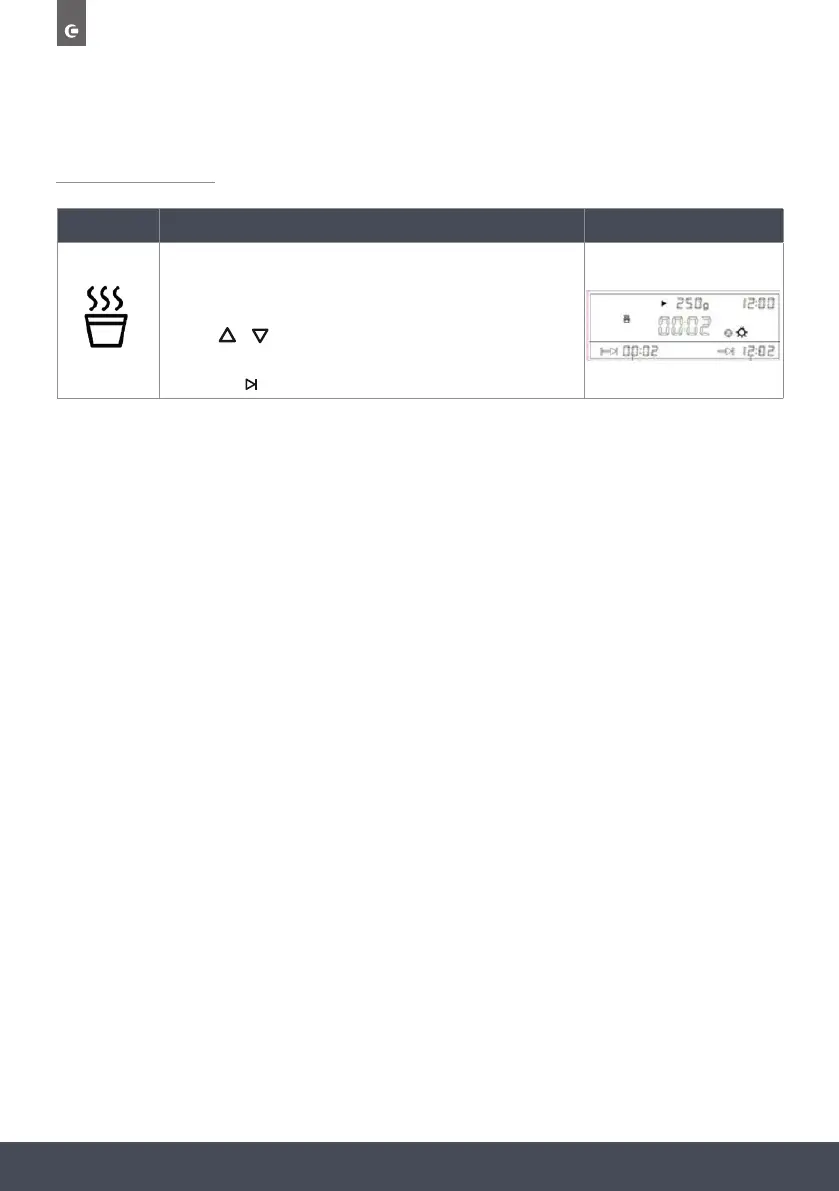
Milk (Auto programme)
Press the Auto programme button until the Milk symbol is displayed.
Press the °C/W/g to enter the Weight selection.
Use the
Turbo grill - t 200°C (Temperature r 220°C).
To adjust the temperature press °C/W/g followed by / . Press SELECT
to confirm.
The default time is 1.00hr. To Adjust the time, press the button followed by
the / and SELECT to confirm.
Finally press to start the programme.
Microwave & Fan heat
Microwave default power P50 (Power range P10-P50).
Fan heat d 200°C ( °C).
Press °C/W/g once to enter the Microwave power mode, and then again to
enter the fan heat temperature mode. These can both then be adjusted using the
/ keys followed by SELECT to confirm.
The default time is 1.00hr. To Adjust the time, press the button followed
by the / and SELECT to confirm.
Finally press to start the programme.
MICROWAVE OVEN FUNCTIONS
s:
p
Microwave & Turbo grill
Microwave default power P50 (Power range P10-P50).
Turbo grill default temperature 200°C (Temperature range 50-220°C).
Press °C/W/g once to enter the Microwave power mode, and then again to
enter the Turbo grill temperature mode. These can both then be adjusted using
the / keys followed by SELECT to confirm.
The default time is 1.00hr. To Adjust the time, press the button followed
by the / and SELECT to confirm.
Finally press to start the programme.
Microwave & Turbo conventional heat
Microwave default power P50 (Power range P10-P50).
Turbo grill default temperature 200°C (Temperature range 50-220°C).
Press °C/W/g once to enter the Microwave power mode, and then again to
enter the Turbo conventional temperature mode. These can both then be
adjusted using the / keys followed by SELECT to confirm.
The default time is 1.00hr. To Adjust the time, press the button followed by
the / and SELECT to confirm.
Finally press to start the programme.
Microwave – Default power P100 (power range P10-P100).
To adjust the power, press / until the correct power is reached followed by
SELECT.
Default time is 1 minute. To Adjust the time, press the button followed by
the / and SELECT to confirm.
Finally press to start the programme.
Defrost - Default weight 1000g (weight range 100-2000g).
To adjust the weight press the °C/W/g button followed by the / and
SELECT to confirm.
Finally press to start the programme. The default time will be adjusted
according to the set weight (See the 'Defrost time table' for more info).
Fan heat - Default temperature 200°C
To adjust the temperature press °C/W/g followed by / . Press SELECT to
confirm.
The default time is 1.00hr. To Adjust the time, press the button followed by
the / and SELECT to confirm.
Finally press to start the programme.
Turbo conventional - t 200°C (Temperature r 220°C).
To adjust the temperature press °C/W/g followed by / . Press SELECT to
confirm.
The default time is 1.00hr. To Adjust the time, press the button followed by
the / and SELECT to confirm.
Finally press to start the programme.
to adjust the weight and press SELECT toconrm.
The default time will be adjusted according to the weight selected.
Finally press
Turbo grill - t 200°C (Temperature r 220°C).
To adjust the temperature press °C/W/g followed by / . Press SELECT
to confirm.
The default time is 1.00hr. To Adjust the time, press the button followed by
the / and SELECT to confirm.
Finally press to start the programme.
Microwave & Fan heat
Microwave default power P50 (Power range P10-P50).
Fan heat d 200°C ( °C).
Press °C/W/g once to enter the Microwave power mode, and then again to
enter the fan heat temperature mode. These can both then be adjusted using the
/ keys followed by SELECT to confirm.
The default time is 1.00hr. To Adjust the time, press the button followed
by the / and SELECT to confirm.
Finally press to start the programme.
MICROWAVE OVEN FUNCTIONS
s:
p
Microwave & Turbo grill
Microwave default power P50 (Power range P10-P50).
Turbo grill default temperature 200°C (Temperature range 50-220°C).
Press °C/W/g once to enter the Microwave power mode, and then again to
enter the Turbo grill temperature mode. These can both then be adjusted using
the / keys followed by SELECT to confirm.
The default time is 1.00hr. To Adjust the time, press the button followed
by the / and SELECT to confirm.
Finally press to start the programme.
Microwave & Turbo conventional heat
Microwave default power P50 (Power range P10-P50).
Turbo grill default temperature 200°C (Temperature range 50-220°C).
Press °C/W/g once to enter the Microwave power mode, and then again to
enter the Turbo conventional temperature mode. These can both then be
adjusted using the / keys followed by SELECT to confirm.
The default time is 1.00hr. To Adjust the time, press the button followed by
the / and SELECT to confirm.
Finally press to start the programme.
Microwave – Default power P100 (power range P10-P100).
To adjust the power, press / until the correct power is reached followed by
SELECT.
Default time is 1 minute. To Adjust the time, press the button followed by
the / and SELECT to confirm.
Finally press to start the programme.
Defrost - Default weight 1000g (weight range 100-2000g).
To adjust the weight press the °C/W/g button followed by the / and
SELECT to confirm.
Finally press to start the programme. The default time will be adjusted
according to the set weight (See the 'Defrost time table' for more info).
Fan heat - Default temperature 200°C
To adjust the temperature press °C/W/g followed by / . Press SELECT to
confirm.
The default time is 1.00hr. To Adjust the time, press the button followed by
the / and SELECT to confirm.
Finally press to start the programme.
Turbo conventional - t 200°C (Temperature r 220°C).
To adjust the temperature press °C/W/g followed by / . Press SELECT to
confirm.
The default time is 1.00hr. To Adjust the time, press the button followed by
the / and SELECT to confirm.
Finally press to start the programme.
to start the programme.


 To Next Page
 Loading...