Please keep this instruction manual for future reference Instruction manual DD780BK 45
HOB ERROR CODES
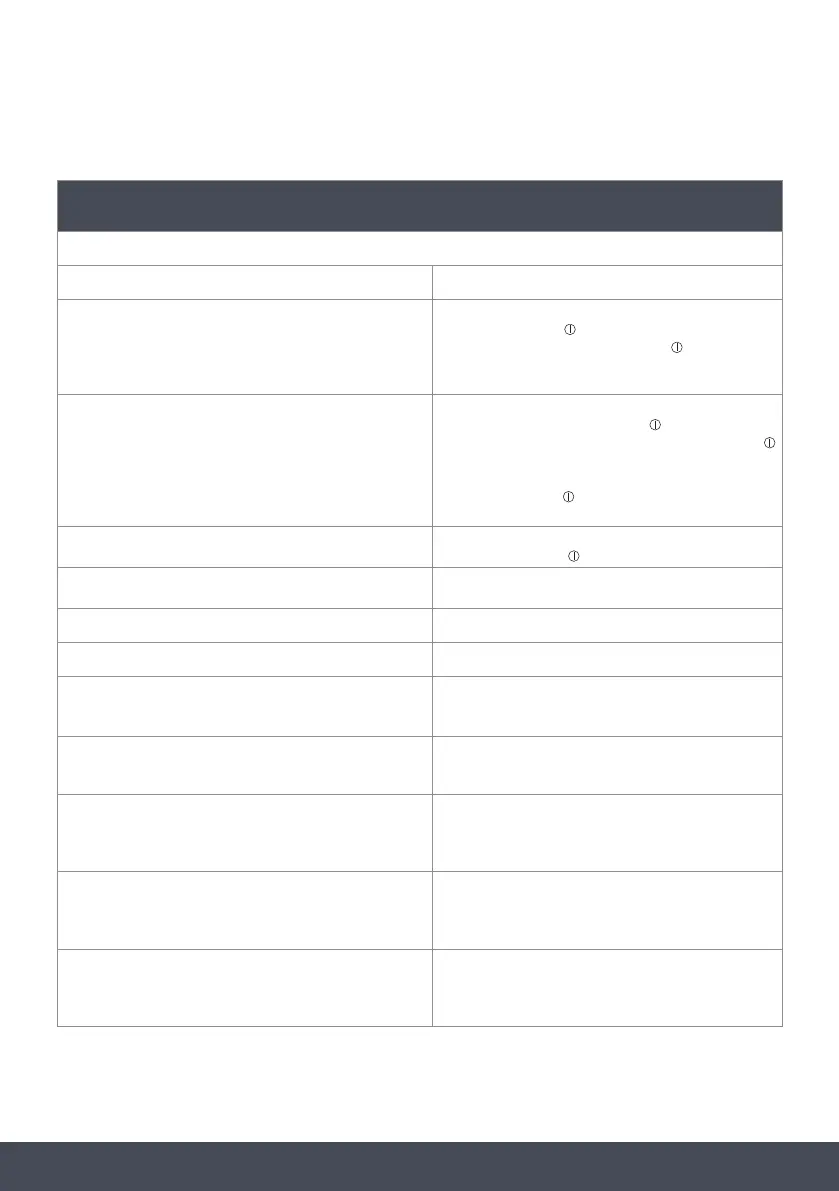
ERROR CODES
If there is an error, an error code will be shown on the heater display
E1 Cooling fan is disabled. Call Caple Service.
E3
Supply voltage is other than the rated values. Switch the
hob off by pressing
, wait until ‘H” disappears for all
zones, switch the hob on by pressing and continue
to use. If the same error is displayed again, call Caple
Service.
E4
Supply frequency is different from the rated values.
Switch the hob off by pressing
, wait until ‘H”
disappears for all zones, switch the hob on by pressing
and continue to use. If the same error is displayed again,
switch the plug for the appliance off and on. Switch the
hob on by pressing and continue to use. If the same
error is displayed again, call Caple Service.
E5
Internal temperature of the hob is too high, switch the
hob off by pressing
and let the heaters cool down.
E6
Communication error between the touch control and
heater. Call an authorised service agent.
E7
Coil temperature sensor is disabled. Call Caple Service.
E8
Cooler temperature sensor is disabled. Call Caple Service.
E9
Incompatible cookware has been used or the cookware
as been moved too quickly in a short amount of time. See
‘COOKWARE’ section for suitable cookware.
I-
Incompatible cookware has been used.
See ‘COOKWARE’ section for suitable cookware.
EA
Larger coil saturation error. Switch the hob off by
pressing on/off button, switch the hob on by pressing on/
off and continue to use. If the same error is displaying
again, call Caple Service.
EC
Supply voltage error. Switch the hob off by pressing on/
off button, switch the hob on by pressing on/off and
continue to use. If the same error is displaying again,
call Caple Service.
C1-C8
Microprocessor alert. Switch the hob off by pressing on/
off button, switch the hob on by pressing on/off and
continue to use. If the same error is displaying again,
call Caple Service.



 To Next Page