Instruction manual DD780BK Please keep this instruction manual for future reference36
EXTRACTOR CONTROLS
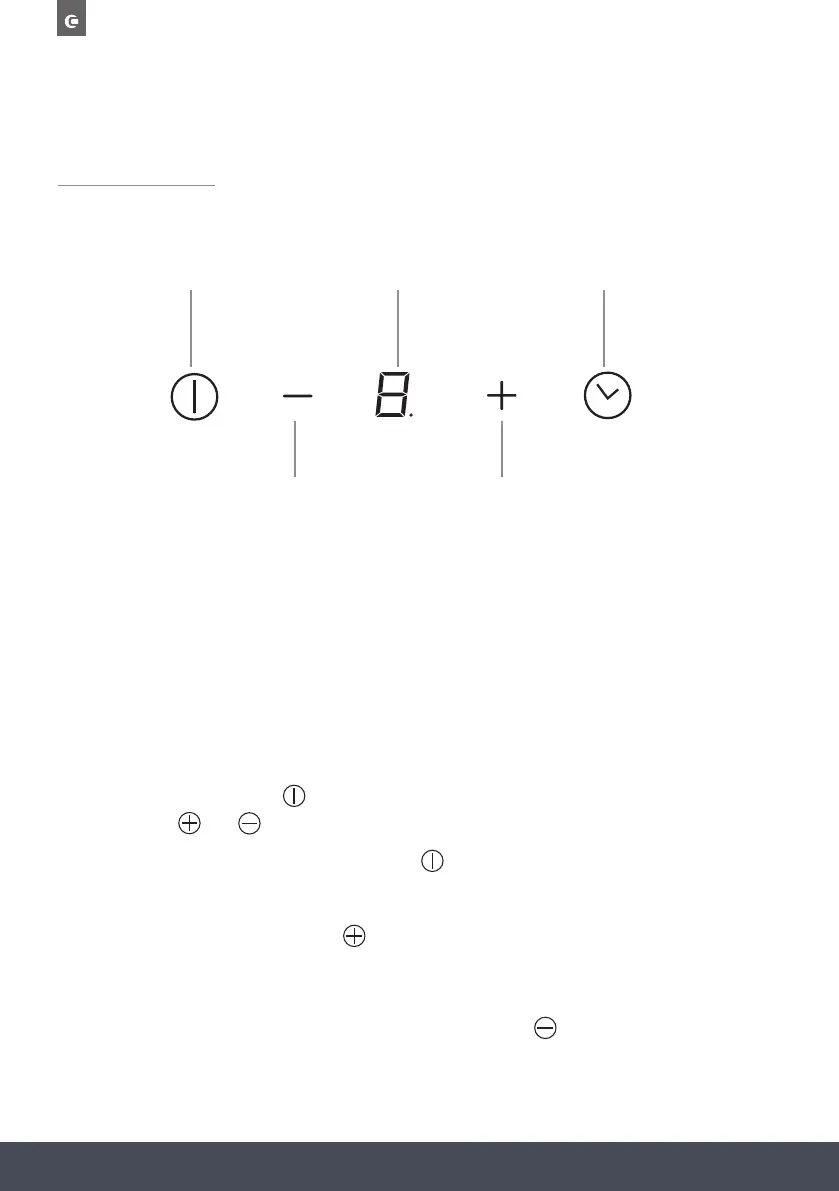
TOUCH CONTROL UNIT
1 3 5
2 4
1. Extractor On / Off
2. Decrease fan speed
3. Fan speed display
4. Increase fan speed
5. Timer selection
SWITCHING THE EXTRACTOR ON/OFF
Press the air extraction on/off
button. After that “0” appears on the digital display.
You can use the and buttons to set the speed of the fan.
To turn off the fan, press the air extraction on/off
button.
INCREASING THE EXTRACTOR FAN SPEED
Increase the fan speed by pressing the
button.
DECREASING THE EXTRACTOR FAN SPEED
DECREASE THE FAN SPEED BY PRESSING THE
BUTTON.



 To Next Page