30 Instruction manual RiF1801 Please keep this instruction manual for future reference
DEFROSTING THE FREEZER COMPARTMENT
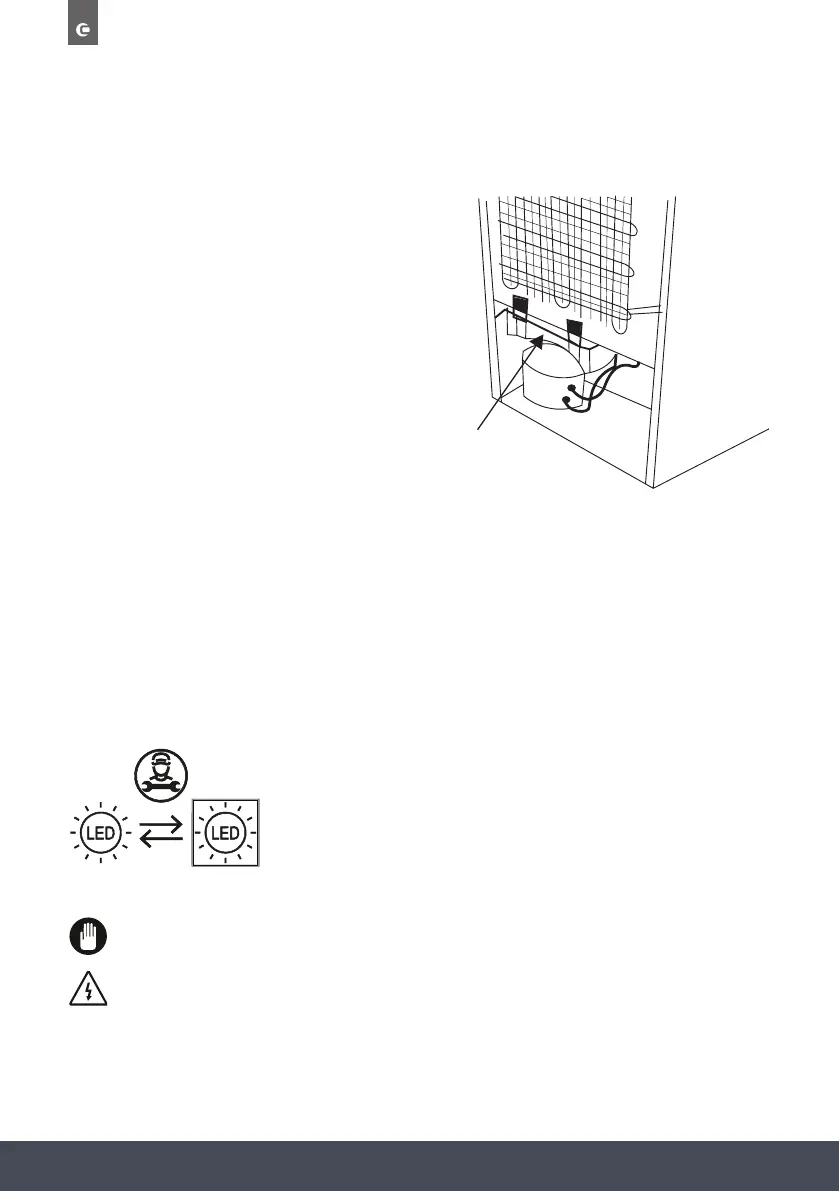
› Your freezer performs automatic defrosting.
The water formed as a result of defrosting
passes through the water collection spout,
owsintothevaporisationcontainer
behind your freezer and evaporates there.
› Make sure you have disconnected the
plug of your appliance before cleaning the
vaporisation container.
› Remove the vaporisation container from
its position by removing the screws as
indicated. Clean it with soapy water at
specictimeintervals.Thiswillpreventodoursfromforming.
Water Tray
REPLACING LED LIGHTING
LIGHT SOURCE ENERGY CLASS
ThisproductcontainsalightsourceofenergyefciencyclassF.
The LED light must be replaced by an authorised engineer or similar only. For more
information, please contact Caple service - 0117 938 7420 or service@caple.co.uk
1. Carefully remove the 2 screws that secure the light.
2.Remove the LED light from its housing.
3.Disconnect the connector and change the LED light.
4.Implement the steps in reverse order.
5.After waiting 5 minutes, plug the unit.
,
Unplug the unit from the power supply before starting the process.
LIGHT SOURCE ENERGY CLASS
This product contains a light source of energy efficiency class F.
LED strip
Unplug the unit from the power supply before starting the process.
1. Carefully remove the 2 screws that secure the light.
2.Remove the LED light from its housing.
3.Disconnect the connector and change the LED light.
4.Implement the steps in reverse order.
5.After waiting 5 minutes, plug the unit.
,
Unplug the unit from the power supply before starting the process.
LIGHT SOURCE ENERGY CLASS
This product contains a light source of energy efficiency class F.
LED strip



 To Next Page