28
1 2
4
3
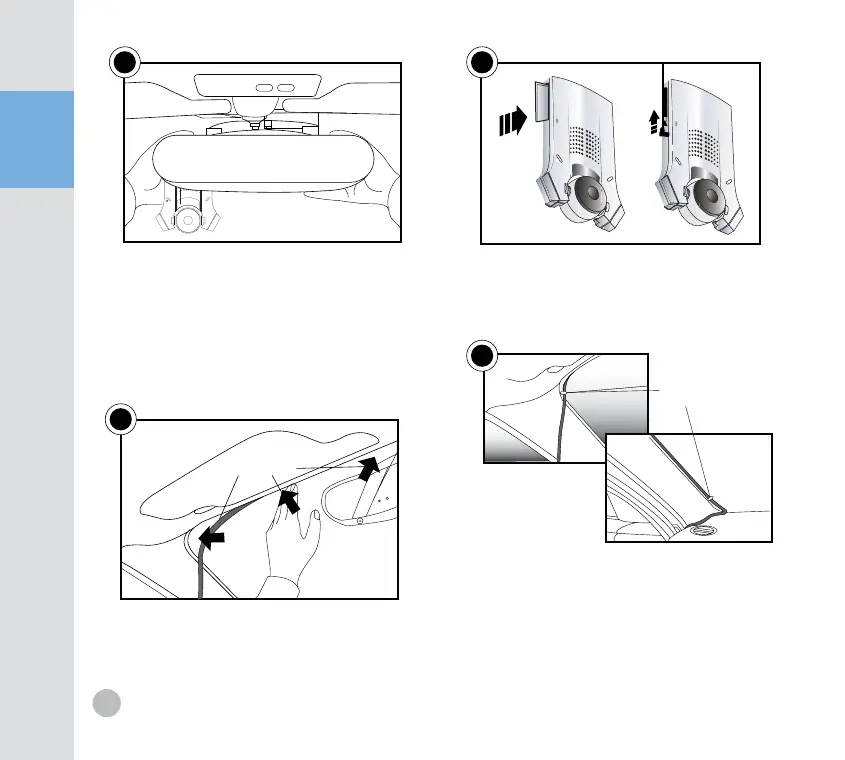
保#Apply force on the double-stick page 4~5 times
ensuring it is firmly attached.
Insert SD card to the SD card slot on the
side of the product, Plug the power plug
into the power jack below the SD card slot.
保Inser SD card before plugging in power jack
Push the power cord into the openning
between the windshield and the roof.
If the power cord seems loose, fix it with
the provided cushions (on 3 spots.)
保The cushions cannot be used in certain types of cars.
Clips for fixing the cord
Continue to push the power cord to the
sides(Using a thin plastic object sush as credit
card might be helpful). If there is no opening,
fix the cord with the provided metal clips
and double-stick tage(on 2 spots).
保Remove dirt and dusts before attaching the tage
保when placing wires on the windshield with the clips.
Remove the plastic from double-stick
tage on the holder located on the upper
rear of the reaeview mirror. Attach the
recorder so that the camera lens is placed
below the rearview mirror,as shown above.
Fix the cushion here


 To Next Page