201 Controller
Stopping and Starting Control
It is possible to stop and start the controller without altering the setpoint. Press Scroll 4 until the
legend
m-A (manual/auto) appears. In the 201, manual means “off” and auto means “on”. Press
Down T or Up S once to show the current on/off state:
mAn for off, and Auto for on. Press T or
S to change between manual and auto (off and on) as required.
2.6
Altering the Ramp Rate
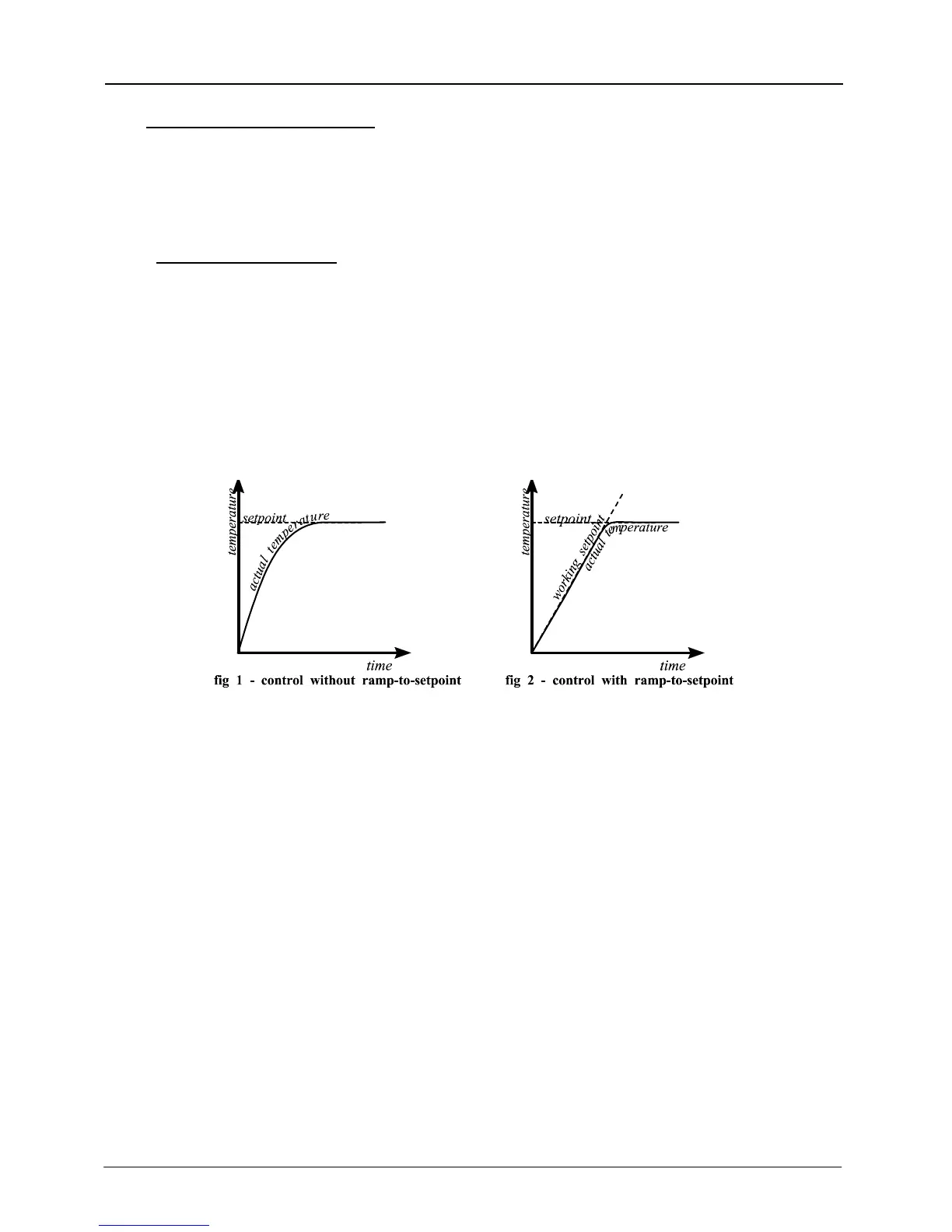
It is possible to limit the rate of heating by setting a ramp rate. Press Scroll 4 until the legend
SPrr (SetPoint ramp rate) is displayed. Use Down T or Up S to display and adjust the value.
The ramp rate sets the maximum rate of heating or cooling in degrees per minute. A value of OFF
cancels the ramp rate, allowing heating and cooling at the maximum rate. When this feature is in
use, there is a “working setpoint” which can be viewed at any time by scrolling to w.SP and
pressing T or S.
Fig 1 and fig 2 indicate the possible difference between running without and with a ramp-to-
setpoint value (depending on the load and the value used).
3
4 MC07



 To Next Page