201 Controller
USER CALIBRATION
The controller is calibrated for life at manufacture against known reference sources, but there
may be sensor errors or other system errors. User calibration allows compensation for such
errors, and the 201 allows for a user 2-point calibration. This setting is password protected to
avoid accidental alteration.
Page to
iP, scroll to CAL.P, and use Up S to alter the password. The password is 3. If the correct
password is entered, the display shows
PASS. Scroll to CAL and use T or S to observe the setting
FACt (factory values, as manufactured) or USEr (user values). Change to USEr.
NOTE: before checking the calibration of the controller, or of the complete system, remember to
reset the 201 to factory calibration values by setting the
CAL.P parameter to FACt.
To enter a user calibration, scroll to each or the following parameters in turn and set the desired
values.
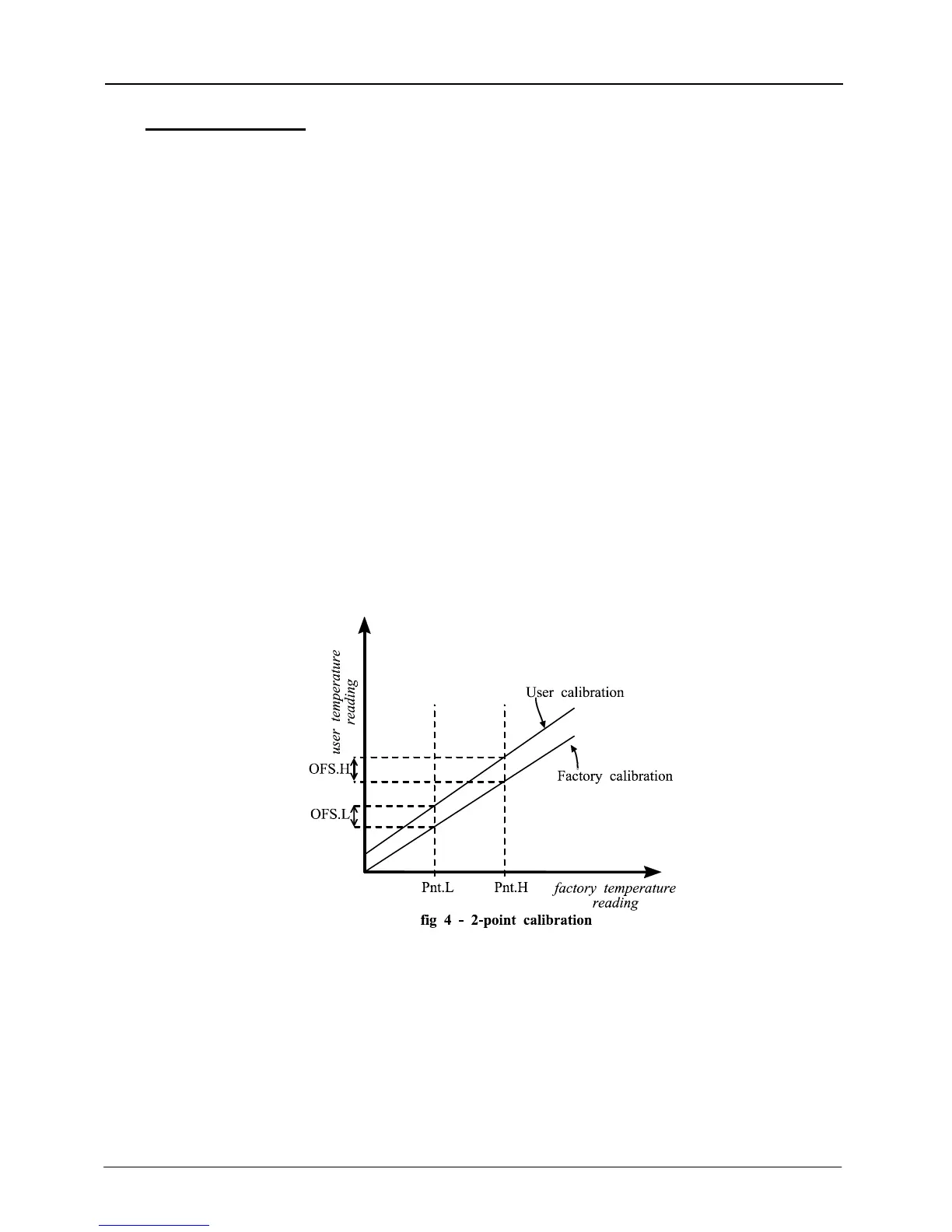
Pnt.L low temperature for which an offset is to be entered
OFS.L offset value for the low temperature
Pnt.H high temperature for which an offset is to be entered
OFS.H offset value for the high temperature
Example: the controller reads 3°C low at 400°C, and 5°C low at 1000°C. The parameter values
should be
Pnt.L=400, OFS.L=3, Pnt.H=1000, OFS.H=5.
Negative or positive values can be entered: if the controller is reading high, negative offsets
would be appropriate.
Fig 4 gives a graphical representation of the 2-point calibration.
6
6 MC07



 To Next Page