Introduction
4
MC16-EN – 1.04
1 Introduction to the Controller and Manual
1.1 Using This Manual
This manual aims to explain how to set up and operate the 301 controller; it must be read in
conjunction with the product main manual.
Due to the complex nature of furnace or oven control the use of technical terms throughout
this manual is unavoidable. Explanations of these terms can be found in the ‘Glossary of
Terms’ at the back of this manual.
1.2 PID Control
The 301 controller uses PID (Proportional Integral Derivative) temperature control. This
type of control uses a complex mathematical control system to adjust the power being sent
to the elements and hold the furnace or oven at the desired temperature.
1.3 Key Stroke Diagrams
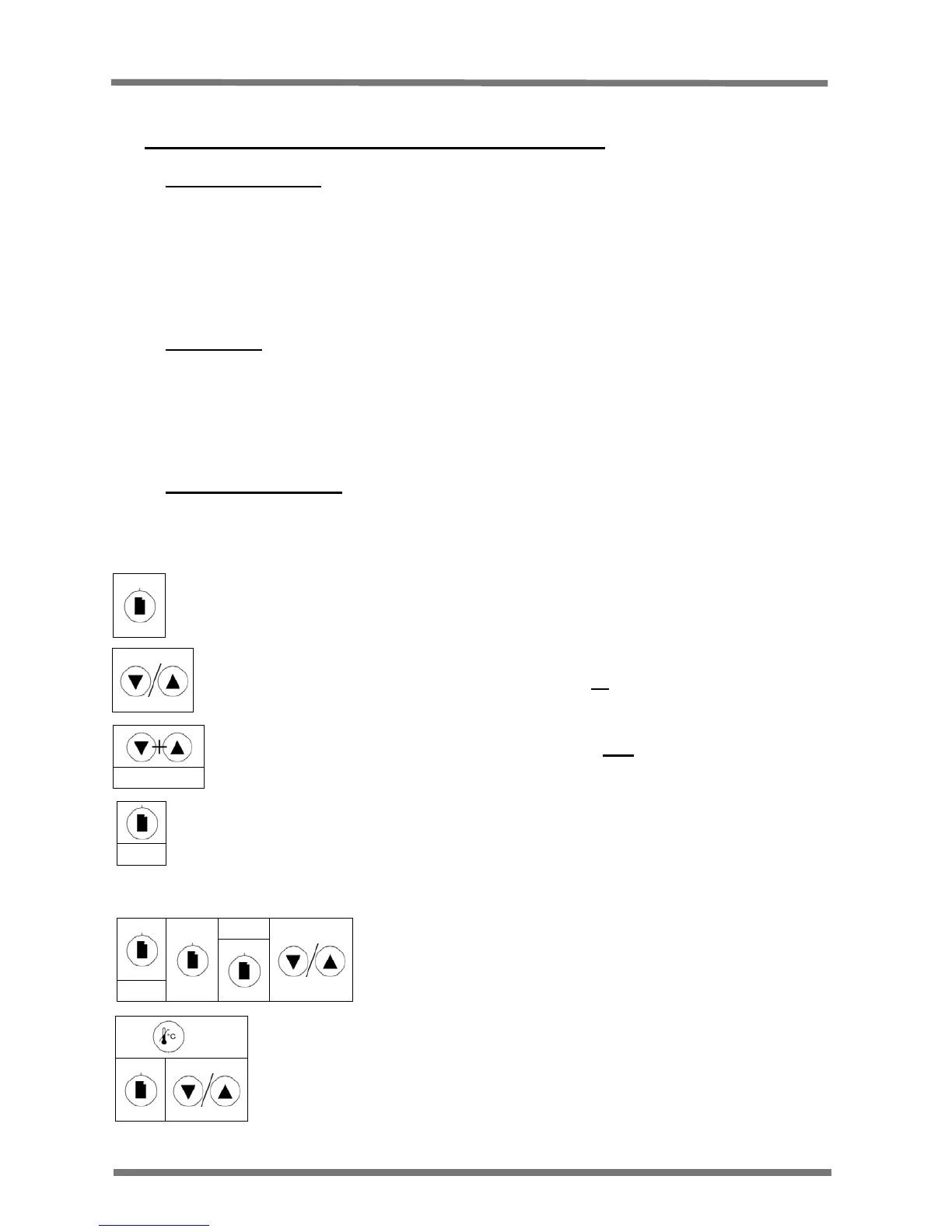
Throughout this manual, key stoke diagrams are used to quickly describe the key presses
required on the controller to alter the desired value.
Examples of key press sequences:
This symbol denotes a single press of the Page Key
This symbol denotes a single press of the Up Key or the Down Key
This symbol denotes pressing and holding the Page key for 1.5 seconds
Hold
This symbol denotes a single press of the Up Key and the Down Key for 1.5
Secs
Hold Together
Hold
These symbols denote holding the Overtemperature key down
while pressing the Page key, followed by the Up or Down arrow
key.
OPHi
These symbols denote holding the Page key for
1.5 seconds, pressing the Page key twice (OPHi
should be showing on the display) then pressing
the Up or Down arrow key.
Hold


 To Next Page