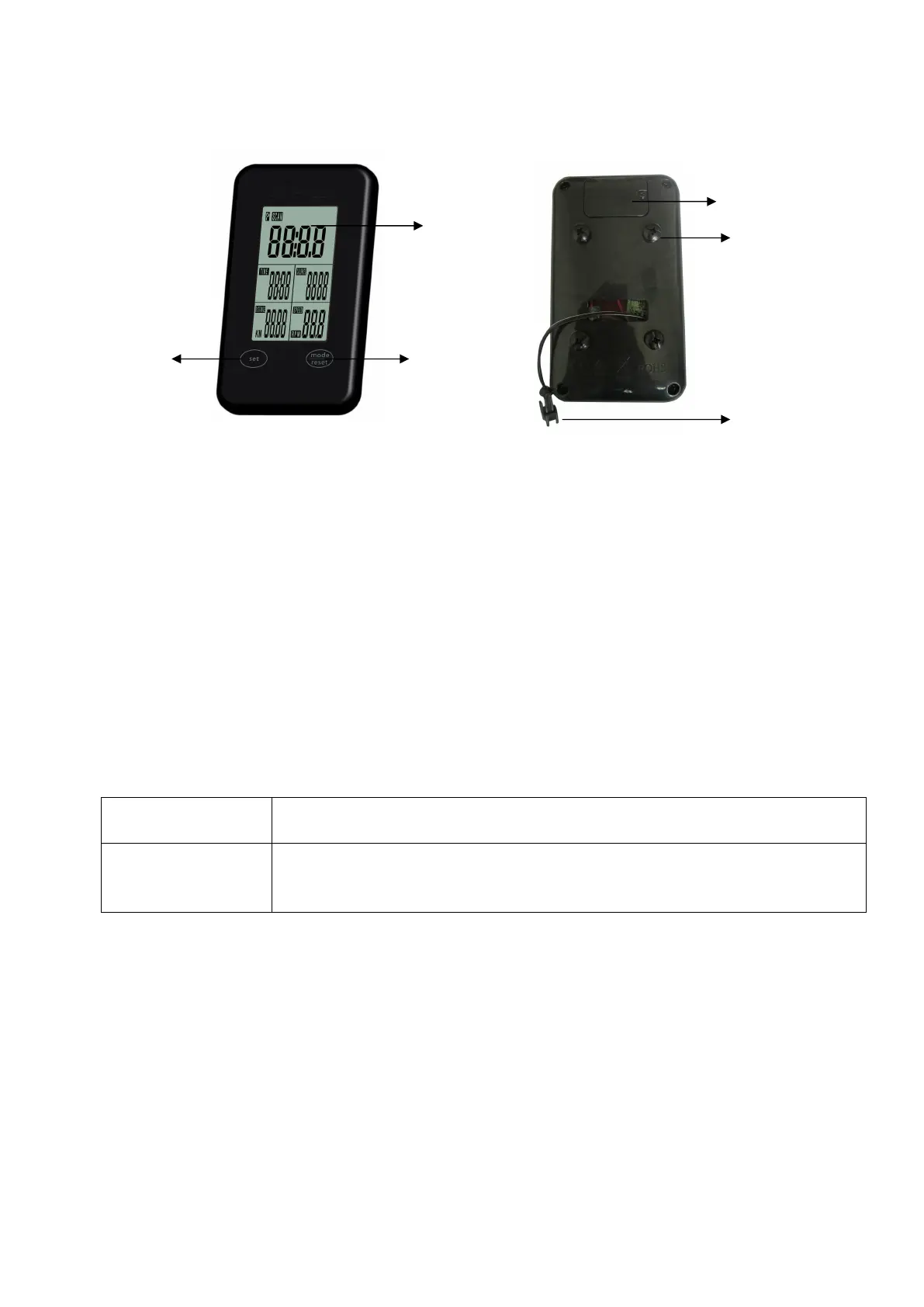
1. LCD
2. Button : Set
3. Button : Mode / Reset
4. Battery compartment
5. Screws (4pcs)
6. Meter cable connection
COMPUTER INSTURTION
BUTTONS:
MODE/
RESET
To confirm all settings.
Press this button and hold for 2 seconds to reset all function figures.
SET To set up the value of TIME, DISTANCE, CALORIES.
You can hold the button to increase the value fast.
(The computer has to be in stop condition.)
FUNCTIONS:
SCAN: Displays all function TIME→DISTANCE→CALORIES→ RPM/SPEED in sequence.
RPM: Displays the pedaling Rotation Per Minute. The RPM and SPEED will switch to another display in
every 6 seconds after exercise starts.
SPEED: Displays the user’s exercise speed.
TIME: 1.You can press “SET” button to set target time between 0:00 to 99:00 for count down function.
2. It can be set up by the user or accumulated automatically for count up function.
DISTANCE: 1.Your can press “SET” button to set target distance between 0:00 to 99:50 for count down
function.
2. It can be set up by the user or accumulated automatically for count up function.
CALORIES: 1.You can press “SET” button to set target calories between 0 to 9990 for count down function.
1
2 3
4
5
6


 To Next Page