11
STEP 7: Check how well your message was recorded by pressing STAR (*) 7 and listening via the phone
handset. If you are not satised with the message you can repeat Step 6 again.
STEP 8: VIEWING YOUR STORED PHONE NUMBERS.
You can view and listen to the phone numbers in the order that you have stored them through the
Smart Dialler indication window. It is important that you check these numbers to ensure that they
are correct. Preceding each number will be the prex P1, P2, P3 etc indicating Phone number 1,
2, 3, etc. To view them press star (*) 8. Your numbers will be displayed in sequential order in the
indication window on the top of the Dialler. If you hang up the phone the numbers will be verbalized
via the speaker on the base station.
STEP 9: CONNECTING THE DIALLER RECHARGEABLE BATTERY.
Turn o the power to the dialler. Remove the screw to the cover plate beneath the dialler using the
small Phillips head screwdriver provided in the pack. It should be noted that the Smart Dialler will
continue to operate normally without a battery; however should there be a power failure then the
battery is relied upon to ensure that the Smart Dialler will continue to operate for up to 40 hours
(providing batteries have been maintained). A warning message stating: “Mains power is not
detected” will sound once the battery has been installed if the power supply is not connected or
turned on at the switch. It is now time to turn the power back on.
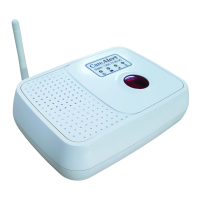
STEP 10: PLACE ANTENNA IN UPRIGHT POSITION ON THE SMART DIALLER AND
POSITION THE “FUNCTION” SWITCH AT THE REAR OF THE SMART
DIALLER TO EITHER “MUTE” OR “ALARM”
If you press the yellow front button on the Wireless pendant and the Smart Dialler sounds a
chime, then this indicates that the Smart Dialler and Wireless pendant are functioning correctly.
Please note that in most domestic applications the function switch should be on the ‘Alarm’
position. ‘Mute’ is for security applications, when you do not want any sound.
Having trouble
programming your dialler?
Solution: just call us on 1300 75 85 95
and for a small fee we can remotely program
your dialler for you.



 To Next Page