18
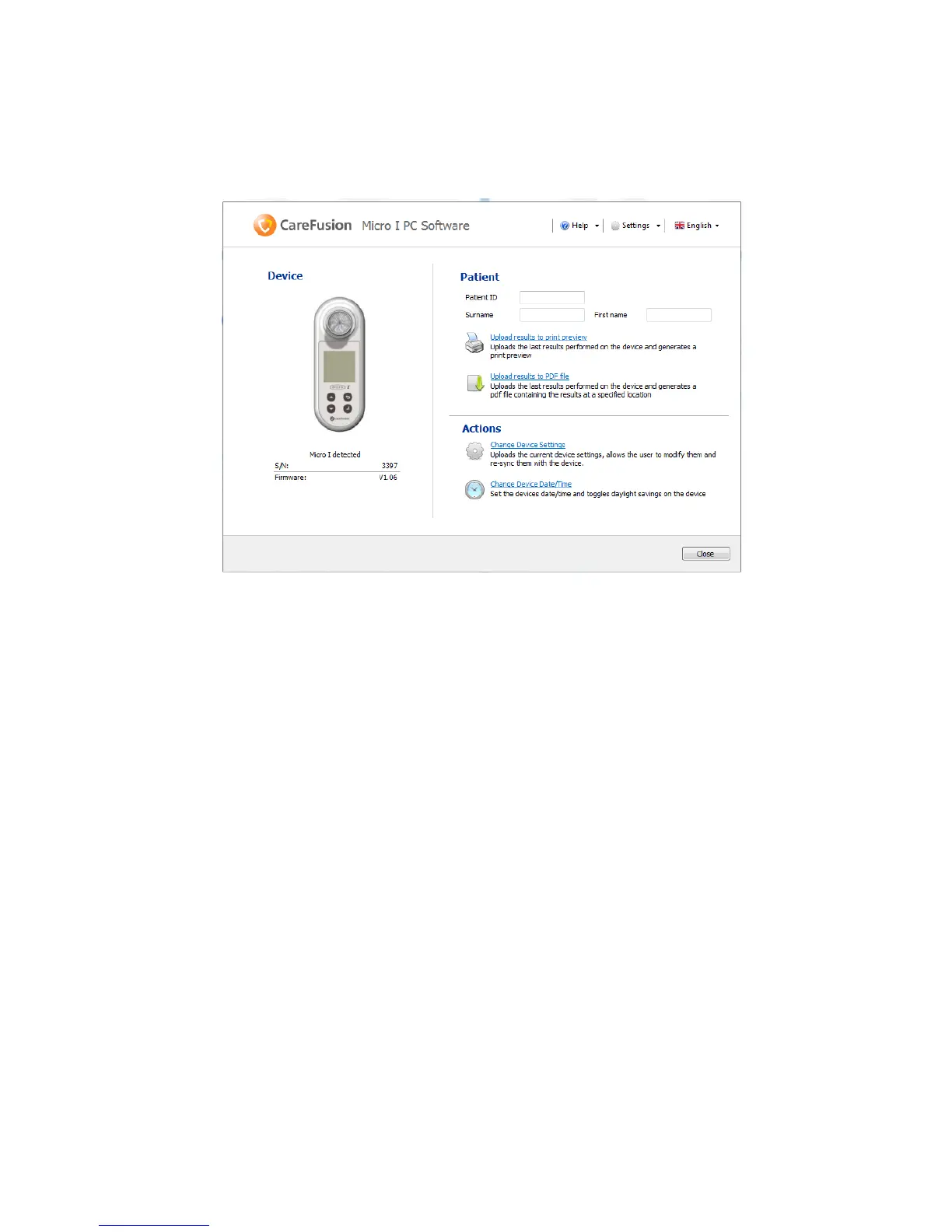
The Micro I PC software will automatically be launched when a Micro I
unit is connected to the PC, the first screen will show:
From this screen you can enter an ID and the patient’s names to
generate a report. The Patient options allows the last results to be
uploaded from the Micro I and print preview of the report can be
viewed in preparation for printing or alternatively a PDF of the report
can be generated for saving to a specified location.
Please note: The patient ID can contain a maximum of 20 characters.
Please note: IF Quanjer-GLI (2012) predicted values are selected, the
number of indices will be limited to those of the published set, it is
also not possible on the printed report to have a predicted area on the
flow volume or volume time graphs if the GLI-2012 predicted values
have been chosen.
In the Actions section the user has the choice of two Options either
change the device settings or adjust the Micro I internal clock.


 To Next Page