20
ENG
“EVD ice” +0300038EN - rel. 1.1 - 23.04.2018
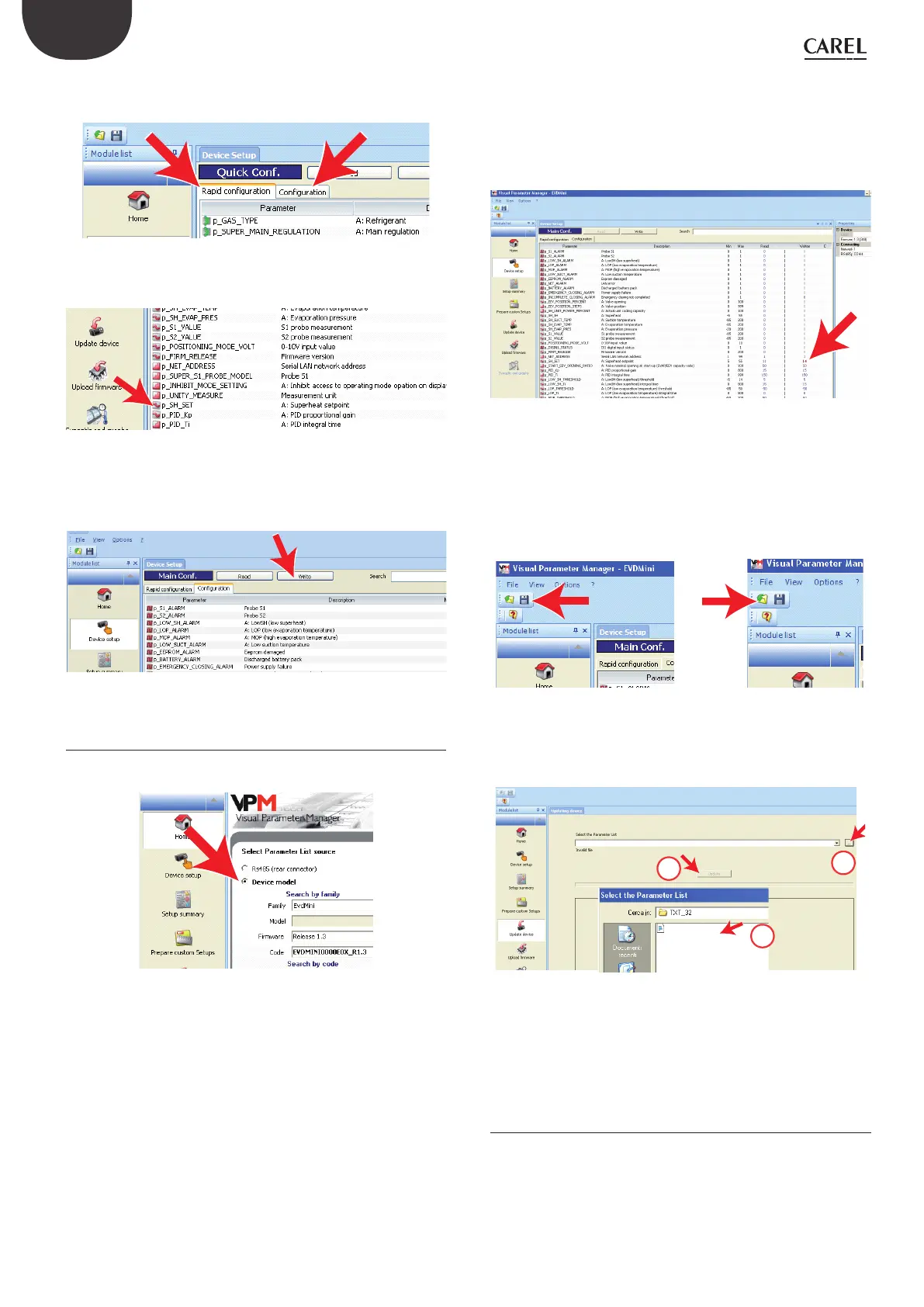
a. on the “Rapid conguration” page, set parameters “p_GAS_TYPE” =
refrigerant and “p_SUPER_MAIN_REGULATION”= type of control;
Fig. 8.i
b. on the “Conguration” page, set parameter “p_SH_SET”.
Fig. 8.j
3. Check whether there are other parameters that need to be set (see the
“Functions” chapter);
4. Finally, select “Write” to copy the parameters to the controller.
Fig. 8.k
8.6 Setup using conguration le
On the Home page select “Device model”.
Fig. 8.l
The setup procedure comprises three steps:
1. Create the conguration le;
2. Copy the conguration le to the controller;
3. Read the conguration le on the controller.
Create the conguration le
1. Select the “Device setup” page;
2. Set the parameters by double clicking, as shown in the gure:
a. on the “Rapid conguration” page, parameters “p_GAS_TYPE” =
refrigerant and “p_SUPER_MAIN_REGULATION”= type of control;
b. on the “Conguration” page, parameter “p_SH_SET”.
Fig. 8.m
3. Save the list of parameters with a new name, for example “NEW_NAME.
hex”. To load and display a list saved by the user, select “Load” and
navigate to the path where the le is saved. On the other hand,
to load a list of parameters supplied by CAREL, select “Load” and
navigate the following path:
LoadàPluginsàCommissioning EVD mini àTXTàTXT32.
Save Load
Copy the conguration le to the controller
Select “Update device” and:
a. Click button (A) to open the drop-down menu;
NEW_NAME.hex
C
B
A
Fig. 8.n
b. Select the list of parameters corresponding to the project le
created: “NEW_NAME.hex”;
c. Click “Update” to UPLOAD the parameters to the controller.
8.7 Read the conguration le on the
controller
1. Go to the “Home” page and select RS485 (rear connector);
2. Go to “Device setup” to read the list of parameters on the controller and
make sure the settings are correct.


 To Next Page