( ) 10
7. USE OF REMOTE CONTROL
COOL MODE
START
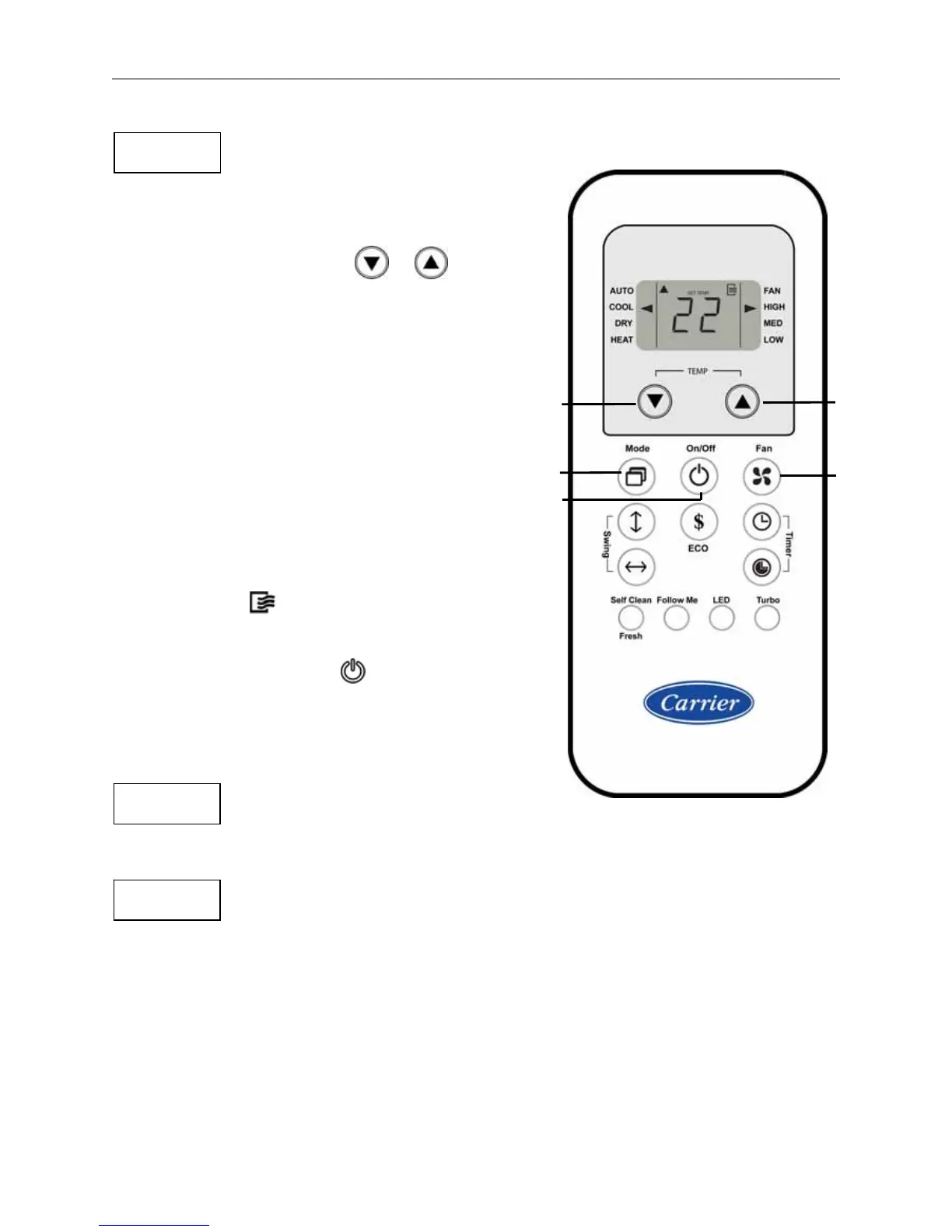
1. Press " Mode " button to select COOL mode
on the remote control display.
2. Press " TEMP " buttons or to select the
desired set temperature on the remote control
display.
For Egyptian Market :
Set desired temp. between 20°C and 28°C.
For Export Markets :
Set desired temp. between 17°C and 30°C.
3. Press " Fan " button to select the desired
fan speed on the remote control display.
4. Press " On/Off " button to start
the air conditioner.
ON symbol appears on the
remote control display.
OPERATION indicator will illuminate
on the display panel of indoor unit.
COOL mode starts after approximately 3 minutes
STOP
If you want to stop the air conditioner,
Press " On/Off " button again.
NOTES
• If the room temperature is higher than
the selected temperature, the system will start COOL mode.
• If the room temperature is equal to or less than
the selected temperature, the system will stop COOL mode.
• If you use AUTO fan speed with COOL mode, the fan speed changes automatically
to low or medium or high speed based on the temperature difference between
setting temperature and room temperature.
4
2
3
2
1

 To Next Page
 Loading...