13
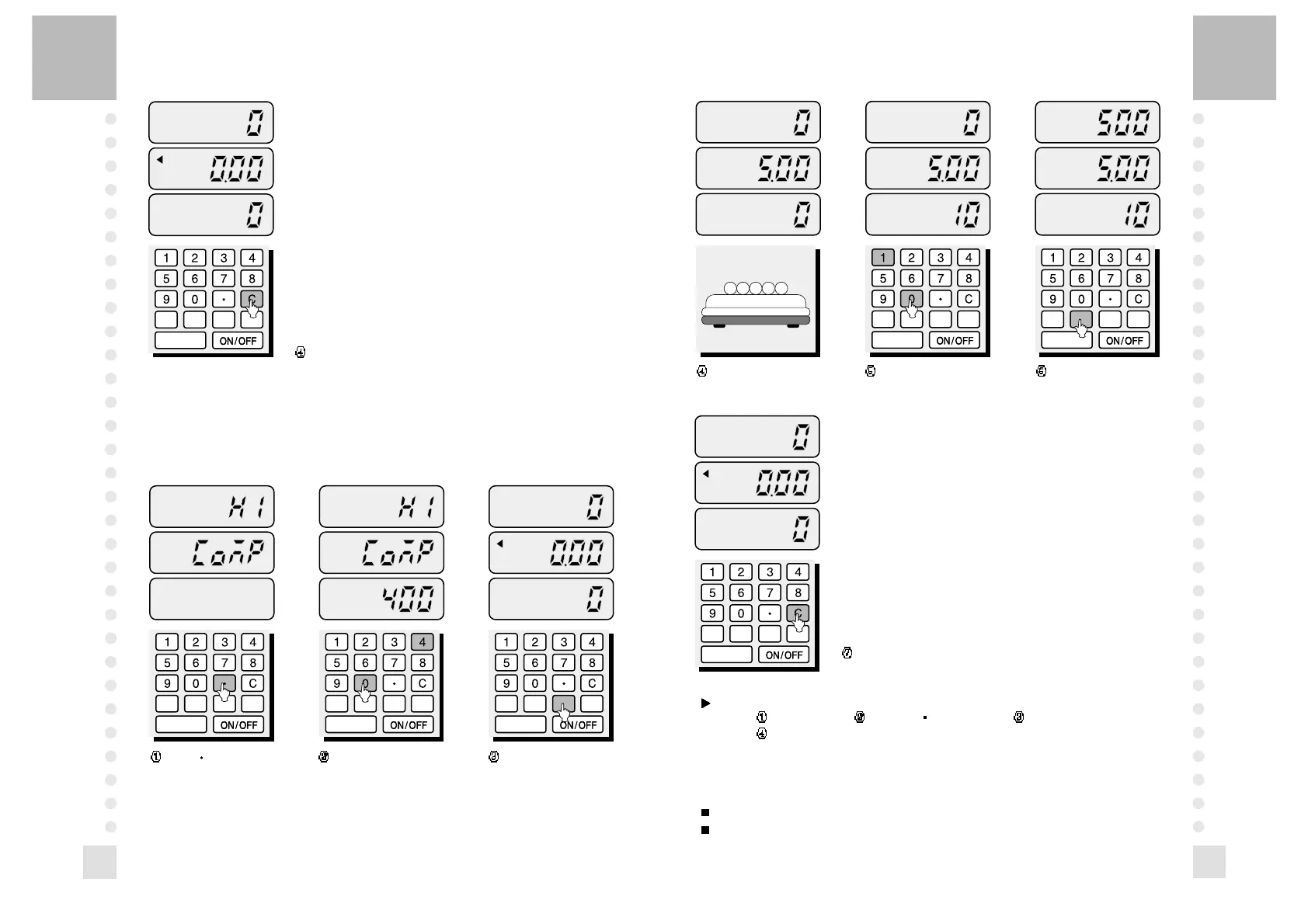
Place the samples on
the platter.
PCS U.W. TARE ZERO
PCS U.W. TARE ZERO
Enter the unit weight. Press the U.W. key.If these
samples exceed the limited
quantity, the number will
flicker in the number display.
Remove the samples from the platter and
press the C key.
NOTE: To get out of this mode, follow below steps.
press the C key press the key three times press the C key
press the TARE key.
4. How to Use Tare Function
Tare is the weight of a container being used for a sample.
The TARE key subtracts the weight of the container.
12
Remove the samples and press the C key.
3. Checking the Limited Quantity
If the number of samples exceed the limited quantity, the display will flicker with
an alarm. This function helps unit packaging or quantity checking.
Make sure that the zero lamp should be on.
PCS U.W. TARE ZERO
PCS U.W. TARE ZERO PCS U.W. TARE ZERO
Press " " key 3 times. Enter the limited quantity
that you wish to set.
If you want to change this
quantity, press the C key and
enter the limited quantity
again.
Press the TARE key,
then the limited quantity is
entered.


 To Next Page