EasyManua.ls Logo

CAS PR2-15 - User Manual

CAS PR2-15
26 pages
Print Icon
To Next Page IconTo Next Page
Loading...
1
Question and Answer IconNeed help?

Do you have a question about the CAS PR2-15 and is the answer not in the manual?

Summary

PRECAUTIONS

Scale Handling and Safety

Avoid disassembly, overloading, grounding, unplugging, and water/heat hazards.

Operational Environment & Setup

Proper placement, avoiding shock, interference, and scale leveling.

PREFACE

OVERALL VIEW

DISPLAY & KEY BOARD

PR II - B Display Overview

Details of front and rear display for PR II - B model.

PR II - P Keyboard Layout

Description of the front cover and key layout for PR II - P model.

KEY FUNCTIONS

COLUMN INSTALLATION

Installation Steps

Visual guide for attaching the column and support.

BASIC OPERATION

Zero Function

How to set the scale to zero before weighing.

Tare Function

Excluding container weight from measurement, including one-time tare.

Successive Tare Operation

Procedure for multiple tare operations in sequence.

PLU MANAGEMENT

Saving Unit Prices to PLU

Step-by-step guide to save unit prices in PLU.

Calling Up PLU Data

Procedure to retrieve saved PLU information.

USERS SET-UP MODE

Display and Power Settings

Configuration for back-light and power save modes.

Pricing and Operational Modes

Settings for price per unit and operational modes.

SALES TRANSACTIONS

Manual Unit Price Entry

How to input unit prices using numeric keys.

PLU Unit Price Entry

Using PLU data to input unit prices for sales.

Accumulating Sales Transactions

Adding multiple sales items for a single transaction.

PAYMENT PROCESSING

Total Sales Payment

How to handle customer payments and calculate change.

Deleting Sales Data

Procedure for clearing total sales records.

INTERFACE DETAILS

RS-232 C Connection & Protocol

Physical connection, communication protocol, and data format.

USB Interface Details

Information about the USB connection socket.

MAINTENANCE

Low Battery Warning

Indication and action for low battery status.

ERROR MESSAGE

Error Code Troubleshooting

Meaning and solutions for common error codes like Z-Err, oL, bAt-Lo.

SPECIFICATIONS

Overview

This document is the owner's manual for the CAS PR-II Series price computing scale, designed for retail weighing solutions. It provides comprehensive instructions for operation, maintenance, and troubleshooting, ensuring users can maximize the scale's performance and reliability.

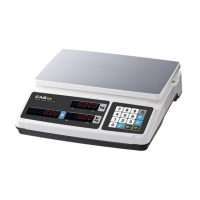
The CAS PR-II Series scale is a versatile price computing device primarily used in retail environments. Its main function is to accurately weigh items and calculate their total price based on a pre-set unit price. This makes it ideal for businesses such as grocery stores, delis, and markets where items are sold by weight. The scale features both front and rear displays, allowing both the operator and the customer to view weight, unit price, and total price simultaneously. Some models also include a pole display for enhanced visibility.

Usage Features:

The PR-II Series scale offers several user-friendly features to streamline daily operations:

  • Basic Operation:

    • Zero Function: The scale can be easily zeroed by pressing the "ZERO" key, ensuring accurate measurements even if there's a slight offset.
    • Tare Function: This feature allows users to subtract the weight of a container (tare) from the total weight, so only the net weight of the item is measured. This can be done as a one-time tare or successively for multiple containers. To set tare, place the container on the platter and press the "TARE" key. To clear tare, remove the container and press "TARE" again.
  • PLU (Price Look-Up) Saving & Calling-up:

    • The scale can store up to 7 unit prices in its PLU memory. This is particularly useful for frequently sold items, eliminating the need to manually input prices each time.
    • Saving PLU: To save a unit price, press the "Fn" key for a few seconds to enter the Set-up menu. Input the desired unit price and then press the number corresponding to the PLU you wish to set (M1-M7).
    • Calling-up PLU: To recall a saved unit price, simply press the corresponding PLU key (M1-M7). This will automatically apply the stored unit price to the weighed item.
  • Sales Transaction:

    • Inputting Unit Price: Users can input the unit price directly using the numeric keypad. After placing an item on the platter, enter the unit price, and the scale will calculate the total price.
    • Adding Up Transactions: The scale supports adding up multiple sales transactions. After weighing an item and determining its price, press the "+" key to add it to the running total. This allows for efficient processing of multiple items for a single customer. The "Total Price" display will show the accumulated total, and the "Unit Price" display will show the number of transactions added.
    • Finalizing Sales and Payment:
      • Calling Total Price: Press the "Σ" key to display the total sales amount.
      • Inputting Payment: Enter the amount paid by the customer using the numeric keypad.
      • Calculating Change: Press the "Σ" key again to calculate and display the change due to the customer.
      • Returning to Weighing Mode: After checking the change, press the "Σ" key once more to return to the normal weighing mode.
  • Deleting Total Sales Data:

    • To clear the accumulated total sales data, press the "Σ" key to call up the total price, then press the "C" key. A "Clear Account" message will briefly appear, and the scale will return to the normal weighing mode.
  • User's Set-up Mode:

    • The "Fn" key, combined with other keys (M1, M2, M4, M5), allows access to various settings:
      • Back-light Settings (Fn + M1): Users can choose between "bL-At" (back-light on when weight is applied), "bL-OFF" (back-light always off), or "bL-on" (back-light always on).
      • Power Save Mode (Fn + M2): Options include "ps - 0" (do not use power save mode) or "ps - 1" (use power save mode).
      • Unit Price Setting (Fn + M4): Choose between "up- kg" (price per kg) or "up-100g" (price per 100g).
      • RS-232C Mode (Fn + M5): Select between "rS-Co" (continually mode), "rS-PC" (command mode), or "rS-St" (stable mode) for communication.

Maintenance Features:

Proper maintenance ensures the longevity and accuracy of the CAS PR-II Series scale:

  • General Precautions:

    • Do Not Disassemble: Users are warned against disassembling the scale. Any damage or defect should be addressed by an authorized CAS dealer.
    • Avoid Overload: Do not exceed the maximum weight limit to prevent damage.
    • Grounding: The scale must be properly grounded to minimize static electricity and prevent electric shock.
    • Proper Unplugging: Always pull the plug, not the cord, to avoid damaging the cord, which could lead to electric shock or fire.
    • Environmental Considerations:
      • Keep the scale away from flammable or corrosive gases to prevent fire.
      • Avoid spilling water on the scale or placing it in humid conditions to reduce electric shock risk and ensure accurate readings.
      • Do not place the scale near heaters or in direct sunlight.
    • Power Adapter: Use only the proper adapter to prevent damage to the scale.
    • Stable Environment: Place the scale on a firm, temperature-consistent surface.
    • Leveling: Adjust the four corners of the scale using the built-in leveling indicator to ensure it is even.
    • Electromagnetic Interference: Keep the scale away from other electromagnetic generating devices, as they may interfere with accurate readings.
    • Sudden Shock: Avoid sudden shocks to the scale.
    • Moving the Scale: When moving the scale, grab it from the bottom.
  • Warm-up Time: For maximum performance and consistent readings, plug the scale into a power outlet 30 minutes before use for warm-up.

  • Periodical Checks: Maintain periodical checks by an authorized CAS dealer for consistent and accurate readings.

  • Battery Maintenance:

    • The PR-II Series uses a combination of dry and rechargeable batteries.
    • Low Battery Warning: When the battery is low, the display will show "bAt-Lo".
    • Replacement/Charging: If using dry batteries, replace them with new ones. If using rechargeable batteries, charge them immediately. Failure to do so may shorten battery life and lead to incorrect measurements.
    • Storage: If the scale will not be used for a long time, remove the batteries to prevent leakage, which can be hazardous.
  • Error Messages: The manual provides solutions for common error messages:

    • "Z-Err": Indicates that the current zero point has shifted from the last span calibration. The solution is to call your CAS dealer.
    • "oL": Signifies an overload error. The solution is to remove the weight from the platter.
    • "bAt-Lo": Indicates low battery. The solution is to change new batteries or charge rechargeable batteries immediately.

This comprehensive guide ensures that users can effectively operate, maintain, and troubleshoot their CAS PR-II Series price computing scale for reliable and accurate retail weighing.

CAS PR2-15 Specifications

General IconGeneral
Capacity15 kg
Readability0.005 kg
DisplayLCD
Auto Power OffYes
Overload IndicationYes
Unitskg, g, lb, oz
PowerBattery / AC adapter

Related product manuals