SECTION 2 - CONTROLS, INSTRUMENTS AND OPERATION
2ï94
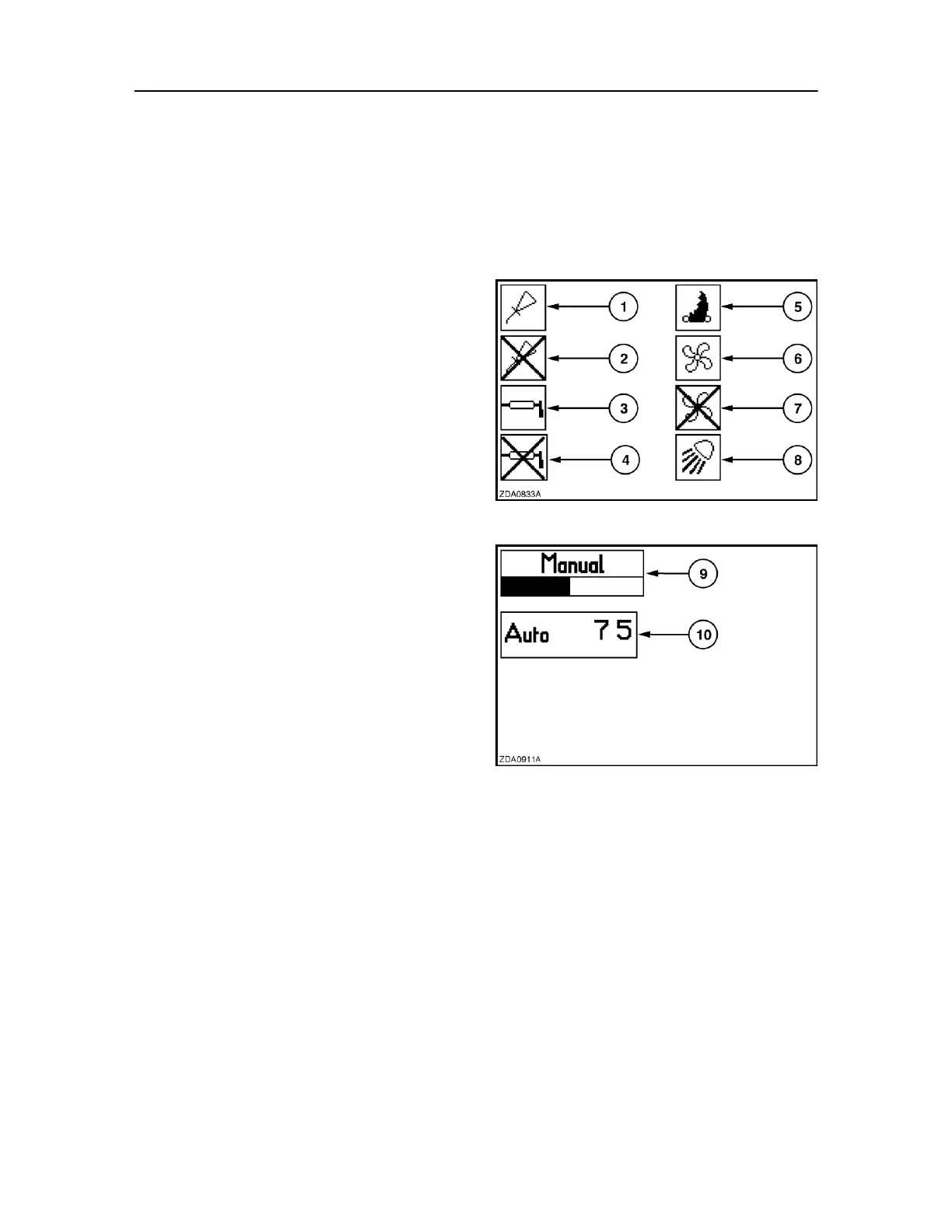
NOTE: In addition, the symbol for the automatic greasing
system will blink in case of a diagnostic fault. 5. Crop
cutting system knives inserted
The knives have to be inserted or retracted
hydraulically but the position status of the knives is
displayed on the monitor by means of this symbol.
6. Knotter fans
7. Knotter fans - crossed through
This indicator shows that the knotter fans are stand‐
by but not activated because the conditions for
activation are not fulfilled (i.e. PTO speed lower than
< 600 rpm and knotter guard closed). The cross will
disappear as soon as all conditions are fulfilled.
NOTE: If the PTO speed exceeds > 600 rpm but the knotter
guard is open, a warning message will appear on the
screen (refer to paragraph headed Warning messages
further in this section).
9. Manual bale density setting
A bargraph appears together with this symbol. In
this mode, the setting is visible in the bargraph
and will be reflected in the density cylinder
pressure.
10. Automatic bale density setting
The operator selected setting appears together
with this symbol. In this mode, the setting is the
requested load on the plunger on a scale
between 0 and 100.
NOTE: The set value next to the automatic density
mode can be changed by pressing the minus (-) or the 206
plus (+) keys. For more information on the density



 To Next Page